International Baccalaureate · MYP 2
Formulae
I
Formulas and Their Subject
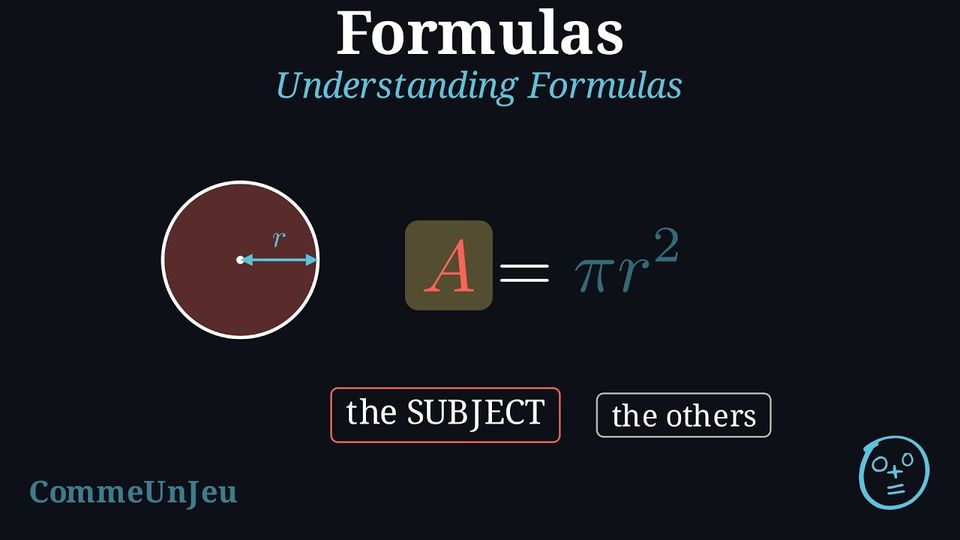
A formula is an equality that links two or more quantities. Unlike an equation, whose unknown is one number to be found, a formula keeps letters that vary: they can take many values. Formulas are powerful tools in mathematics and science because they provide a concise rule for modelling real-world phenomena, from calculating the area of a shape to predicting the distance an object travels.
Definition — Formula
A formula is an equality that expresses one quantity in terms of others; its letters are variables. The single variable that stands alone on one side of the equality is called the subject of the formula. Example
 The perimeter of a square of side \(s\) is given by the formula \(P = 4s\). Name the subject of the formula, then find \(P\) for \(s = 7\) cm.
The subject is \(P\): it stands alone on the left-hand side, and the formula gives it in terms of \(s\). For \(s = 7\): $$\begin{aligned}[t]P &= 4s \\
&= 4 \times 7 &&(\text{replacing } s \text{ with } 7) \\
&= 28\end{aligned}$$ The perimeter is \(28\) cm.
Skills to practice
- Finding the Subject
- Writing Formulas for Perimeter and Area
II
Substituting into a Formula
Method — Substituting Values
To find the value of a formula's subject, we can substitute known values for the other variables and evaluate the expression. - Identify the formula required for the problem.
- Substitute the given values in place of their corresponding variables.
- Evaluate the resulting numerical expression to find the value of the subject.
Example
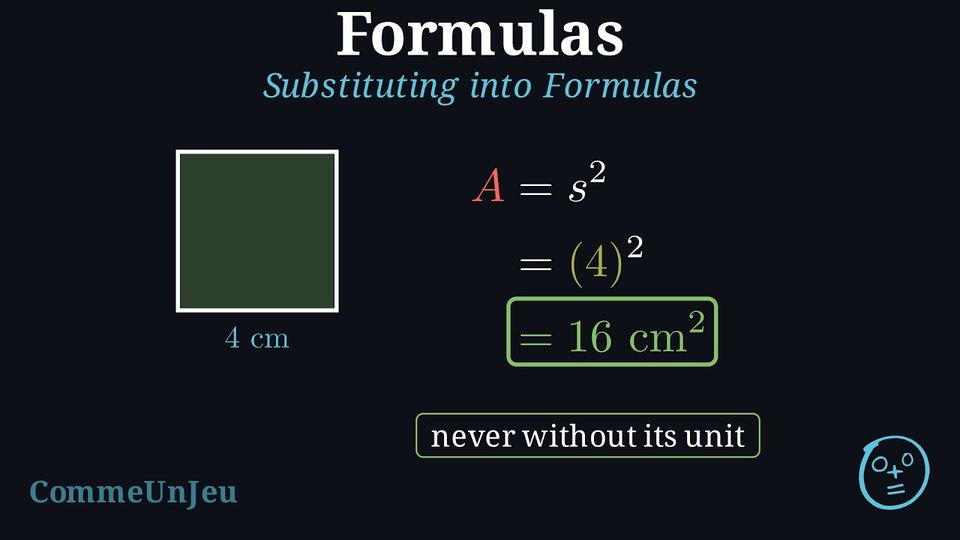
The formula for the area of a square is \(A = s^2\). Find the area of a square with a side length of \(4 \text{ cm}\). - The formula is given: \(A = s^2\).
- Substitute the known value \(s = 4\): \(A = (4)^2\).
- Evaluate the expression: \(A = 16\).
Skills to practice
- Evaluating y from a Formula
- Evaluating a Formula
- Substituting into Everyday Formulas
III
Running and Undoing a Program
Definition — Calculation Program
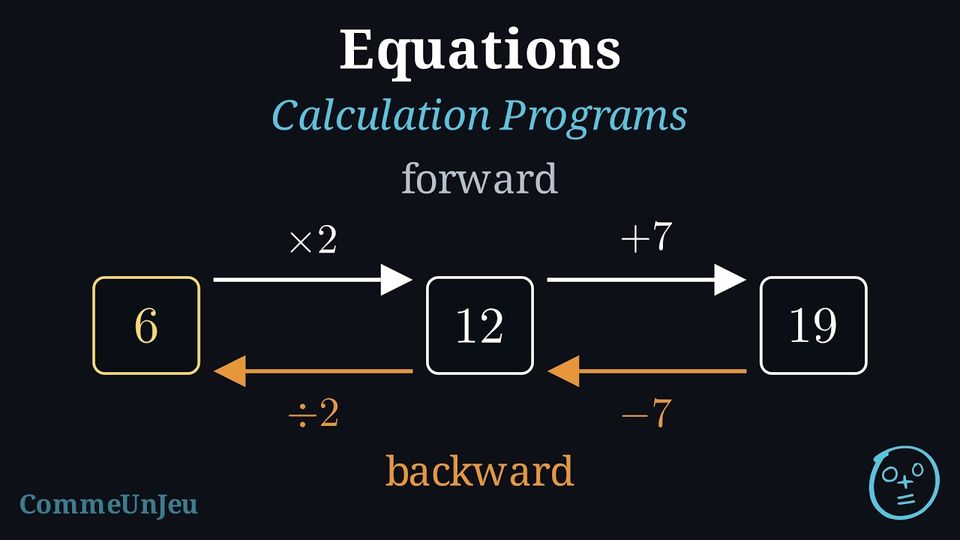
A calculation program is a list of instructions applied one after the other to a chosen starting number; the number obtained at the end is the result. A run is pictured as a chain of boxes and arrows: $$\boxed{3} \xrightarrow{\times 2} \boxed{6} \xrightarrow{+7} \boxed{13}$$ Example
Program: choose a number; multiply it by \(4\).Run the program from \(3\), then from \(10\).
$$\boxed{3} \xrightarrow{\times 4} \boxed{12} \qquad\qquad \boxed{10} \xrightarrow{\times 4} \boxed{40}$$ Whatever the starting number, the result is \(4\) times that number — the program itself can be written in one word: “quadruple”.
Method — Finding the Starting Number
To find the starting number that produced a given result, work backwards through the program: - Undo each instruction with its inverse operation: an addition is undone by a subtraction, a subtraction by an addition, a multiplication (by a nonzero number) by a division, a division by a multiplication.
- Start from the last instruction and walk back to the first.
- Check forwards: run the program from the number found and make sure it produces the given result.
Example
The program “multiply by \(4\)” produced the result \(52\). Find the starting number.
One single instruction, \(\times 4\), undone by its inverse operation, \(\div 4\), applied to the result: $$\boxed{52} \xrightarrow{\div 4} \boxed{13}$$ The starting number is \(\boldsymbol{13}\). Check forwards: \(13 \xrightarrow{\times 4} 52\) \(\checkmark\)
Example
The program “multiply by \(2\); add \(7\)” produced the result \(19\). Find the starting number.
Two instructions this time — two undoings, chained, the last instruction first. The \(+7\) was applied last, so it is undone first by \(-7\); then the \(\times 2\) is undone by \(\div 2\): $$\boxed{19} \xrightarrow{-7} \boxed{12} \xrightarrow{\div 2} \boxed{6}$$ The starting number is \(\boldsymbol{6}\). Check forwards: \(6 \xrightarrow{\times 2} 12 \xrightarrow{+7} 19\) \(\checkmark\)
Why undo the last instruction first? Because it was applied last: it wraps everything done before it, like shoes put on after socks — and taken off first. A backward run whose every step is a correct inverse operation does prove the starting number; but a wrong order can perfectly well produce a plausible-looking number, and the forward check is what tells the two apart. An unexpected intermediate value (a fraction, a negative) deserves a second look — but it decides nothing by itself: a perfectly correct run can produce one too.
Skills to practice
- Reading a Program
- Running a Program with Negative and Decimal Numbers
- Finding the Starting Number: Level 1
- Finding the Starting Number: Level 2
IV
From the Program to the Formula
Method — Applying a Program to a Letter
Call the starting number \(x\): the letter stands for any starting number. Apply each step to the expression obtained, then simplify: the result is an expression in \(x\), and writing “result \(=\) this expression” gives the formula of the program, valid for every starting number at once. Example
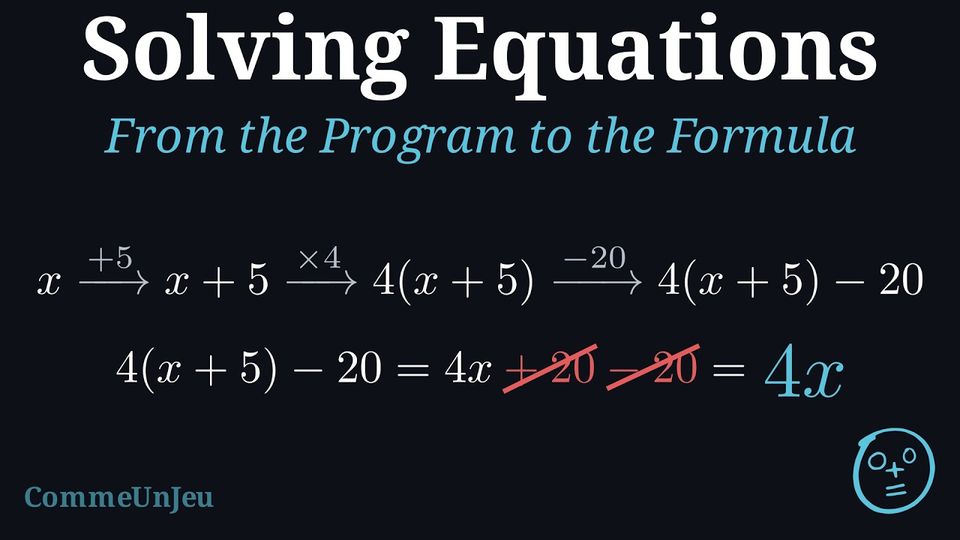
Consider the program: “choose a number; add \(5\); multiply by \(4\); subtract \(20\).” - Apply the program to \(x\) and simplify the expression obtained.
- What does the program really do?
- Step by step, starting from \(x\): $$\begin{aligned}[t] x &\;\longrightarrow\; x + 5 && \text{(add 5)}\\ &\;\longrightarrow\; 4(x + 5) && \text{(multiply by 4)}\\ &\;\longrightarrow\; 4(x + 5) - 20 && \text{(subtract 20)}. \end{aligned}$$ Then simplify: $$\begin{aligned}[t] 4(x + 5) - 20 &= 4x + 20 - 20 && \text{(distributive property)}\\ &= \textcolor{colorprop}{4x}. \end{aligned}$$ The formula of the program is: result \(= 4x\).
- The program simply multiplies the starting number by \(4\): the formula reveals what the list of steps hides.
Skills to practice
- Writing the Formula of a Program
- Writing and Using the Formula of a Program
V
Going further
Skills to practice
- Using Formulas in Context
- Investigating Formulas and Programs
- Quiz
Jump to section