International Baccalaureate · MYP 2
Algorithms and Flowcharts
I
Programs Without a Machine
I.1
The Vocabulary of Programs
Here are three programs. The robot starts on square A1, looking to the right; \(\rightarrow\) means “move forward one square”, \(\curvearrowleft\) “quarter turn to the left”.
What do these three programs have in common? For each of them, say what is given at the start and what is obtained at the end.
| Robot | Calculation | Construction |
| \(\rightarrow\ \rightarrow\ \curvearrowleft\ \rightarrow\ \rightarrow\) | Choose a number. | Draw a segment \(\Segment{AB}\) of \(4\)~cm. |
| Multiply it by \(2\). | Draw the perpendicular to \((AB)\) at \(B\). | |
| Add \(5\). | Place \(C\) on it, \(3\)~cm from \(B\). | |
| Write the number obtained. | Draw the segment \([BC]\). |
Each of the three is a list of orders, executed in order, one after the other, without deciding anything: the robot moves, the calculator calculates, the hand draws.
- Robot. Given at the start: the square A1 and the direction “to the right”. Obtained at the end: the arrival square — two squares forward to C1, a quarter turn to the left, the robot now looks up, two squares forward: C3.
- Calculation. Given: a number, for instance \(3\). Obtained: \(3 \times 2 = 6\), \(6 + 5 = 11\): the number \(11\). With \(10\) at the start, \(25\) at the end: the same program, another number.
- Construction. Given: a blank sheet. Obtained: a figure — two segments forming a right angle at \(B\).
Definition — Instruction and Sequence
An instruction is an order precise enough to be carried out without deciding anything: “move forward one square”, “multiply by \(2\)”, “draw a segment of \(4\)~cm”. “Go to the station” is not an instruction: whoever receives it still has to choose the way.A sequence of instructions — a program — is a list of instructions carried out in order, the first one first, the last one last. The same instructions in another order make another program: starting from \(3\), “multiply by \(2\), then add \(5\)” gives \(11\), while “add \(5\), then multiply by \(2\)” gives \(16\).
Definition — Input and Output
The input of a program is what is given before executing it; the output is what is obtained after. The program itself does not change: it is written once and works for every allowed input. | Input | Output | |
| Robot program | the starting square and direction | the arrival square and direction |
| Calculation program | the number chosen | the number written |
| Construction program | a blank sheet | the figure |
Method — Three Tasks with a Sequence
- Identify. Is this line an instruction — can it be carried out without choosing anything? Is this list a sequence — does the order matter, and is it given?
- Execute. Carry out one instruction at a time, in order, and write down the state after each one: the square and the direction of the robot, the number obtained. Executing means obeying exactly, even when the program looks wrong.
- Produce. To obtain an imposed output, put instruction cards in order, then execute the sequence obtained to check that it really gives the output wanted. If it does not, the program is wrong, not the one who executes it.
Example
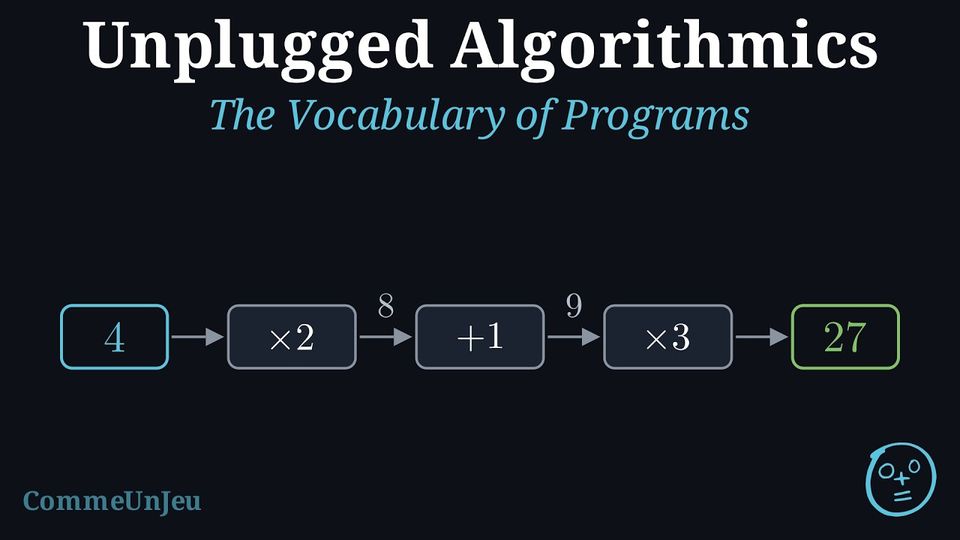
- Three cards are available: “add \(1\)”, “multiply by \(2\)”, “multiply by \(3\)”. Put them in order so that the input \(4\) gives the output \(27\).
- The robot starts looking to the right. Which of these two programs makes it draw a square?
(a)\ \(\rightarrow\ \rightarrow\ \curvearrowright\ \rightarrow\ \rightarrow\ \curvearrowright\ \rightarrow\ \rightarrow\ \curvearrowright\ \rightarrow\ \rightarrow\) (b)\ \(\rightarrow\ \rightarrow\ \curvearrowright\ \rightarrow\ \curvearrowright\ \rightarrow\ \rightarrow\ \curvearrowright\ \rightarrow\)
- Try the orders and execute each one from \(4\). “Multiply by \(2\), add \(1\), multiply by \(3\)”: \(4 \times 2 = 8\), \(8 + 1 = 9\), \(9 \times 3 = 27\). This order works. Another order, “add \(1\), multiply by \(2\), multiply by \(3\)”, gives \(4 + 1 = 5\), \(5 \times 2 = 10\), \(10 \times 3 = 30\): not \(27\).
- Execute both, counting the squares of each straight run. In (a) the robot goes \(2\) forward, turns right, \(2\) forward, turns right, \(2\) forward, turns right, \(2\) forward: four sides of \(2\) squares with a quarter turn between them, it is back on its starting square — a square. In (b) the runs are \(2\), \(1\), \(2\), \(1\): a rectangle, not a square. Program (a).
A Program Has No Opinion
Executing a program means obeying it exactly: the robot does not guess where one wanted it to go, the calculation does not correct itself. That is why a program is checked by executing it, not by reading it and finding it convincing. And that is why it is written once for every input: the same calculation program serves for \(3\), for \(10\), for any number one chooses.
Skills to practice
- Identifying Instructions and Sequences
- Executing and Producing a Sequence
I.2
Repeating
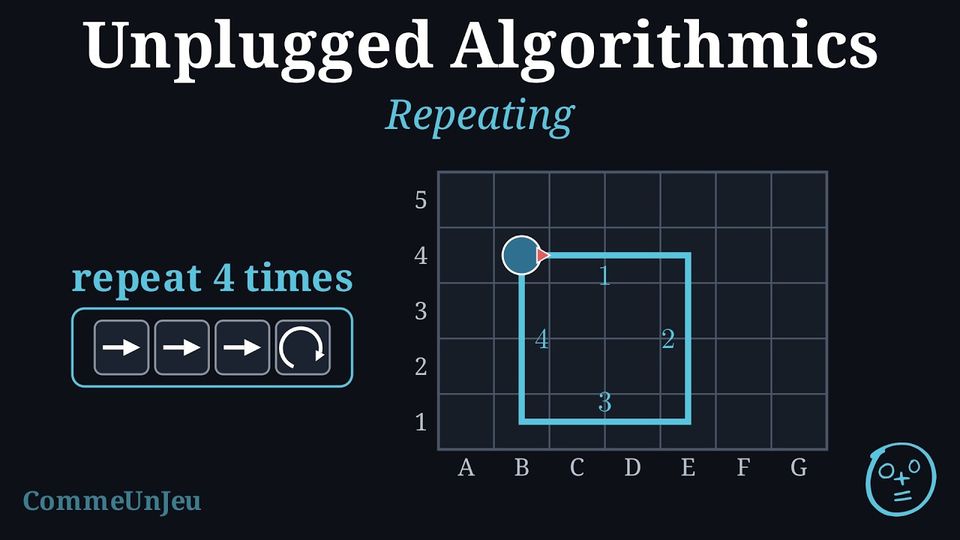
The robot starts looking to the right and draws a square with sides of \(3\) squares: \(\rightarrow\ \rightarrow\ \rightarrow\ \curvearrowright\ \rightarrow\ \rightarrow\ \rightarrow\ \curvearrowright\ \rightarrow\ \rightarrow\ \rightarrow\ \curvearrowright\ \rightarrow\ \rightarrow\ \rightarrow\ \curvearrowright\) Sixteen instructions. Write this program shorter, without changing what the robot does.
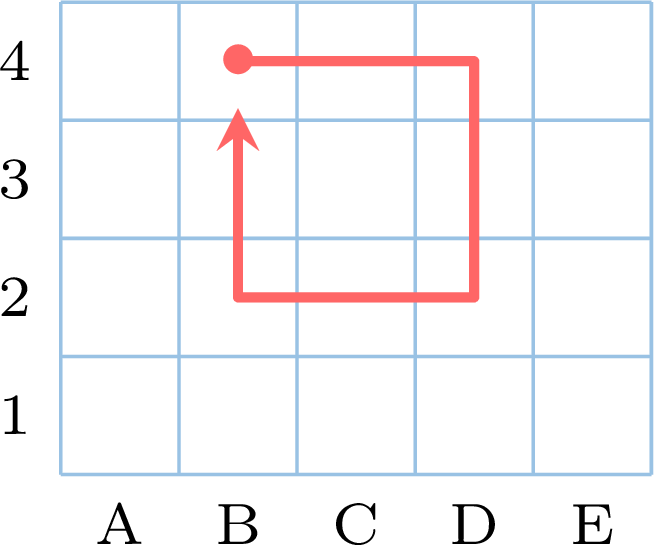
The same group of four instructions, \(\rightarrow\ \rightarrow\ \rightarrow\ \curvearrowright\), comes back four times: one side, then a quarter turn. So the program can be written repeat \(4\) times \((\rightarrow\ \rightarrow\ \rightarrow\ \curvearrowright)\) The robot still executes sixteen instructions — \(4\) sides of \(3\) squares and \(4\) quarter turns — and still draws the same square. Only the writing is shorter. Starting from B4 and looking to the right, here is the square the robot draws: 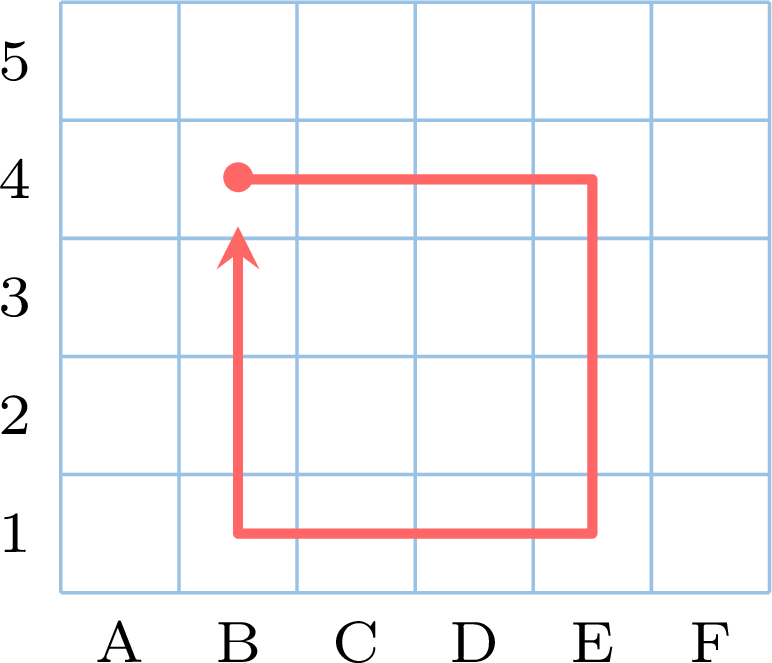
(Reminder: for the robot, \(\rightarrow\) means “forward, in the direction I am looking”, not “towards the right of the sheet”.)
Definition — Repeat
The instruction “repeat \(n\) times ( …\ )” executes the group written between the brackets ( ) (also called parentheses) — its body — \(n\) times in a row, then continues with what follows the closing bracket. Each execution of the body is a turn. It is also written \(n \times (\ldots)\): \(4 \times (\rightarrow\ \rightarrow\ \curvearrowright)\) and “repeat \(4\) times \((\rightarrow\ \rightarrow\ \curvearrowright)\)” say the same thing.A program with a repeat has two counts:
- the instructions written: the “repeat” line and the instructions of its body — for “repeat \(4\) times \((\rightarrow\ \rightarrow\ \rightarrow\ \curvearrowright)\)”, \(1 + 4 = 5\) written instructions;
- the instructions executed: the body as many times as there are turns — \(4 \times 4 = 16\) instructions.
Method — Executing a Repeat by Hand
- Number the turns. Write “turn 1” and execute the whole body, one instruction at a time, noting the state after each one.
- Next turn. Go back to the beginning of the body and execute it again, under “turn 2”, and so on, up to turn \(n\).
- After the last turn, continue with the instruction that follows the closing bracket — do not execute the body once more.
- A repeat inside a repeat: at each turn of the outer repeat, the inner repeat is executed entirely, with all its turns.
Example
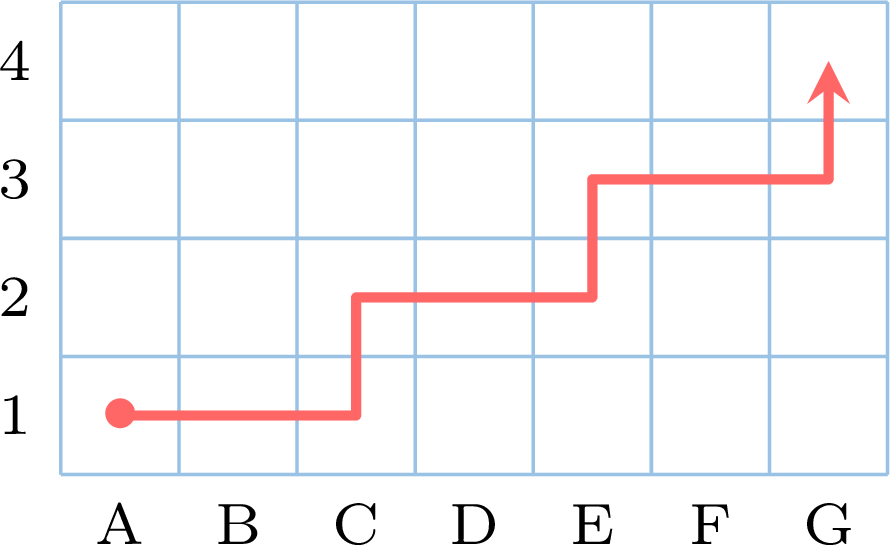
The robot starts from A1, looking to the right, on an empty grid, and draws its path. Execute “repeat \(3\) times \((\rightarrow\ \rightarrow\ \curvearrowleft\ \rightarrow\ \curvearrowright)\)”. Where does it arrive, and what does it draw? | turn | instructions | state (square, looking) |
| 1 | \(\rightarrow\ \rightarrow\), \(\curvearrowleft\), \(\rightarrow\), \(\curvearrowright\) | C1, right; C1, up; C2, up; C2, right |
| 2 | \(\rightarrow\ \rightarrow\), \(\curvearrowleft\), \(\rightarrow\), \(\curvearrowright\) | E2, right; E2, up; E3, up; E3, right |
| 3 | \(\rightarrow\ \rightarrow\), \(\curvearrowleft\), \(\rightarrow\), \(\curvearrowright\) | G3, right; G3, up; G4, up; G4, right |
Example
The sequence \(1\), \(2\), \(4\), \(8\), \(16\), …\ goes from each term to the next with the same instruction. Write it as a calculation program with a repeat, and find its eleventh term.
From one term to the next, the number is multiplied by \(2\). The first term is \(1\), and reaching the eleventh takes \(10\) steps:
The eleventh term is \(1\,024\). Four instructions written (the “repeat” line and its body count as two), twelve executed. The table of turns is exactly what a spreadsheet column would show.
| Start from \(1\). |
| Repeat \(10\) times ( multiply by \(2\) ). |
| Write the number obtained. |
| turn | 1 | 2 | 3 | 4 | 5 | 6 | 7 | 8 | 9 | 10 |
| number | 2 | 4 | 8 | 16 | 32 | 64 | 128 | 256 | 512 | 1024 |
Example
With a ruler and a set square, a square of side \(4\)~cm can also be drawn by repeating. Write the program, and say what it starts from at each turn.
On paper there is no robot: the program must say where to restart and which way to turn, always the same.
Each turn restarts from the end of the side just drawn, and the quarter turn is always to the left: four sides, four right angles, and the fourth side comes back to \(A\). Turning left at some turns and right at others would not give a square.
| Mark a point \(A\) and choose a direction. |
| Repeat \(4\) times ( draw a side of \(4\)~cm from the current point; |
| at the end of this side, turn a quarter turn to the left ). |
Why Repeat?
A repeat makes a program shorter and safer: sixteen arrows copied by hand are sixteen chances of a mistake, “repeat \(4\) times” is one. It also says the structure: a square is four times the same thing, a staircase is three times the same step. And counting the turns is exactly what a machine does without ever getting tired: “repeat \(1\,000\) times” is no longer to write than “repeat \(4\) times”, and the machine executes the \(1\,000\) turns without a mistake.
Skills to practice
- Executing a Repeat
I.3
Flowcharts
The same calculation program is written twice: as a list of lines, and as a drawing of boxes joined by arrows.
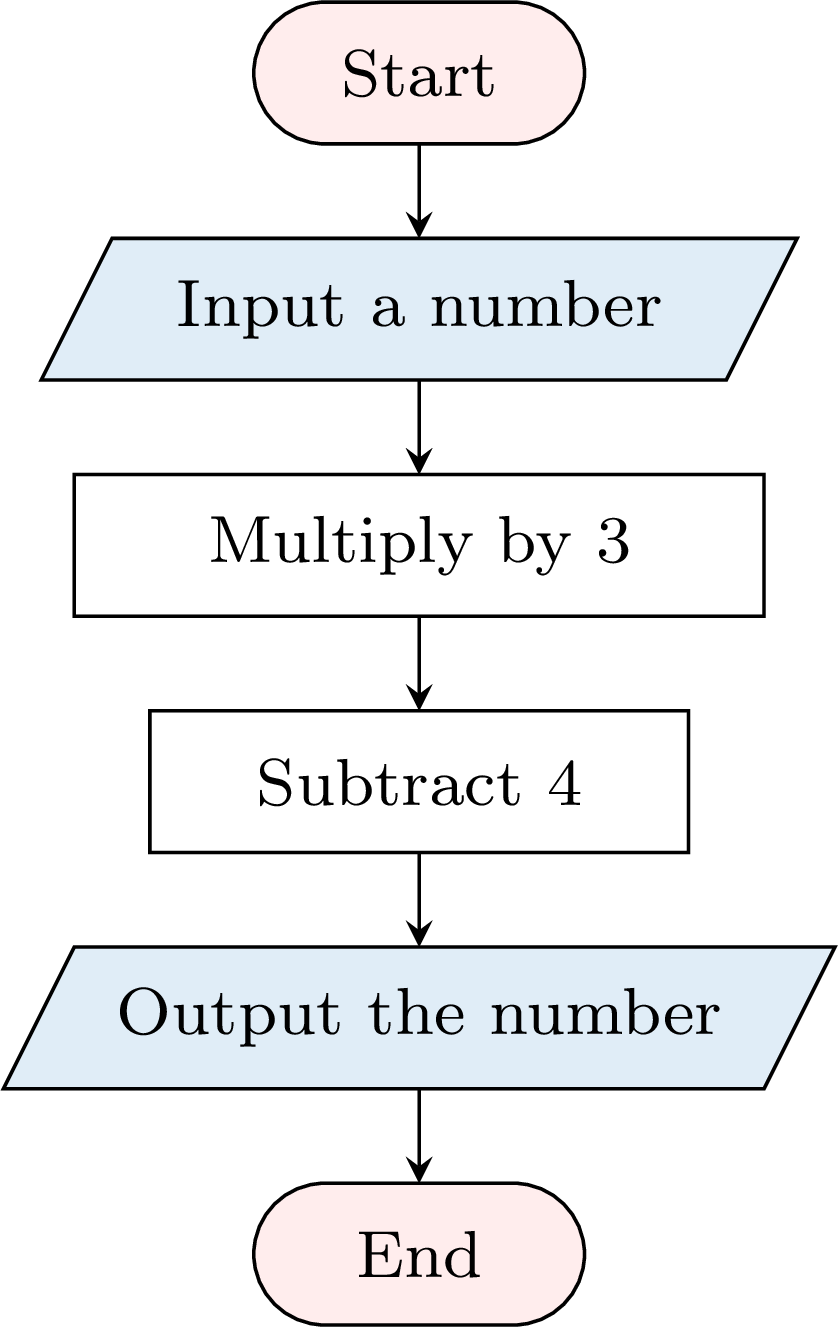
Execute the list for \(5\), then follow the arrows of the drawing for \(5\). Do the two writings give the same number? In the drawing, how can one tell, without reading the words, which box receives the number, which boxes compute, and which box writes the result?
| Choose a number. |
| Multiply it by \(3\). |
| Subtract \(4\). |
| Write the number obtained. |
The list: \(5 \times 3 = 15\), then \(15 - 4 = 11\); the number written is \(11\). The drawing: from Start, the arrow leads to “Input a number” (\(5\)), then to “Multiply by \(3\)” (\(15\)), to “Subtract \(4\)” (\(11\)), to “Output the number” (\(11\)), and to End. Same instructions, same order, same result: \(11\).
In the drawing, the shape of each box tells its role before any word is read: the boxes with rounded ends mark where the program starts and ends; the slanted boxes, parallelograms, are where a number comes in or goes out — the first one, just after Start, receives the number, and the last one, just before End, writes the result; the rectangles compute. And the arrows show which box comes next. Such a drawing is a flowchart.
In the drawing, the shape of each box tells its role before any word is read: the boxes with rounded ends mark where the program starts and ends; the slanted boxes, parallelograms, are where a number comes in or goes out — the first one, just after Start, receives the number, and the last one, just before End, writes the result; the rectangles compute. And the arrows show which box comes next. Such a drawing is a flowchart.
Definition — Flowchart
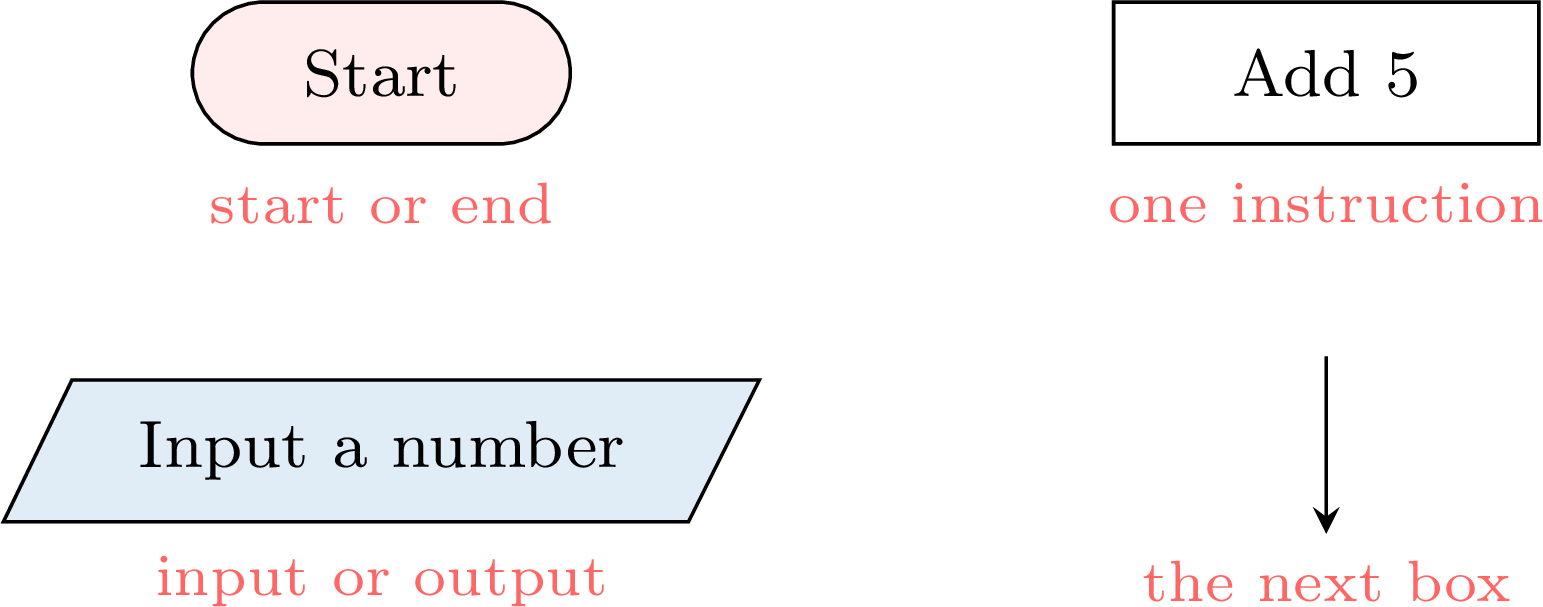
A flowchart is a drawing of a program: each instruction is written in a box, and arrows join the boxes in the order in which they are executed. The shape of a box tells what it does: - a box with rounded ends marks the start or the end of the program — there is one Start and one End;
- a process box, a rectangle, holds one instruction: “add \(5\)”, “divide the number by \(2\)”;
- an input or output box, a parallelogram, receives the input (“input a number”) or writes the output (“output the number”).
Method — Tracing a Flowchart by Hand
- Start at Start; when the flowchart has an input box, write the input down.
- Follow the arrows, one box at a time. After each box, write the number obtained — the current number — in a trace table: one line per box executed, Start and End apart.
- Stop at End: the output is the number written by the output box.
Example
Trace this flowchart for the input \(3\), then for the input \(10\). 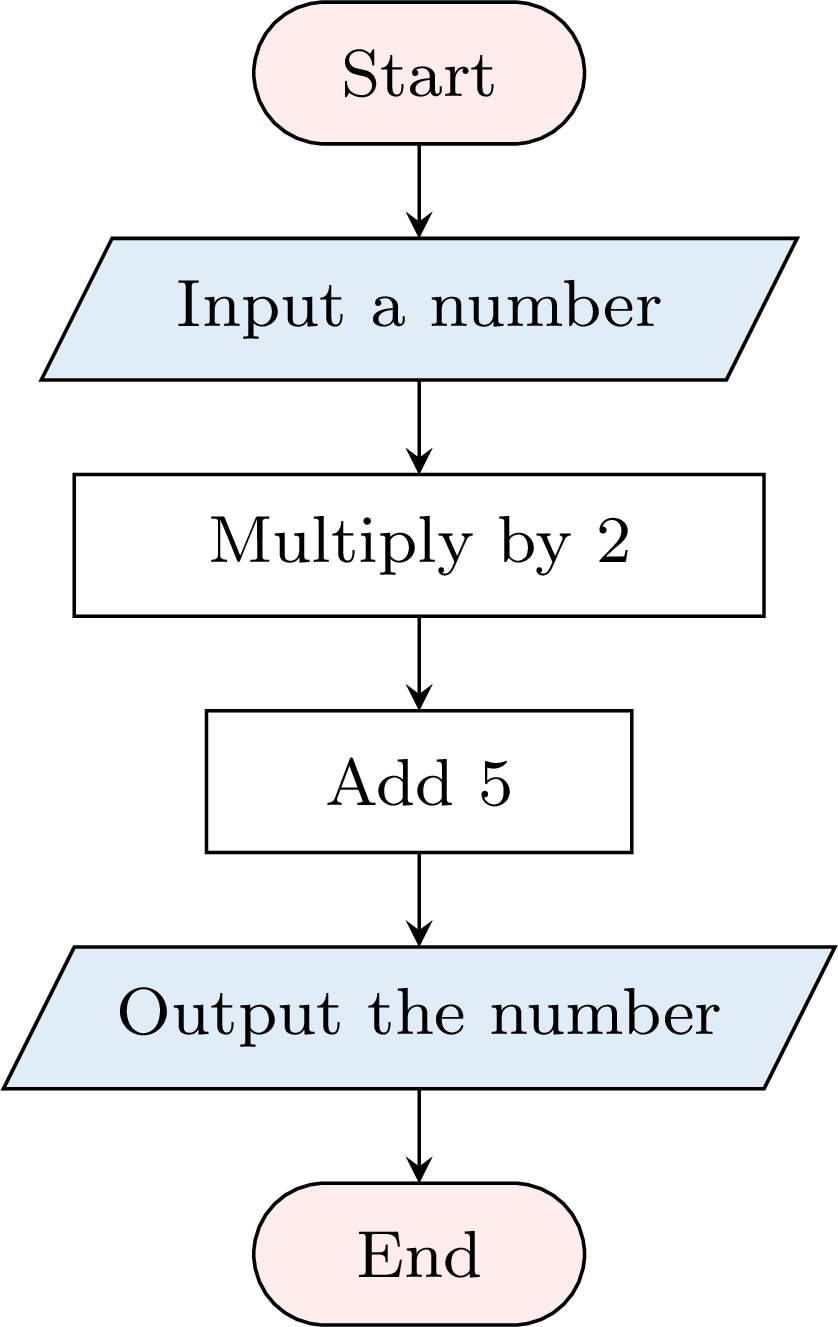
One line per box executed, in the order of the arrows:
The outputs are \(11\) and \(25\). The boxes are executed one after the other, from top to bottom. It is the calculation program “choose a number, multiply by \(2\), add \(5\), write the number”, drawn instead of listed: the same instructions, the same outputs.
| Box | input \(3\) | input \(10\) |
| Input a number | \(3\) | \(10\) |
| Multiply by \(2\) | \(3 \times 2 = 6\) | \(10 \times 2 = 20\) |
| Add \(5\) | \(6 + 5 = 11\) | \(20 + 5 = 25\) |
| Output the number | \(11\) | \(25\) |
Example
Here is a flowchart. 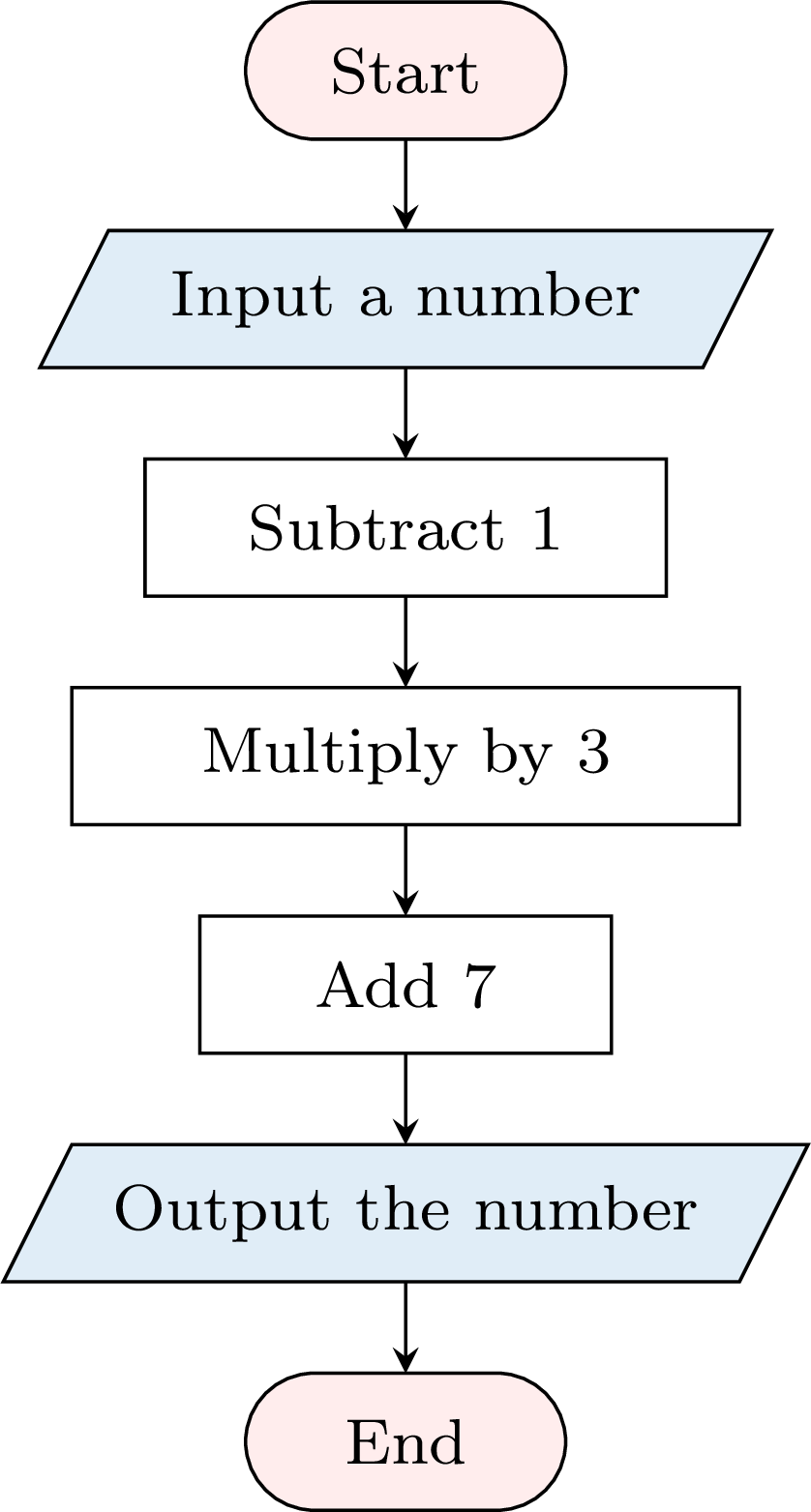
- Trace it for the input \(5\), then for the input \(2\).
- Which input gives the output \(31\)?
- Input \(5\): \(5 - 1 = 4\), \(4 \times 3 = 12\), \(12 + 7 = 19\); the output is \(19\). Input \(2\): \(2 - 1 = 1\), \(1 \times 3 = 3\), \(3 + 7 = 10\); the output is \(10\).
- Go back up the flowchart, undoing each box from the bottom: the last box added \(7\), so before it the number was \(31 - 7 = 24\); the box before multiplied by \(3\), so the number was \(24 \div 3 = 8\); the first box subtracted \(1\), so the input was \(8 + 1 = 9\). Check: \(9 - 1 = 8\), \(8 \times 3 = 24\), \(24 + 7 = 31\).
Definition — Counted Loop
In a flowchart, a loop is drawn with a return arrow: it leaves from below a box and goes back up to an earlier box, and it is marked with a count, such as “\(10\) times”. The boxes between the end of the return arrow and its start are executed that number of times in a row; each pass through them is a turn, the word already used for “repeat”. After the last turn, the flow goes on along the arrow that goes down. To trace a loop by hand, execute its boxes as many times as the count says, with one line of the trace table per turn.A loop marked “\(10\) times” is the drawing of “repeat \(10\) times ( …\ )”: the boxes of the loop are its body.
Example
Trace this flowchart with a trace table: one line per turn. What is the output? 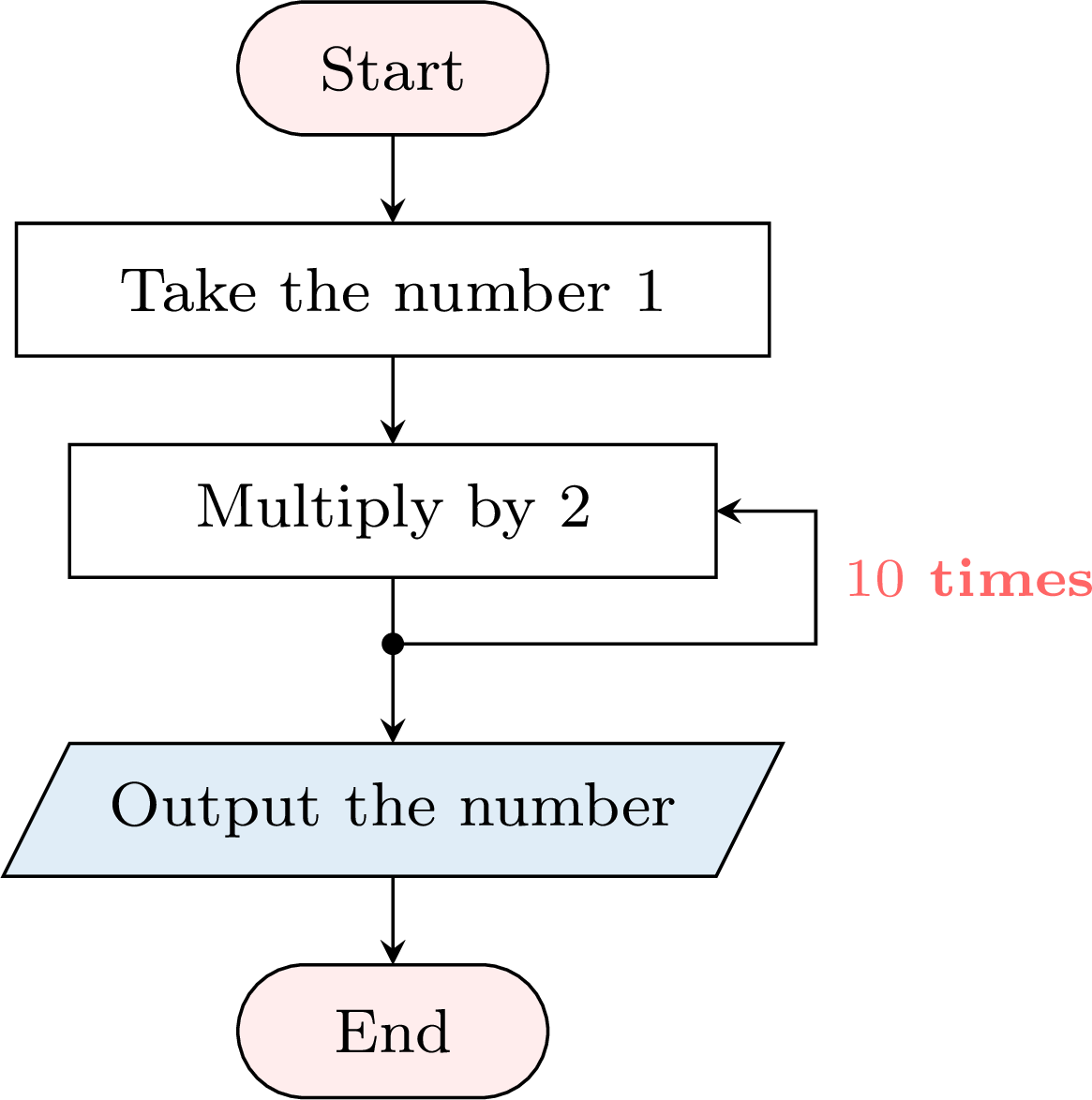
The number starts at \(1\); at each turn it is multiplied by \(2\).
After the tenth turn, the flow goes down to the output: \(1\,024\). The flowchart draws the program “start from \(1\); repeat \(10\) times (multiply by \(2\)); write the number”, whose output is the eleventh term of the sequence \(1\), \(2\), \(4\), \(8\), …
| Turn | \(1\) | \(2\) | \(3\) | \(4\) | \(5\) | \(6\) | \(7\) | \(8\) | \(9\) | \(10\) |
| Number | \(2\) | \(4\) | \(8\) | \(16\) | \(32\) | \(64\) | \(128\) | \(256\) | \(512\) | \(1\,024\) |
Method — Drawing a Flowchart
- List the instructions in order, and spot the groups of instructions that are repeated, with their number of times.
- Draw one box per instruction, with its shape: Start, the input, the processes, the output, End.
- Draw a repeated group once, and add a return arrow from below its last box up to its first box, marked with the number of times.
- Join the boxes by arrows in the order of execution.
- Check by tracing with two inputs — or once, for a program that starts from a given number.
Example
Draw the flowchart of the program “choose a number; repeat \(3\) times (add \(5\), then multiply by \(2\)); write the number obtained”. Check it with the inputs \(1\) and \(0\).
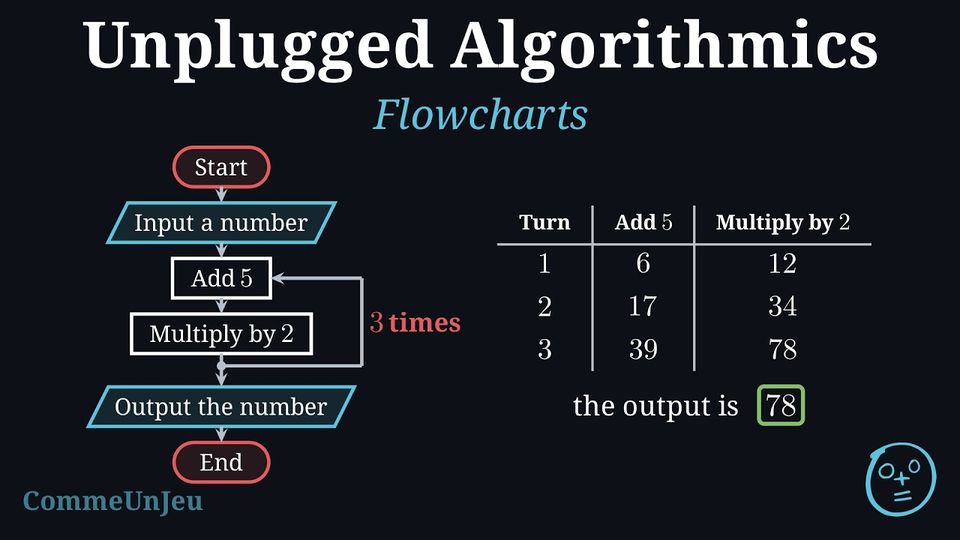
The group “add \(5\), multiply by \(2\)” is repeated \(3\) times: its two boxes are drawn once, with a return arrow marked “\(3\) times”. 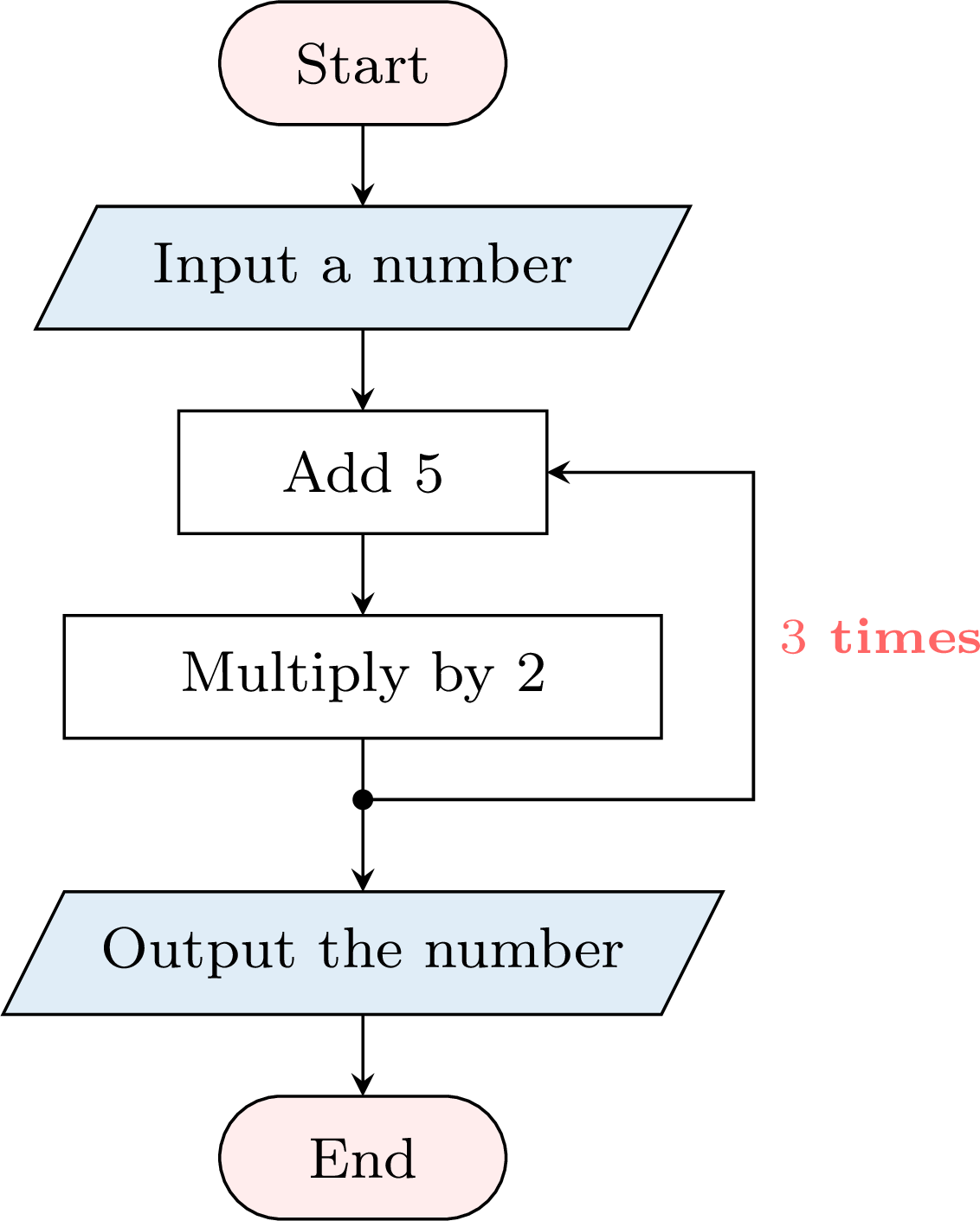
Check. Input \(1\): turn 1, \(6\) then \(12\); turn 2, \(17\) then \(34\); turn 3, \(39\) then \(78\); the output is \(78\). Input \(0\): \(5\), \(10\); \(15\), \(30\); \(35\), \(70\); the output is \(70\).
Three Ways to Write a Program
The same program can be written in three ways: as a list of instructions, read from top to bottom; as a flowchart, where the shapes show the role of each instruction and the arrows the order, loops included; and as a block program, the form a screen executes. The instructions do not change, and neither does the way to execute them: one line, one box or one block at a time, in order. A list is quick to write; a flowchart shows at a glance where the program starts, where the numbers come in and go out, and which part is repeated.
Skills to practice
- Recognising the Symbols of a Flowchart
- Tracing Flowcharts and Counted Loops
- Drawing a Flowchart
I.4
Programming a Path
From the Sheet to the Screen
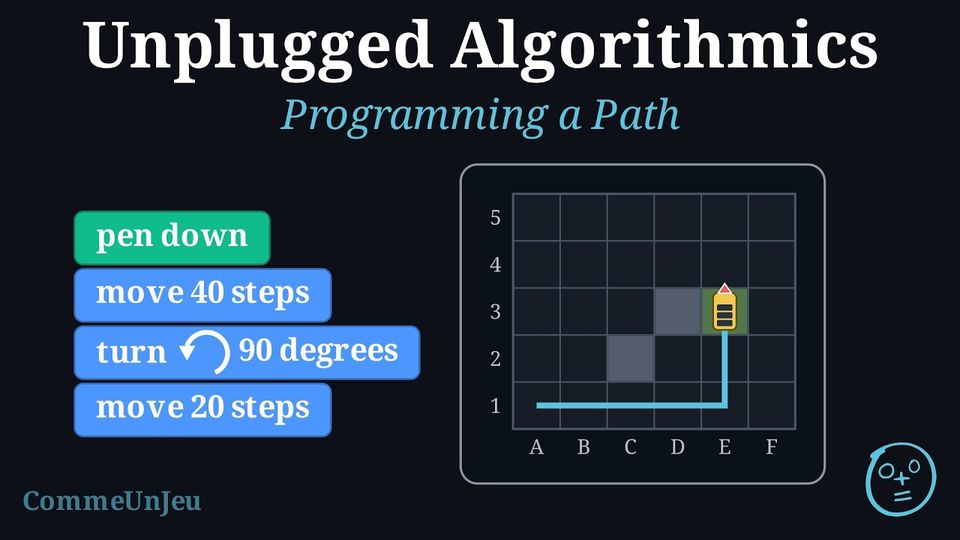
On a screen, a program is written with blocks that snap together, and it is executed by a character — a sprite — that moves and leaves a line behind it. The instructions are those of the robot, with two conventions: 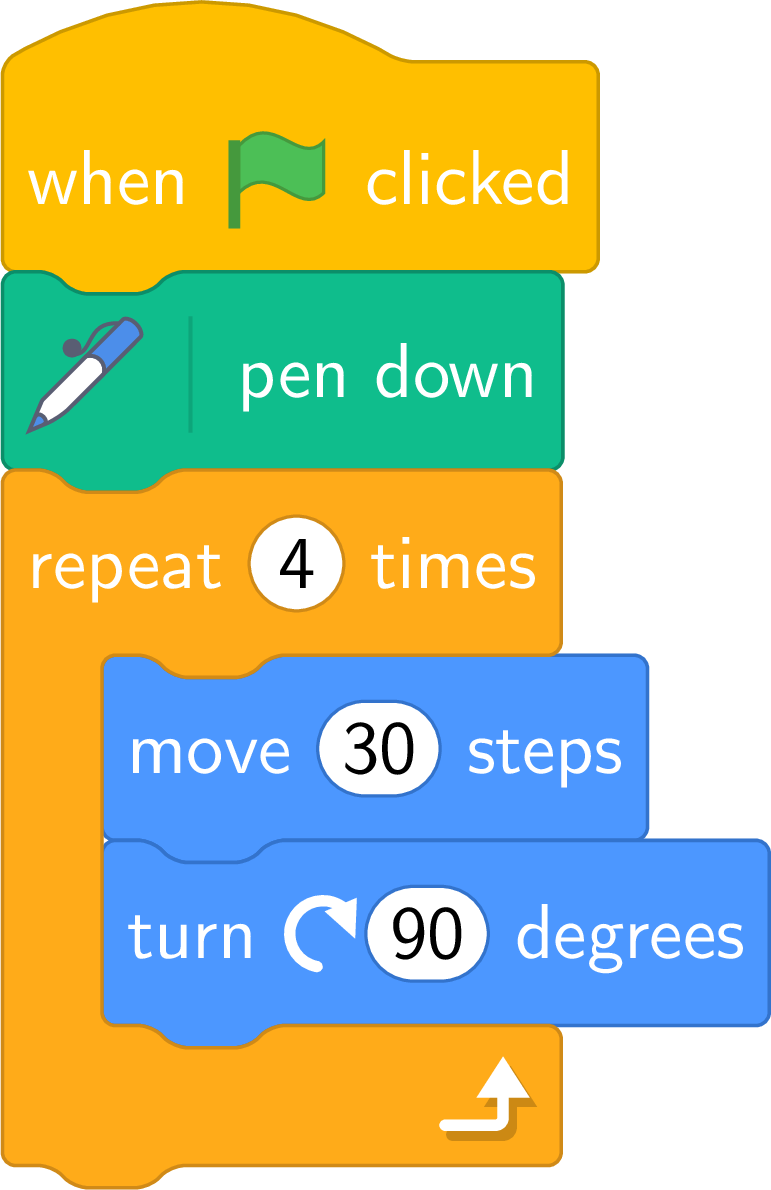
- the sprite starts on a square of the grid, looking to the right; the block “pen down” makes it draw its path;
- “move \(10\) steps” moves it one square forward; “turn \(\circlearrowright\) \(90\) degrees” is a quarter turn to the right and “turn \(\circlearrowleft\) \(90\) degrees” a quarter turn to the left — the arrow shows which way the sprite turns, on the spot.
Definition — Block Program
A block program is a sequence of instructions written as blocks stacked from top to bottom: one block is one instruction, the stack is the sequence, and it is executed from the top. A repeat block contains its body; the blocks placed inside it are executed at each turn, the block placed under it after the last turn. Method — Programming a Simple Path
- Draw the path on the grid, from the starting square to the arrival square.
- Cut it into straight runs and turns. At each turn, decide for the sprite whether it is right or left — follow the path with a finger, looking where the sprite looks.
- One block per piece: “move \(10 \times k\) steps” for a run of \(k\) squares, “turn \(90^\circ\) right/left” for each turn.
- Look for a group that comes back — a side and a turn, a step of a staircase — and write it once inside a repeat block.
- Execute the program from the start and compare the line drawn with the path wanted.
Example
The bus starts from the School (square A1, \(\bullet\)), looking to the right, and must reach the Stadium (square E3, \(\bigstar\)). 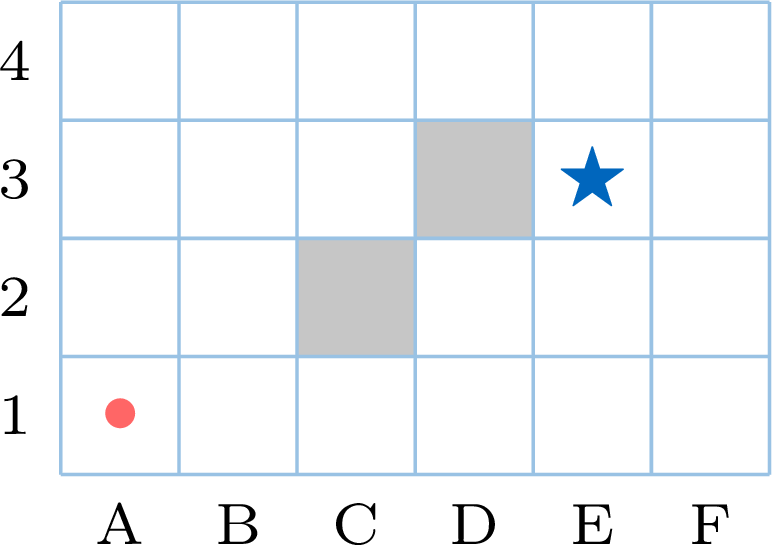
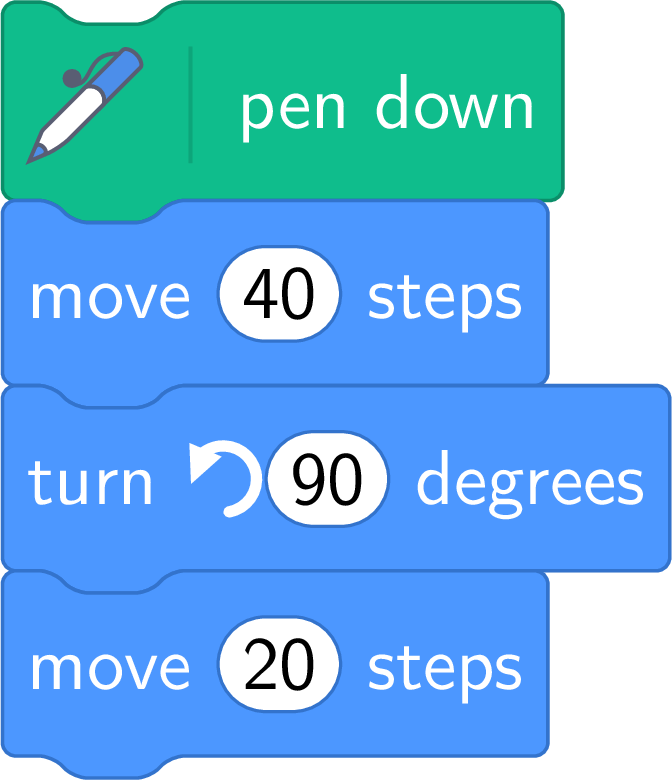
- Write a block program that makes the bus draw its route.
- Draw what the program “repeat \(4\) times ( move \(20\) steps, turn \(90^\circ\) right )” draws on an empty grid, starting from B4.
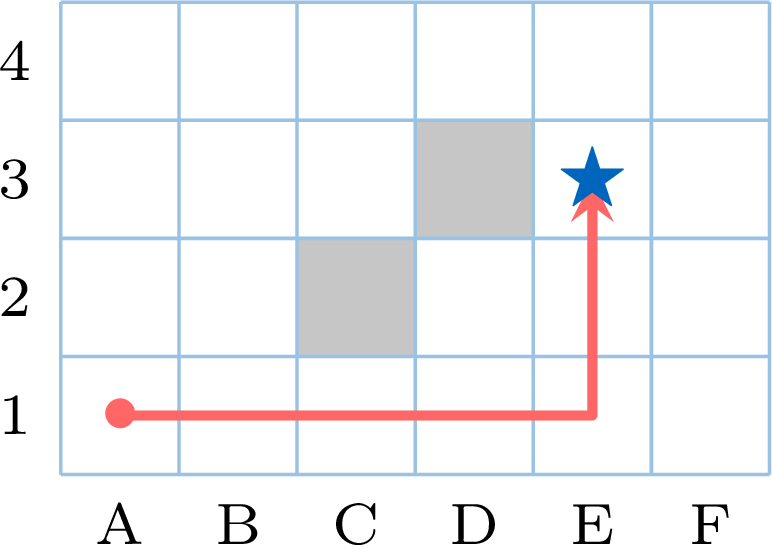
- The grey squares are buildings: the bus goes along row 1 to E1, then up to E3 — \(4\) squares to the right, a turn, \(2\) squares up. Looking to the right, going up is a turn to the left.
- Four runs of \(2\) squares with a right turn after each: a square with sides of \(2\) squares, drawn from B4 towards the right, then down — and the sprite ends where it started, looking to the right again.
The Wrong Block
When the line drawn is not the path wanted, the sprite has obeyed: the mistake is in the program. To find it, execute the program block by block and compare, after each block, the square reached and the direction with those expected — the first block after which they differ is the wrong one (a wrong turn does not change the square: the direction gives it away). A turn to the wrong side, a run one square too long, a repeat with one turn too many: three mistakes that are only seen by executing.
Skills to practice
- Finding the Wrong Block
- Writing a Block Program
II
Programming in Scratch
II.1
The Sprite and the Stage
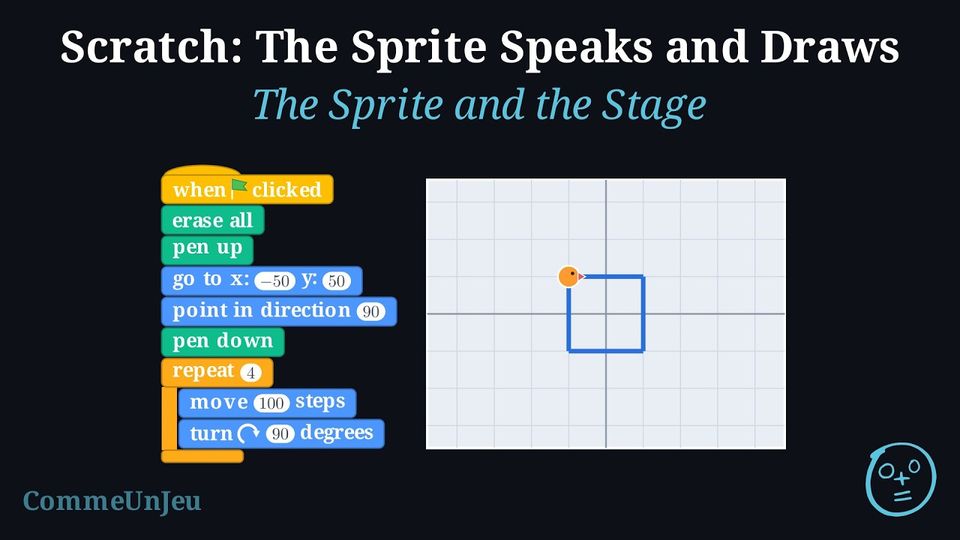
On paper, this program made a robot draw a square on a grid. It is copied into Scratch, block by block: 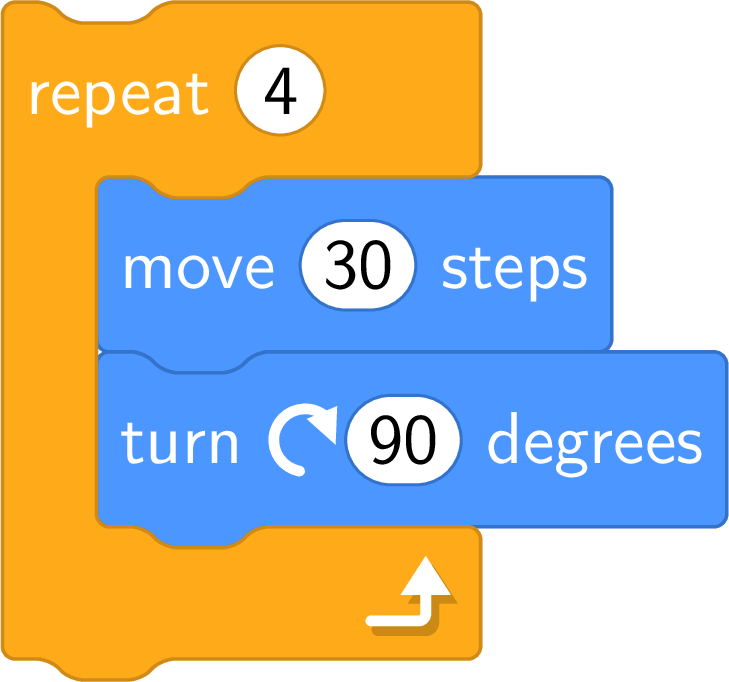
Clicking the green flag: nothing happens. Clicking the pile of blocks: the sprite moves, but nothing is drawn; and it starts from wherever it is — dragged with the mouse between two clicks, it no longer follows the same path. What is missing?
Three things, that the robot on paper did not need. 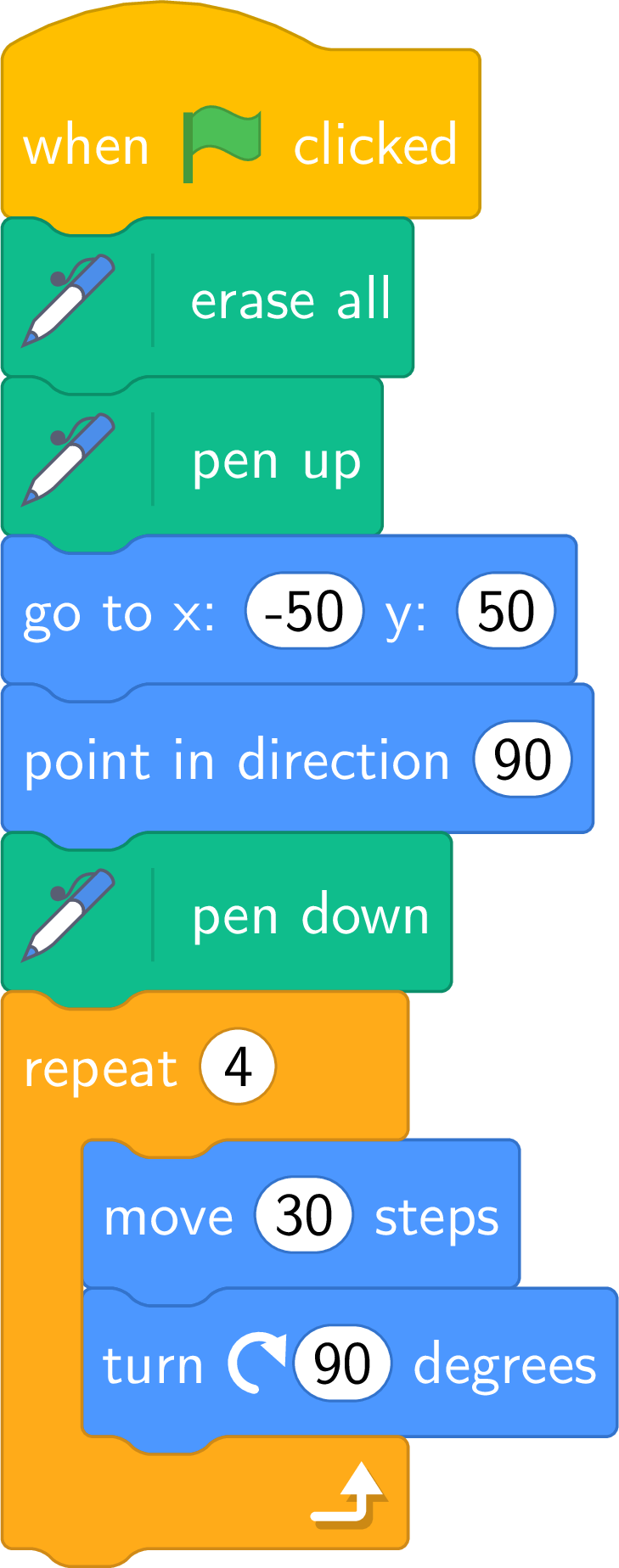
- A start. A script only runs when something triggers it: the block “when green flag clicked” on top makes the flag start it.
- A pen. The sprite leaves a line only when its pen is down: “erase all” to clean the stage first, “pen up” so that the jump to the start leaves no line, “pen down” before drawing.
- An initial state. The flag resets nothing: the sprite stays where the last run left it, pen up or down. “go to x: \(-50\) y: \(50\)” and “point in direction \(90\)” put it back at the same place, looking the same way, every time.
Definition — The Sprite, the Stage and the Script
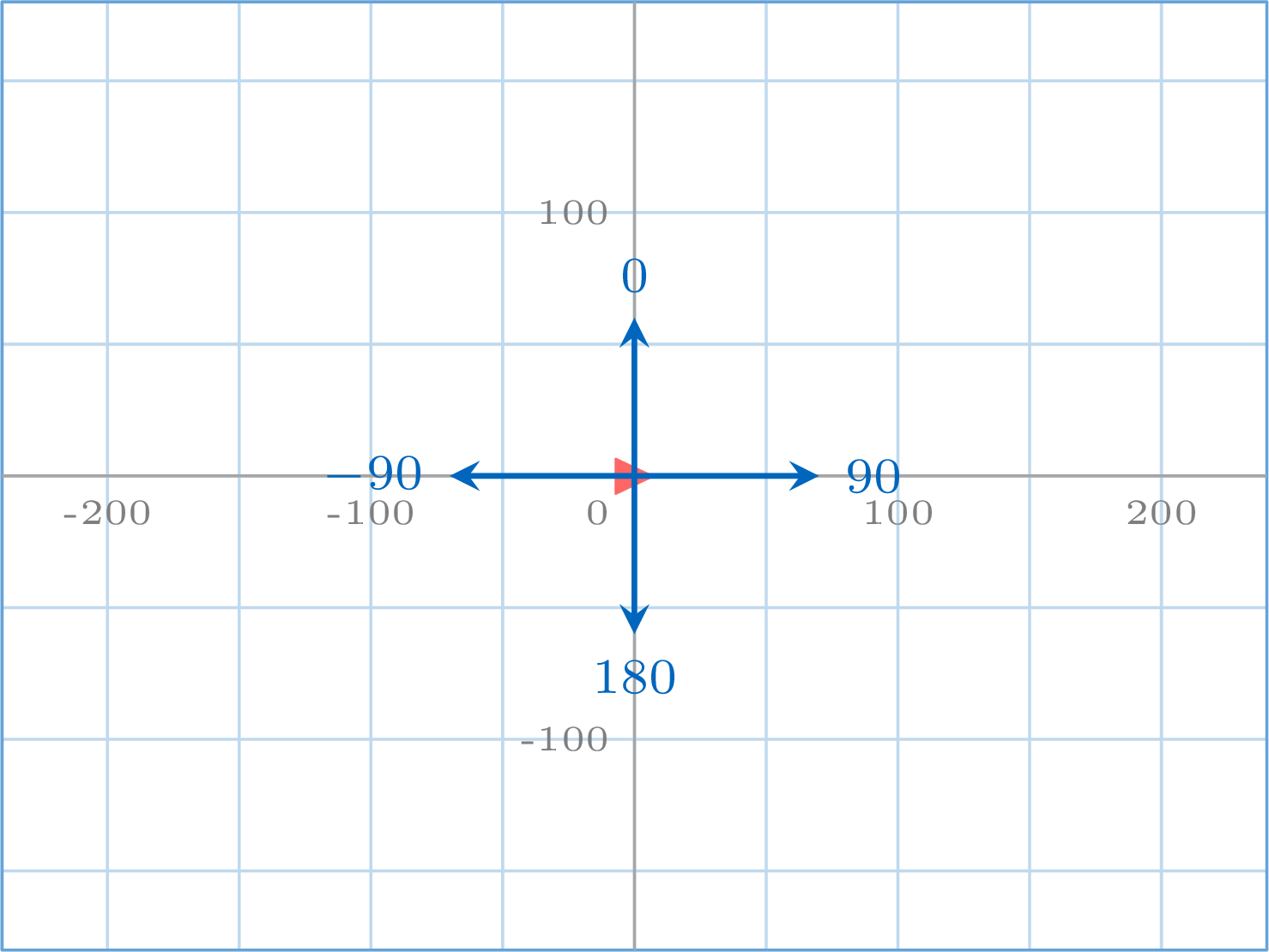
In Scratch, a program is executed by a character, the sprite, on a rectangle called the stage. The stage is \(480\) steps wide and \(360\) steps high; every point of it has two coordinates, \(x\) from \(-240\) to \(240\) and \(y\) from \(-180\) to \(180\), with the centre at \((0, 0)\). There are no squares on the stage: the step is its unit of length (“\(10\) steps = one square” was only a convention of the grid); on the figures, one grid square is \(50\) steps. The sprite always has a position \((x, y)\) and a direction, given in degrees: \(90\) means “looking to the right”, \(0\) “looking up”, \(-90\) “to the left”, \(180\) “down”.A script is a pile of blocks that snap together; a block is one instruction, and the sprite executes them from top to bottom. The blocks are sorted in categories, one colour each: motion (blue), looks (purple), events (yellow), control (orange), sensing (light blue), operators (green), variables (dark orange), pen (dark green).
Definition — Starting a Script
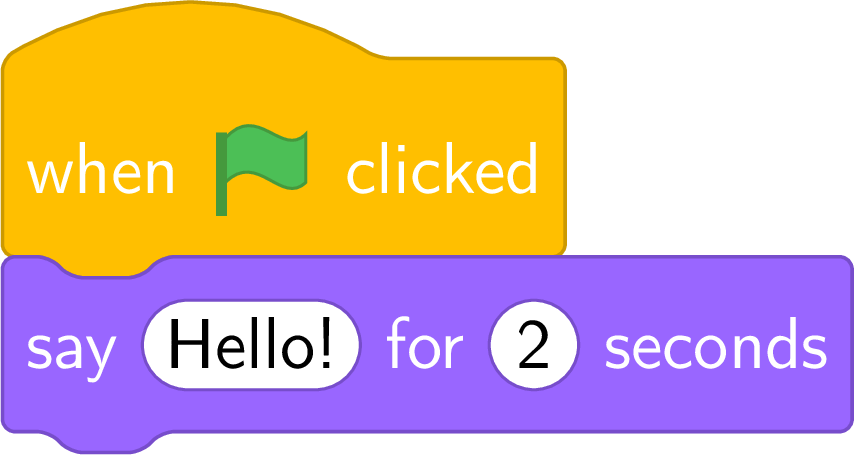
A script starts with an event block, a “hat” block that nothing can be placed above. The most common is “when green flag clicked”: the script runs when the green flag above the stage is clicked. A pile of blocks without a hat does not start with the flag — it only runs when someone clicks on it.The flag resets nothing: position, direction, pen up or down, drawings stay as the last run left them. A script that draws therefore begins with its initial state: erase all, pen up, go to a chosen point, point in a chosen direction, pen down — the pen lifted first, otherwise the jump to the starting point leaves a line.
Definition — Moving, Drawing, Saying
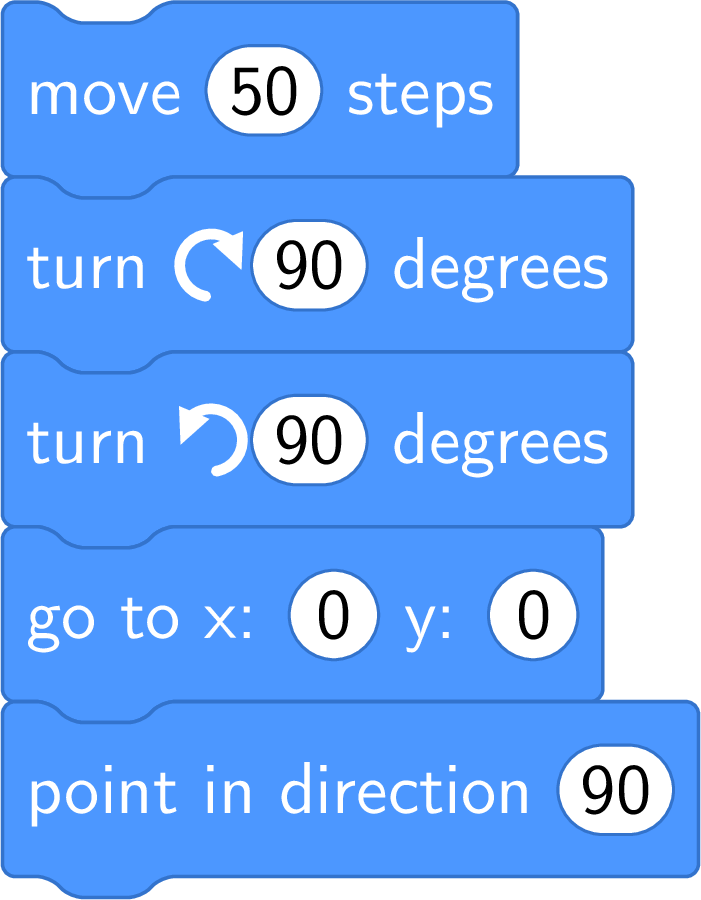
- Move. “move \(10\) steps” moves the sprite \(10\) steps forward, in its direction. “turn \(\circlearrowright\) \(15\) degrees” turns it clockwise — to its right — without moving it; “turn \(\circlearrowleft\)” turns it the other way. “go to x: \(0\) y: \(0\)” jumps to a point; “point in direction \(90\)” sets the direction.
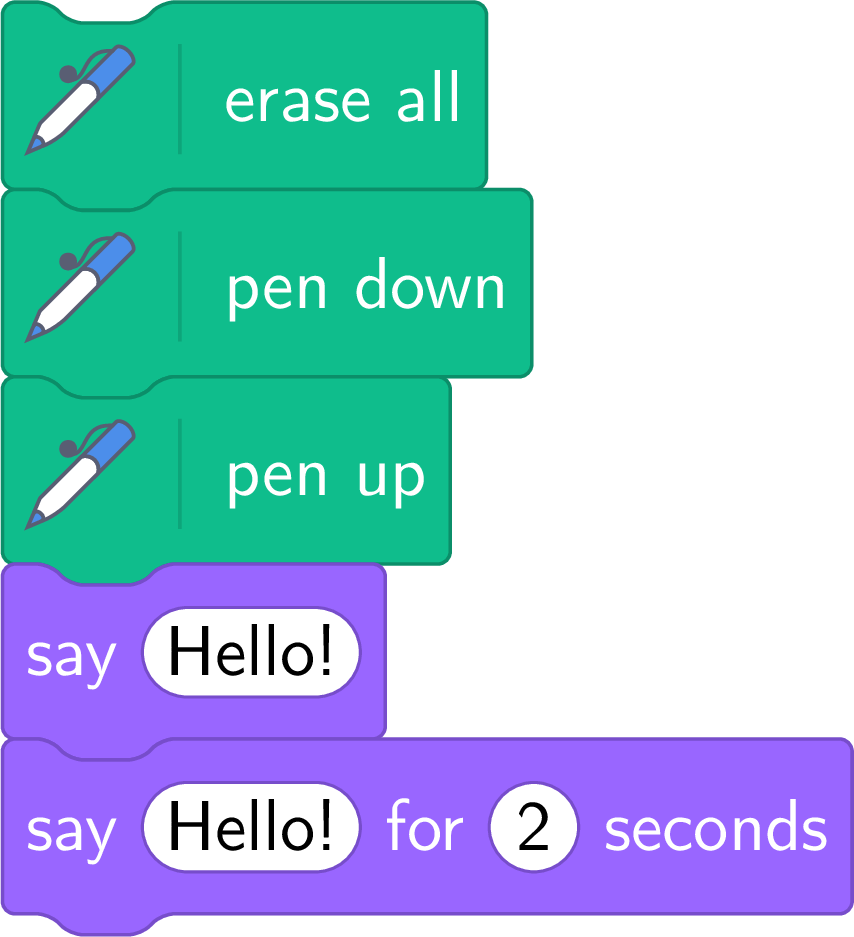
- Draw. “pen down”: from now on, the sprite draws its path, “go to” jumps included; “pen up”: it moves without drawing; “erase all” cleans the stage.
- Say. “say Hello!” shows a speech bubble that stays; “say Hello! for \(2\) seconds” shows it two seconds, then removes it, and the script waits meanwhile.
Method — Following the Sprite
To read a script, the sprite is followed block by block, as the robot was followed square by square. - Write the initial state: position \((x, y)\), direction, pen up or down — as the first blocks set them. Without these blocks, the state is unknown, and so is the drawing.
- Execute one block at a time, top to bottom, and write the new state after each block that changes it: “move” changes the position, “turn” changes the direction only, “say” changes what the bubble shows.
- Give the final state — and, if the pen was down, the line drawn.
Example
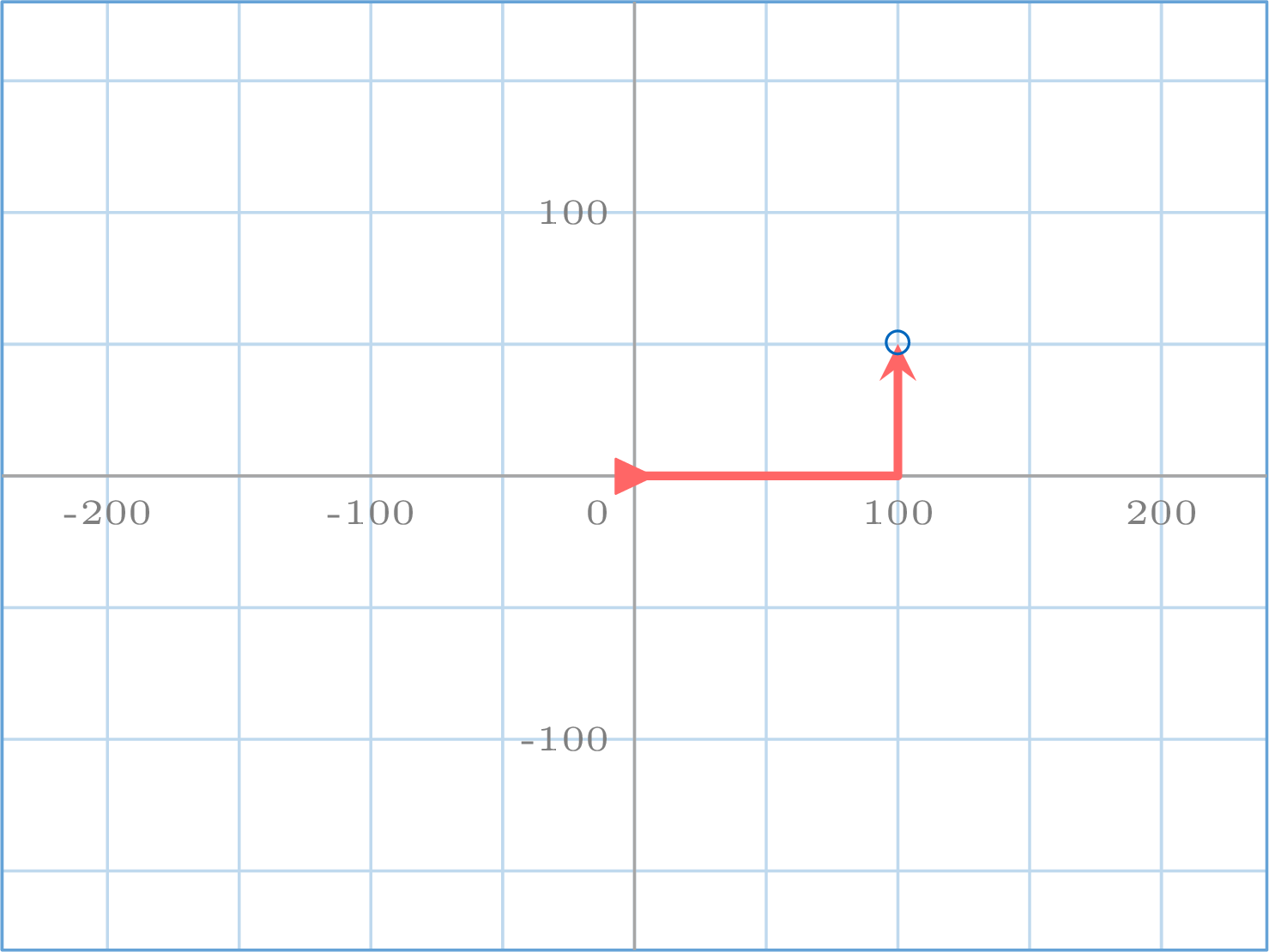
The green flag is clicked. What does the sprite say, where is it at the end, and in which direction does it look? 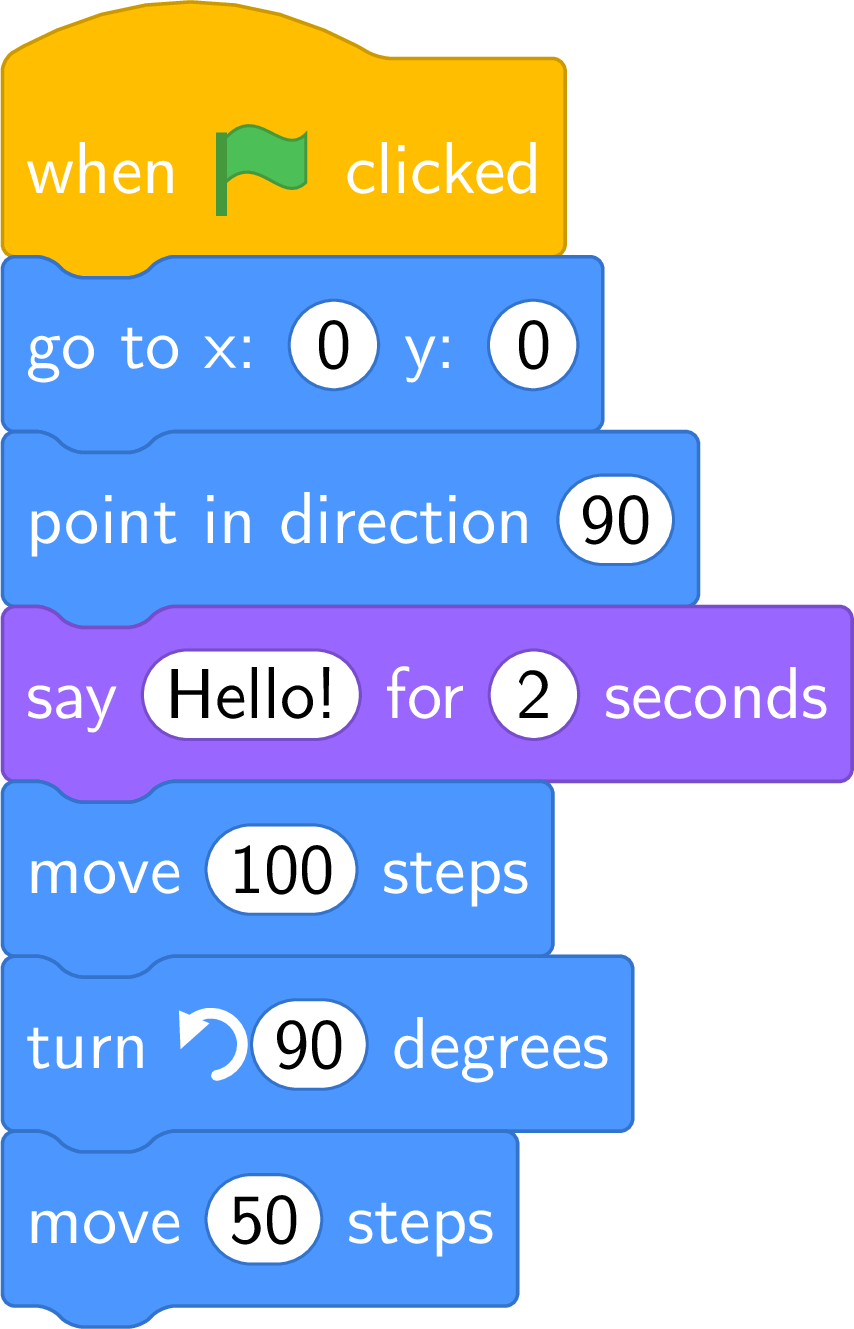
| block | position | direction |
| go to x: \(0\) y: \(0\); point in direction \(90\) | \((0, 0)\) | \(90\) |
| say “Hello!” for \(2\) seconds | \((0, 0)\) | \(90\) |
| move \(100\) steps | \((100, 0)\) | \(90\) |
| turn \(\circlearrowleft\) \(90\) degrees | \((100, 0)\) | \(0\) |
| move \(50\) steps | \((100, 50)\) | \(0\) |
Example
What does this script draw? Give the position and the direction of the sprite at the end. 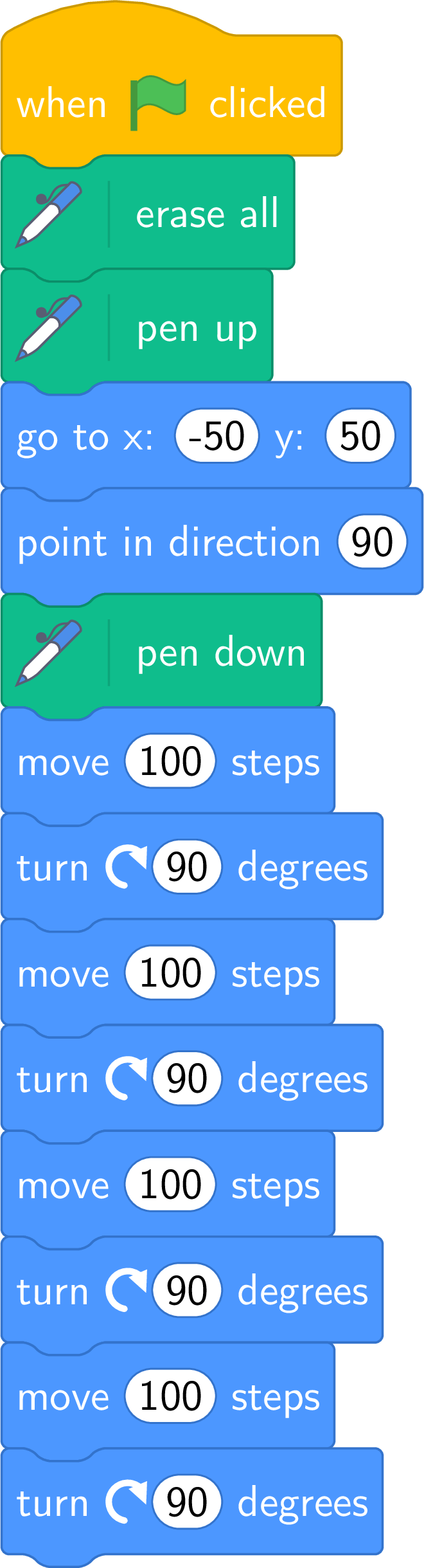
Initial state: \((-50, 50)\), direction \(90\), pen down. Then four times “\(100\) steps forward, quarter turn to the right”: \((50, 50)\) looking down (\(180\)), \((50, -50)\) looking left (\(-90\)), \((-50, -50)\) looking up (\(0\)), \((-50, 50)\) looking right (\(90\)). 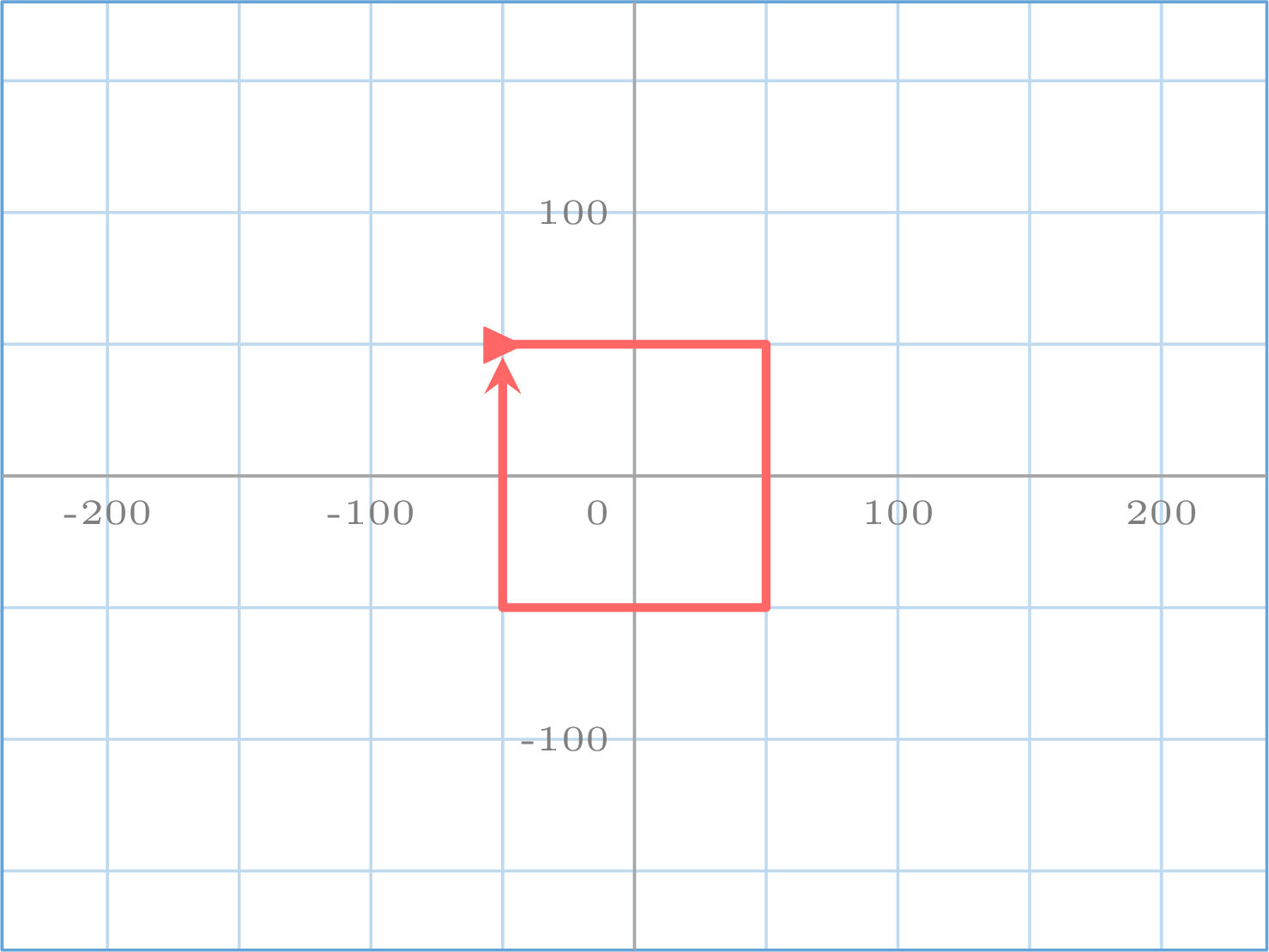
A square of side \(100\), and the sprite is back at its starting point, in its starting direction: \((-50, 50)\), \(90\).
Five Traps of the First Scripts
- “say” leaves the bubble on the stage; “say for \(2\) seconds” removes it — and the script waits two seconds before the next block.
- “turn” changes the direction only: the sprite stays where it is. Two scripts with the same “move” blocks and turns to different sides draw mirror images.
- A pen that is up draws nothing, whatever the path; “erase all” removes the drawings, not the sprite.
- A pile without a hat block never starts with the flag.
- A pen left down at the end of a run draws the “go to” jump of the next one: the initial state lifts the pen before jumping.
Skills to practice
- Reading a Script
II.2
Asking and Answering
This script says “Hello!” to everybody. It should say “Hello Lina” to Lina and “Hello Noah” to Noah, with one and the same script. What must it do that it does not do yet?
It must receive a piece of information from the person who uses it: the first name. A script can ask a question and wait for the answer typed on the keyboard; what was typed is then kept, and the script can use it in its “say”. One and the same script will then greet Lina, Noah, or anybody: that is what the two blocks of this section make possible.
Definition — Asking and the Answer
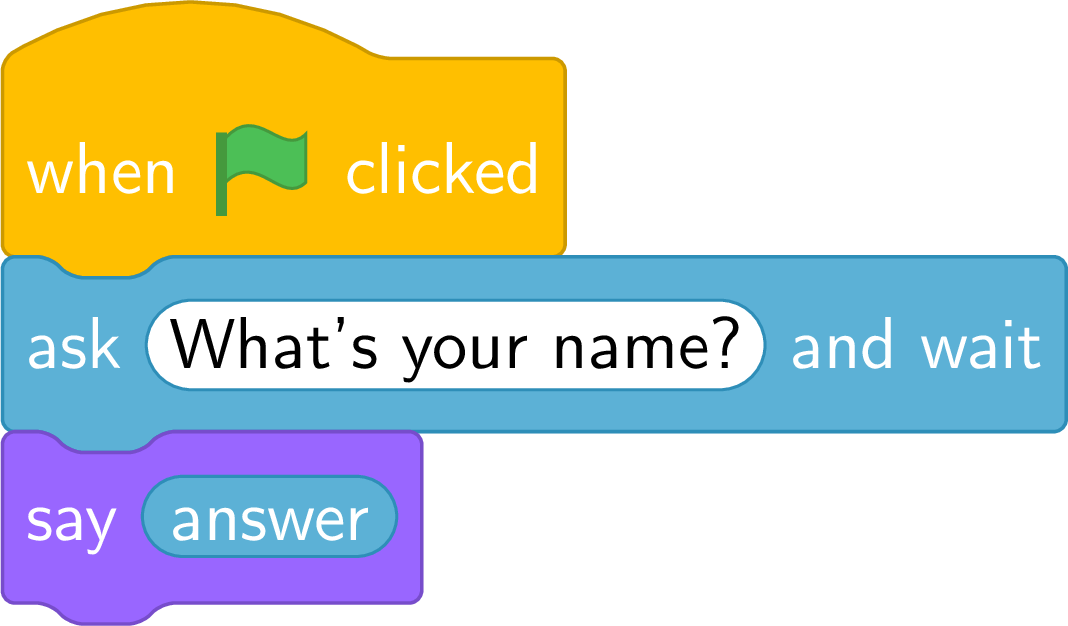
The block “ask … and wait” makes the sprite ask the question in a speech bubble and shows a box to type in at the bottom of the stage; the script waits until the user validates. What was typed is then kept in answer, a round light blue block that can be dropped into other blocks. “say (answer)” shows it in the bubble.“answer” is a single memory: each new “ask” replaces what it held. “answer” is a variable: a name under which a value is kept in memory — here “ask” fills it, and the script reads it.
Definition — Inputs and Outputs of a Script
The inputs of a script are what the user gives it while it runs: what is typed after an “ask”, a key pressed. Its outputs are what it shows: what the sprite says, what it draws, where it goes. The same script gives different outputs for different inputs — that is what it is written for. On paper, the input was given before executing (the number chosen, the starting square); a script receives it while it runs, when it asks for it. Its starting point is no longer an input: it is the initial state, which the script sets itself. Method — Input, then Output
To predict what a script with an “ask” does for a given input: - Read the question and write the input next to it — what the user types.
- Replace “answer” by that input everywhere it appears below, in order. A second “ask” replaces the input for the blocks that follow it.
- Write the output: exactly what the bubble shows, written between quotation marks when it is a text.
Example
The user types “Lina”. What does the sprite say? 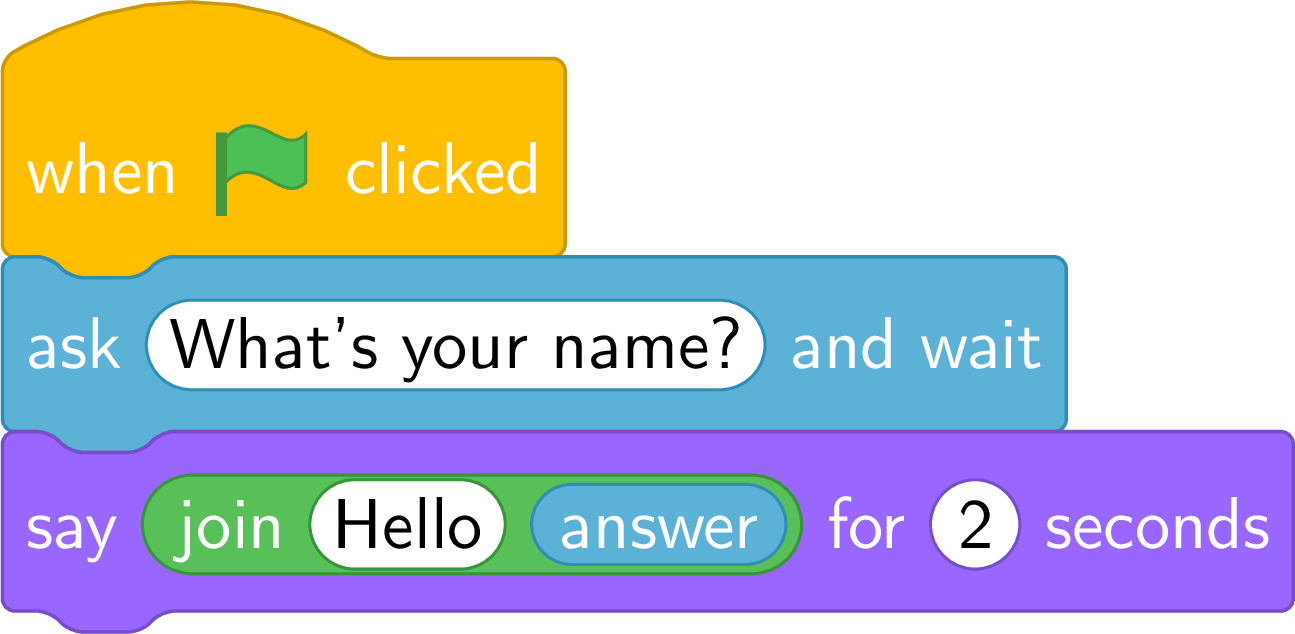
The input is “Lina”, kept in “answer”. The green block “join” glues two texts, adding nothing between them: “Hello” followed by “Lina” — the space between them was typed at the end of “Hello”. The sprite says “Hello Lina” for two seconds. With another name typed, the same script says another greeting: that is the point of “answer”.
Example
The user types “Noah”, then “12”. What does the sprite say at the end? 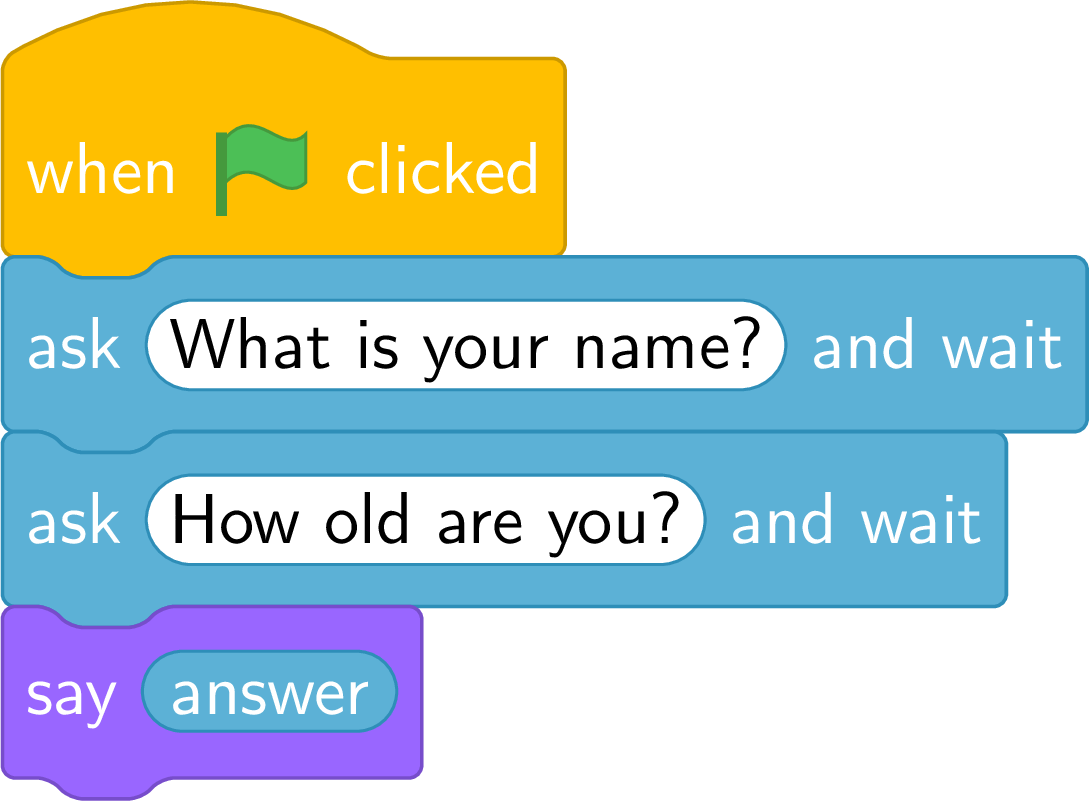
After the first “ask”, “answer” holds “Noah”. After the second, it holds “12”: the name is gone. The sprite says “12”. To keep two inputs, two memories are needed: “answer” alone keeps only the last one.
“answer” Is a Text Until It Is Computed
What is typed after an “ask” is kept as it was typed: “12” is the text made of the digits 1 and 2. “say (answer)” shows it as it is; only a computation turns it into a number.
Skills to practice
- Predicting an Answer
II.3
Formulas in Blocks
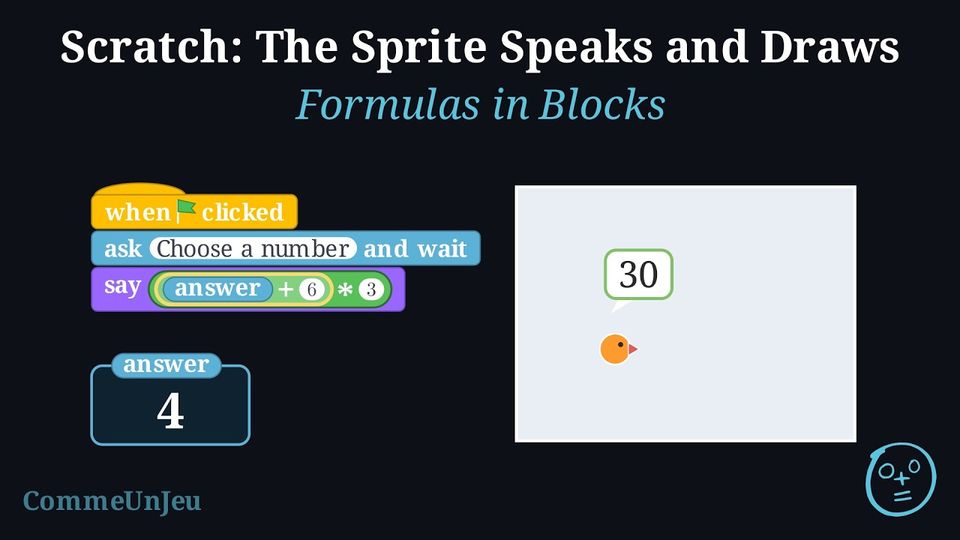
The calculation program “choose a number; add \(6\); multiply the result by \(3\)” gives \(30\) when \(4\) is chosen. A “say” block has only one hole: how can the two operations fit in it, in the correct order, for any number typed?
The number typed is “answer”. The operation done first must sit inside the other one: the green block “answer \(+\) 6” is dropped into a hole of the block “( ) \(*\) 3”, which gives “(answer \(+\) 6) \(*\) 3”; that whole block goes into the hole of “say”. For \(4\): \(4 + 6 = 10\), then \(10 \times 3 = 30\). 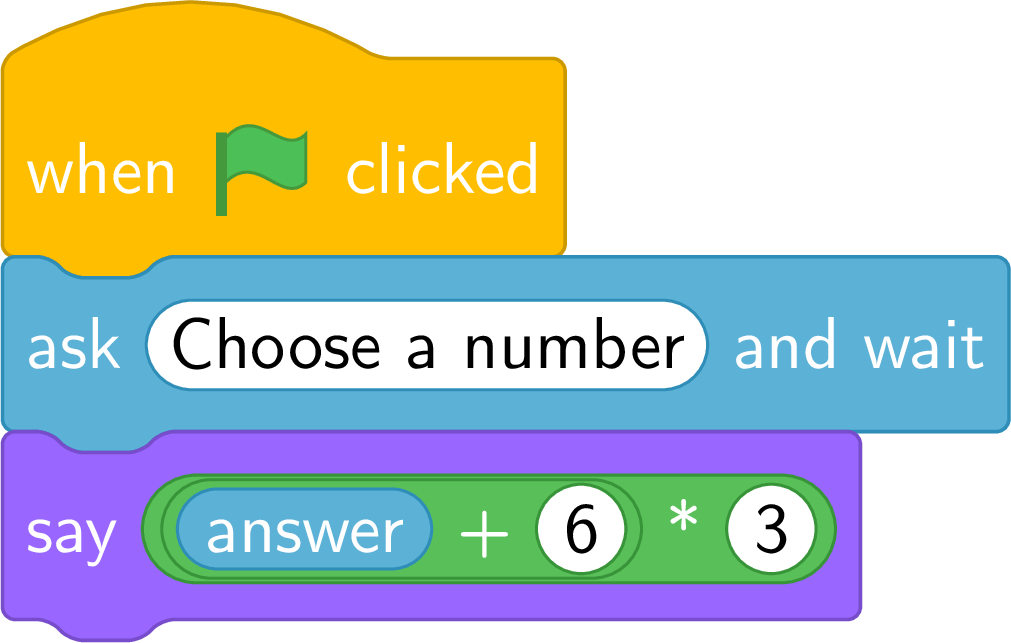
The nesting plays the part of the brackets ( ) (also called parentheses).
Definition — Operator Blocks
The green operator blocks compute: “( ) + ( )”, “( ) \(-\) ( )”, “( ) \(*\) ( )” for a product, “( ) / ( )” for a quotient. Each one has two round holes, where a number, “answer” or another operator block can be dropped. An operator inside another is computed first: nesting plays the part of brackets. The value is computed when the block is executed, with what “answer” holds at that moment. 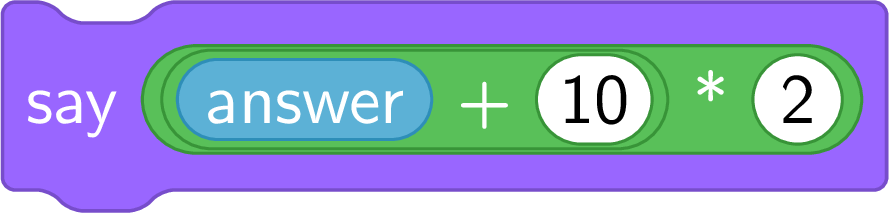
Method — Translating a Formula
- From the formula to the blocks: find the operation done last — it is the outer block; put in its holes the two parts, each translated in turn. \((a + 10) \times 2\): the last operation is \(\times\), the outer block is “( ) \(*\) ( )”, its left hole gets “( ) + ( )” with \(a\) and \(10\), its right hole gets \(2\).
- From the blocks to the formula: start from the outer block and write brackets around every inner block.
- Compute for a value: replace “answer” by the value and compute from the inside out.
Method — From a Calculation Program to a Script
A calculation program — “choose a number; multiply it by \(2\); add \(5\); write the result” — becomes a script in three steps: - “Choose a number” becomes “ask a number and wait”: the number chosen is “answer”.
- Each instruction becomes an operator block that receives the previous one in one of its holes: “answer \(*\) \(2\)”, then “(answer \(*\) \(2\)) + \(5\)”.
- “Write the result” becomes “say” with the outer block inside.
Example
The user types \(12\). What does the sprite say? 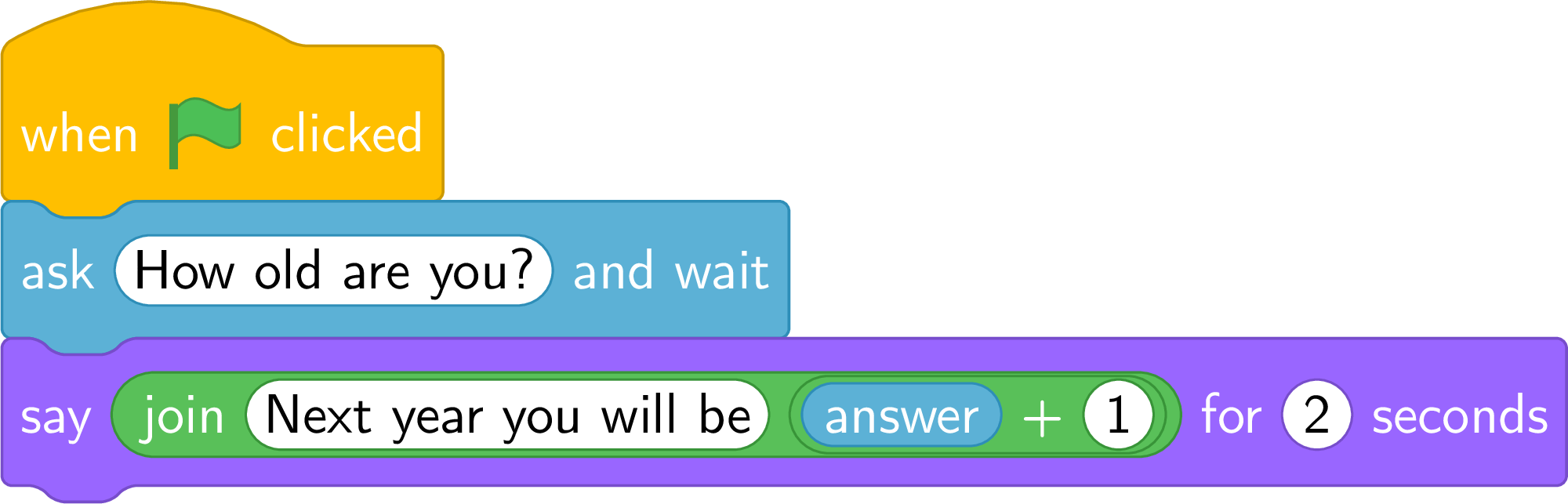
“answer” holds “12”; the block “( ) + ( )” turns it into the number \(12\) and computes \(12 + 1 = 13\); “join” glues the text and the number. The sprite says “Next year you will be 13”. This is the first computation on an input: the same script works for any age.
Example
Give the formula computed by this script, then what the sprite says if the user types \(4\), then \(9\). 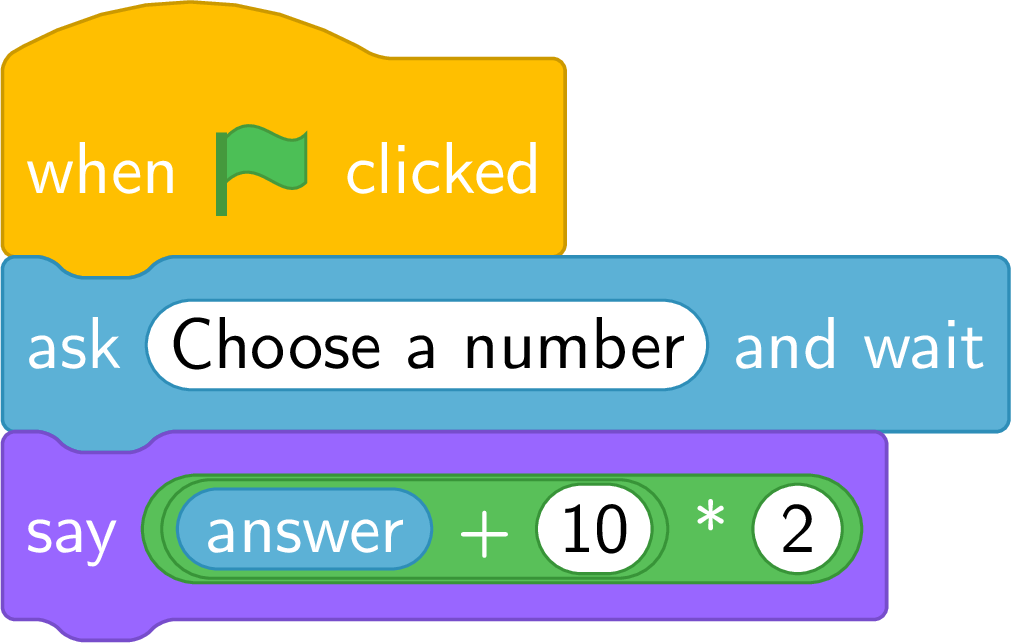
The outer block is “( ) \(*\) ( )”; its left hole holds “answer + 10”: the formula is \((\text{answer} + 10) \times 2\). For \(4\): \((4 + 10) \times 2 = 28\) — the sprite says “28”. For \(9\): \((9 + 10) \times 2 = 38\).
Example
Write the calculation program “choose a number; multiply it by \(2\); add \(5\); write the result” as a script, and give its output for \(7\).
“Choose” is an “ask”; “multiply by \(2\)” is “answer \(*\) \(2\)”; “add \(5\)” wraps it: “(answer \(*\) \(2\)) + \(5\)”; “write” is “say”. 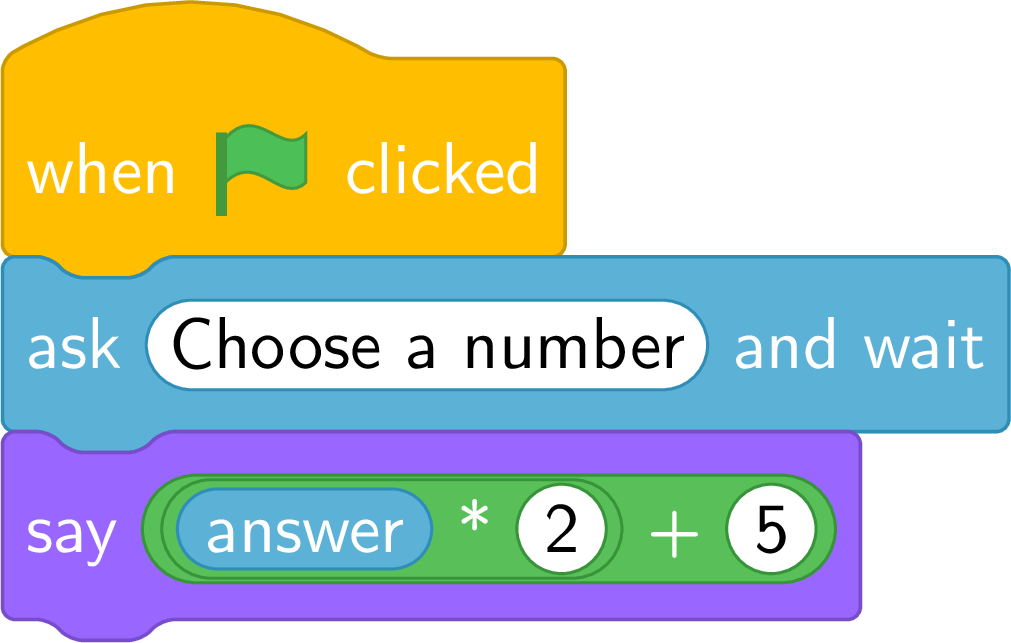
For \(7\): \(7 \times 2 = 14\), \(14 + 5 = 19\) — the sprite says “19”.
Example
What does this script compute? Give its output for \(6\). 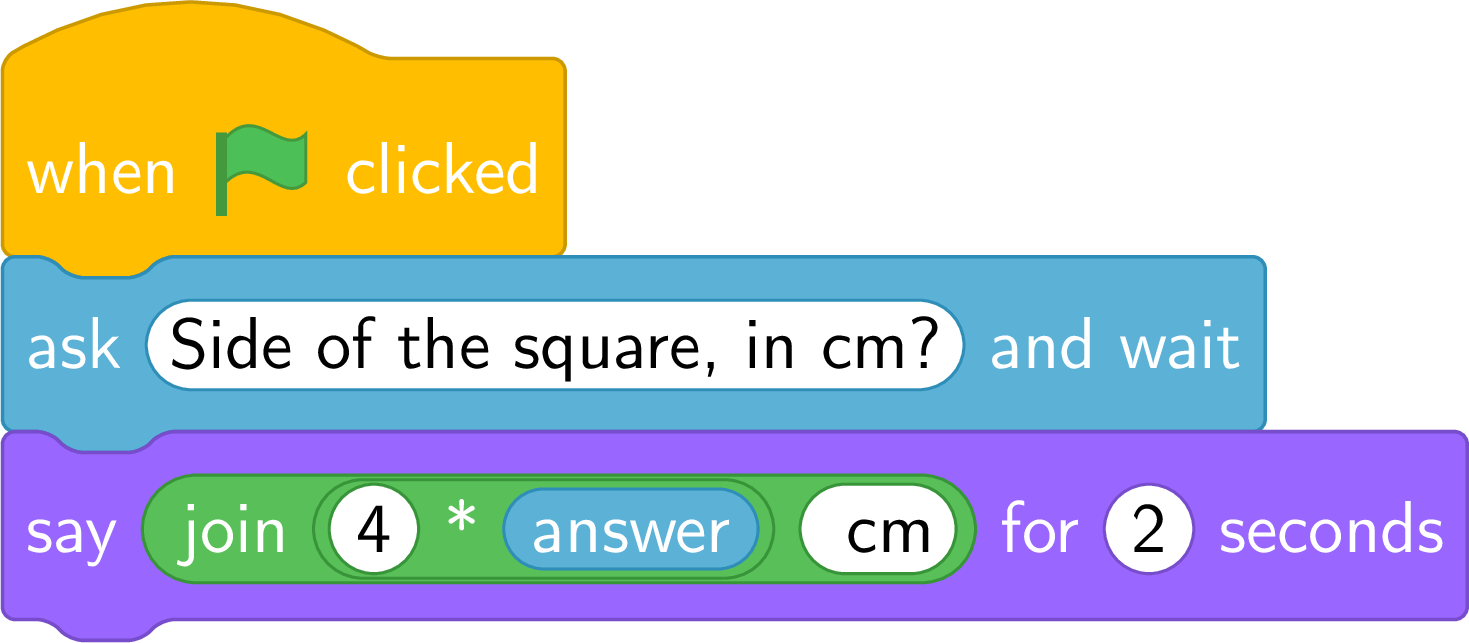
\(4 \times \text{answer}\) is the perimeter of a square of side “answer”. For \(6\): \(4 \times 6 = 24\), and “join” adds the unit — the sprite says “24 cm”. One formula, one script, every square.
Two Nestings, Two Formulas
With the same three pieces — answer, \(10\), \(2\) — the blocks can be nested in two ways, and they are two formulas: 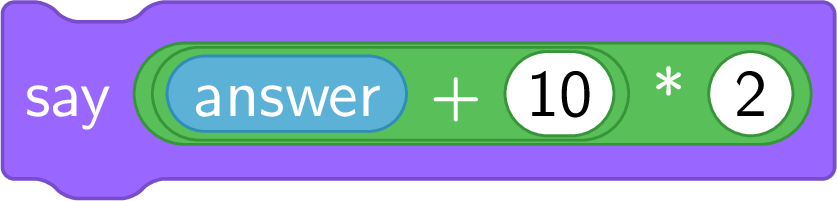
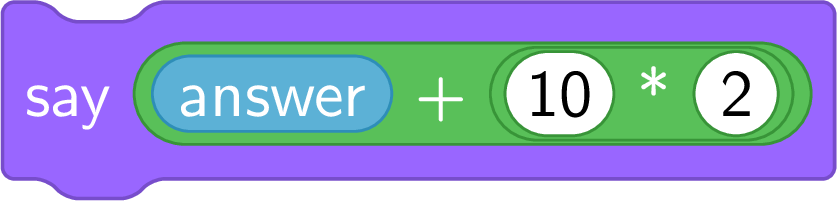
On the left, \((\text{answer} + 10) \times 2\): for \(4\), \(28\). On the right, \(\text{answer} + (10 \times 2)\): for \(4\), \(24\). Reading which block is inside which is reading the brackets.
Skills to practice
- Matching Blocks and Formulas
II.4
Repeating a Number of Times
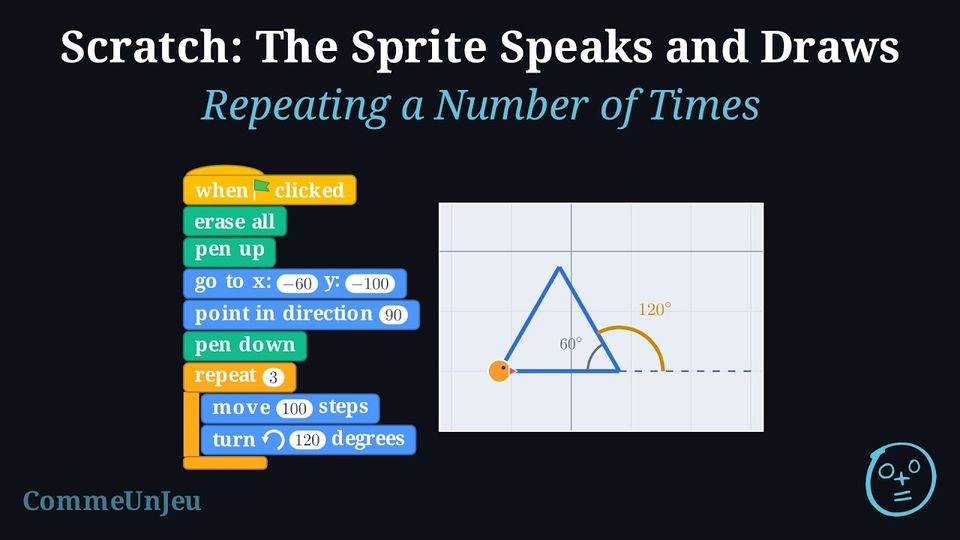
This script draws a square: after its initial state, it takes eight blocks — four times the same two. Write it with fewer blocks, without changing what the sprite draws.
The group “move \(100\) steps, turn \(\circlearrowright\) \(90\) degrees” comes back four times: the orange C-shaped block “repeat 4” wraps it. Three blocks written — the repeat and the two blocks of its body — instead of eight; the sprite still executes eight motion blocks. 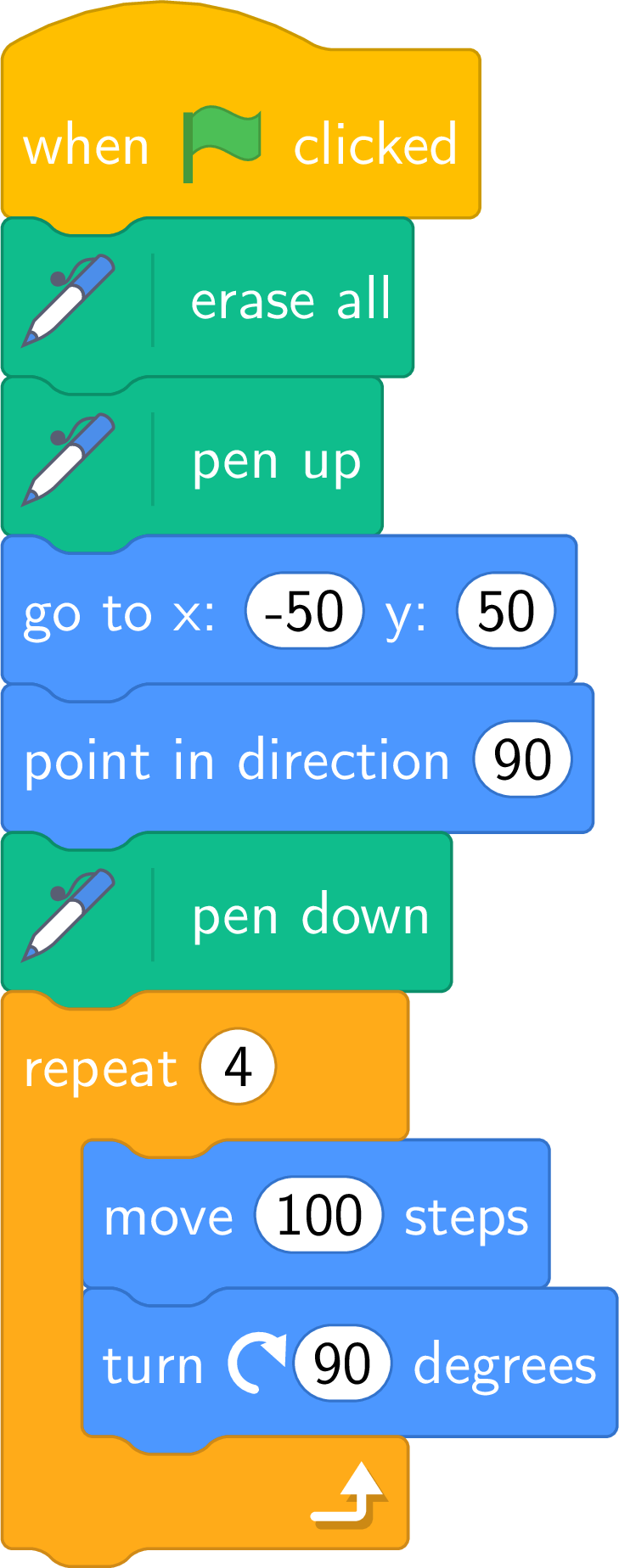
Definition — The Repeat Block
The block “repeat \(n\)” is a loop, shaped like a C: the blocks placed inside the C — its body — are executed \(n\) times in a row, one turn after another; then the sprite goes on with the block placed below the C. A repeat inside a repeat is executed entirely at each turn of the outer one, as for the robot on paper. Method — The Repeated Motif
- Find the motif that comes back — a side and a turn, a step, a petal — and count the turns: they are counted on paper, turn by turn.
- Check the direction at the end of a turn: if the motif does not bring the sprite back to its starting direction, the next turn starts in another direction — on purpose or not.
- Look at what comes after the C: it is executed once, after the last turn.
Method — A Regular Polygon
To draw a regular polygon with \(n\) sides (\(n\) a whole number, \(n \geqslant 3\)), the sprite repeats \(n\) times “move (one side), turn \(\circlearrowright\) \(360 / n\) degrees”. - Why \(360 / n\): at each corner the sprite turns by the exterior angle; after \(n\) corners it has made one full turn, \(360\) degrees, and looks again in its starting direction. That angle is not, in general, the interior angle of the polygon: for the square both are \(90\), which hides the difference; for the equilateral triangle the interior angle is \(60\) and the sprite turns \(120\).
- Check: \(n\) times \(360 / n\) is \(360\) — the sprite looks again in its starting direction; and, since the \(n\) sides are equal and so are the \(n\) turns, the drawing closes on its starting point.
Example
What do these two scripts draw? 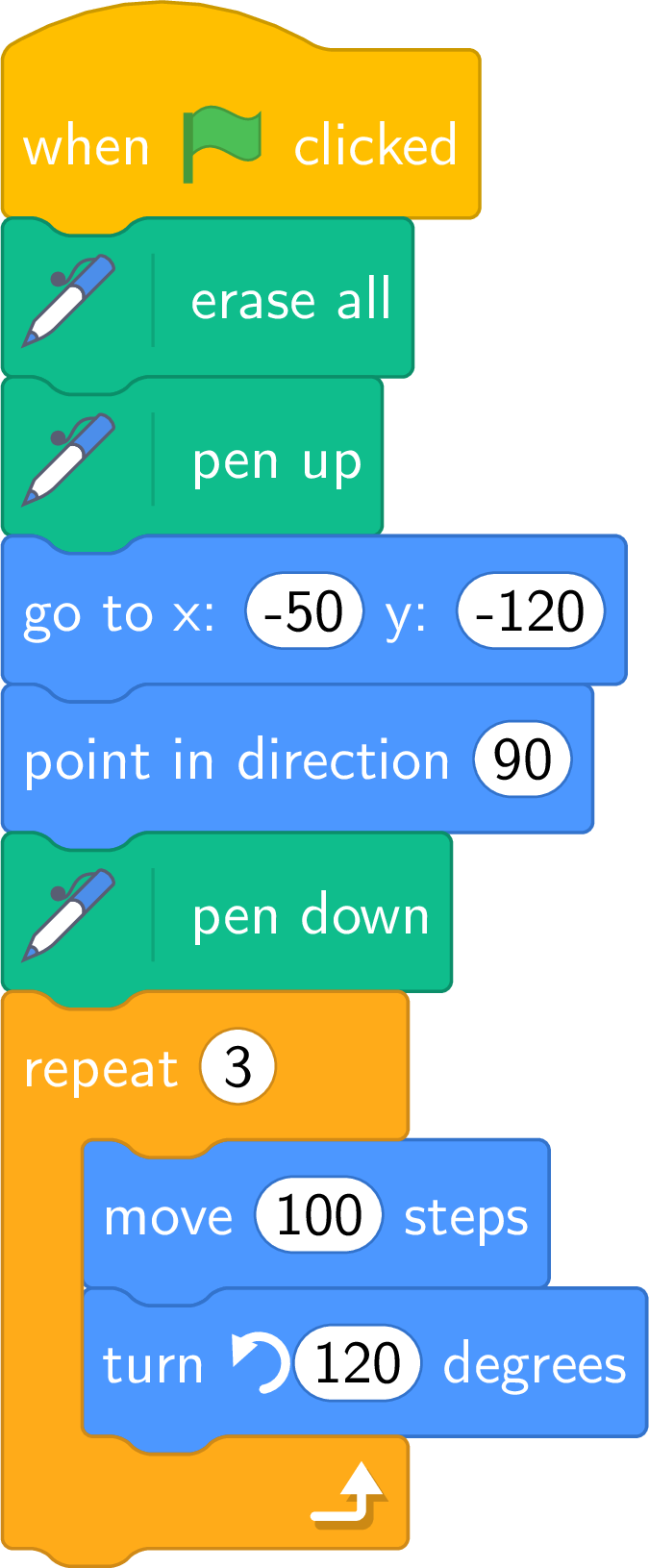
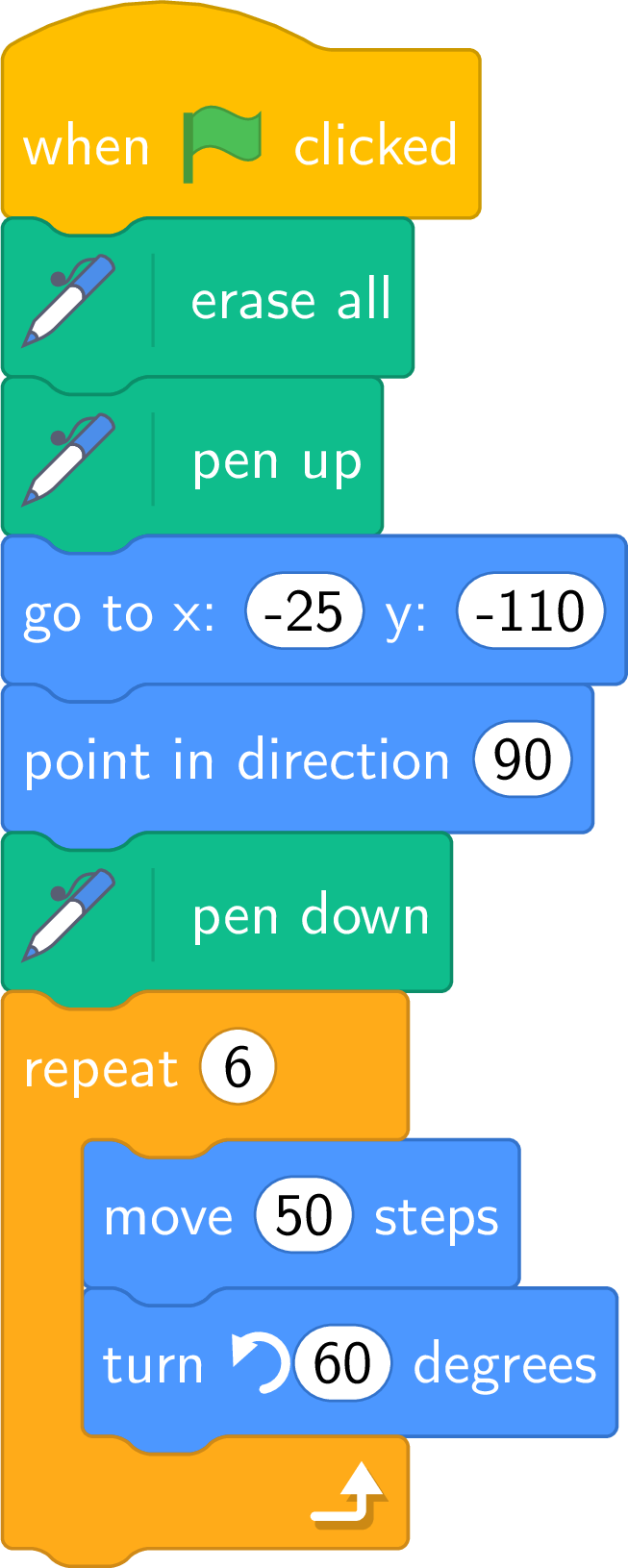
Left: \(3\) turns of “\(100\) steps, turn \(\circlearrowleft\) \(120\)”: \(360 / 3 = 120\), an equilateral triangle of side \(100\), drawn upwards since the turns are to the left. Right: \(6\) turns of “\(50\) steps, turn \(\circlearrowleft\) \(60\)”: \(360 / 6 = 60\), a regular hexagon of side \(50\). In both, the sprite ends at its starting point, looking to the right. 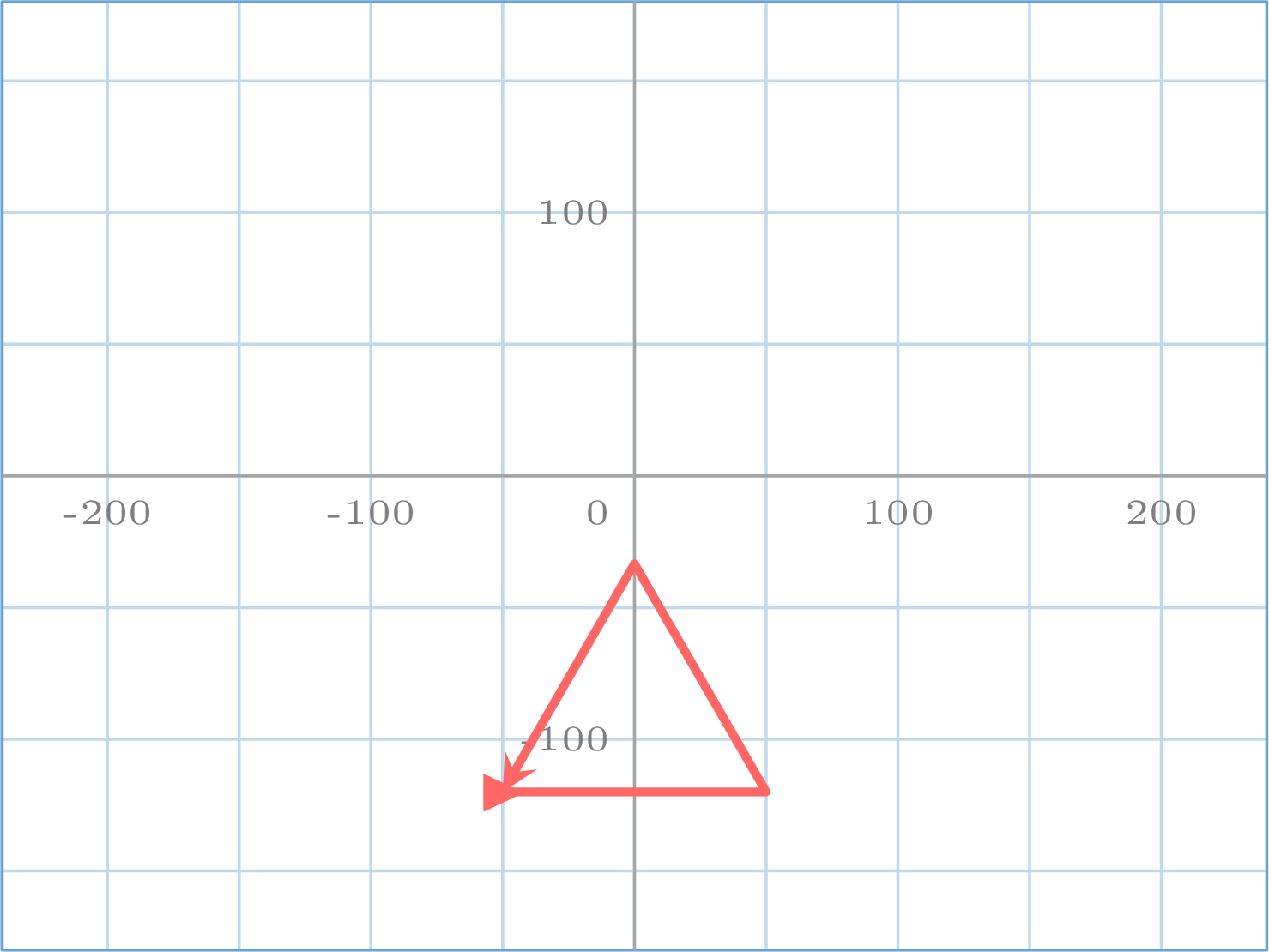
Example
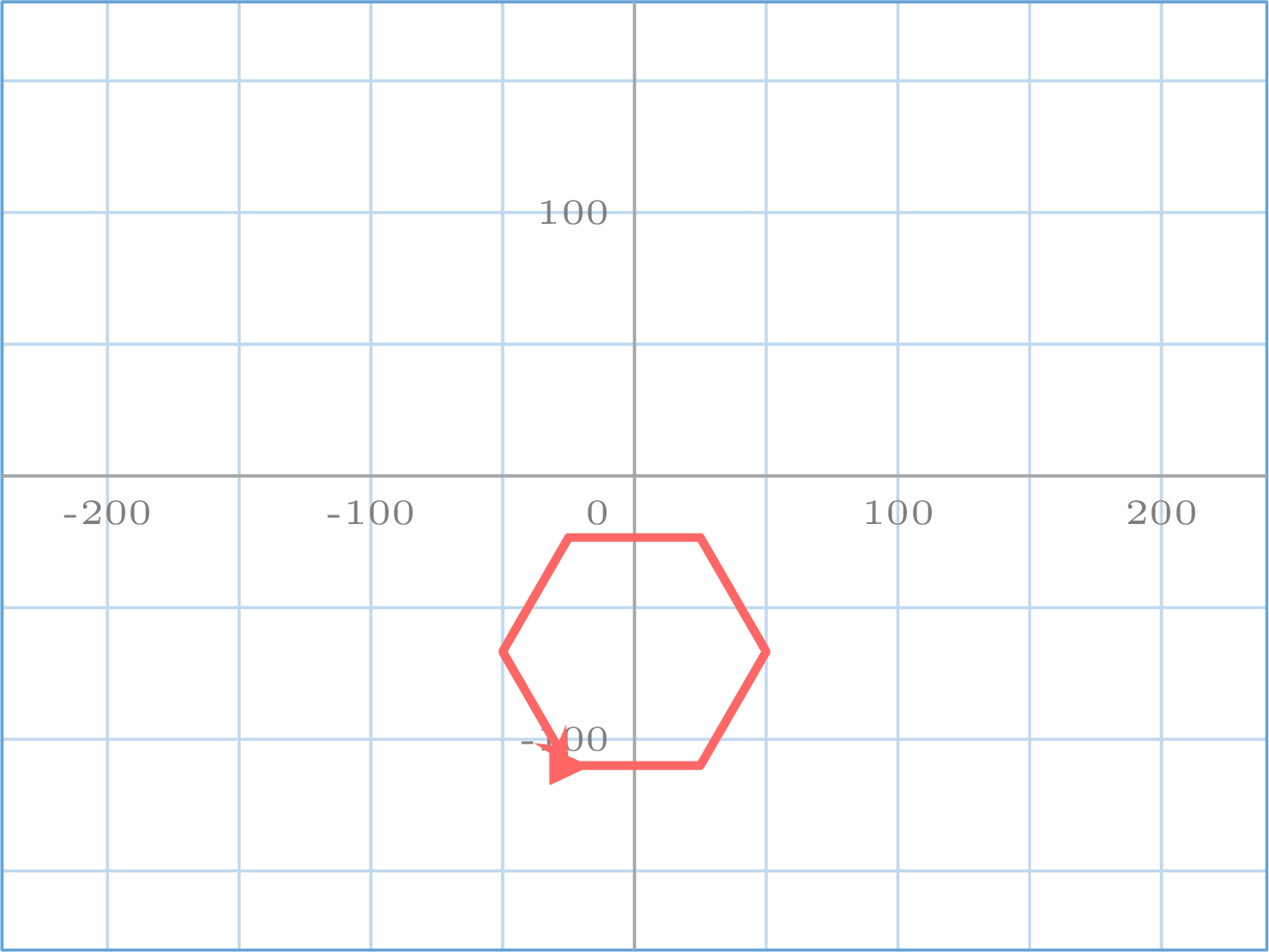
What does this script draw? Where is the sprite at the end? 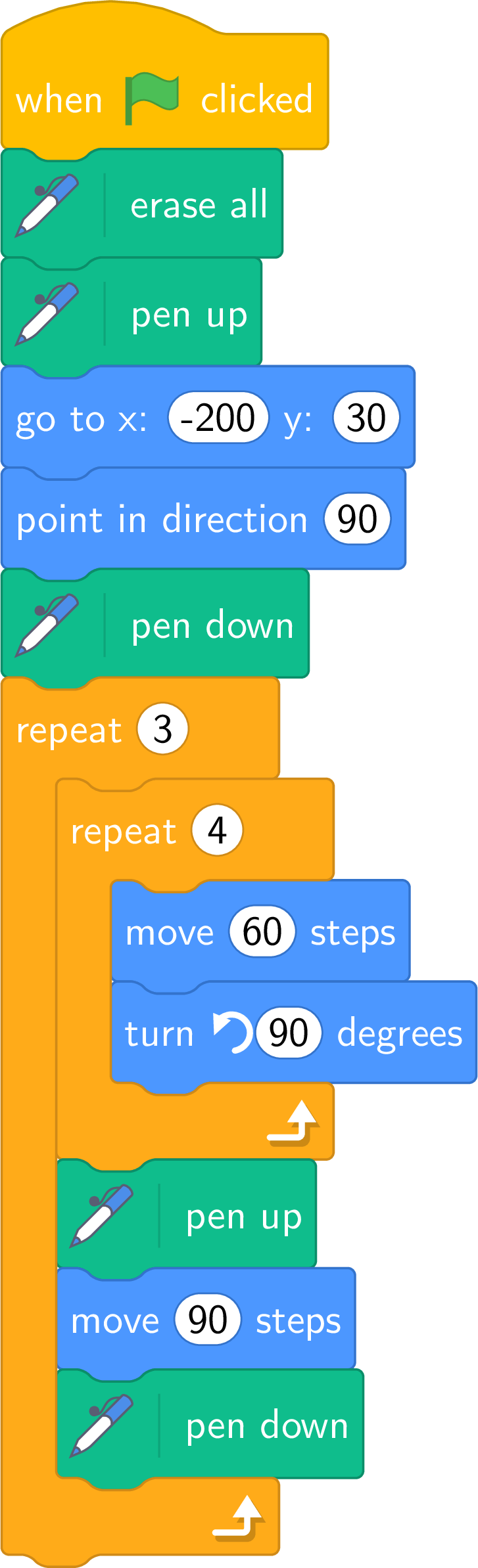
Each turn of the outer repeat: a square of side \(60\) (four times “\(60\) steps, turn \(\circlearrowleft\) \(90\)”, back at the corner, looking right), then a jump of \(90\) steps with the pen up. Three turns: three squares in a row, \(30\) steps apart — a frieze. The sprite ends \(90\) steps after the starting corner of the third square, at \((70, 30)\), looking right. 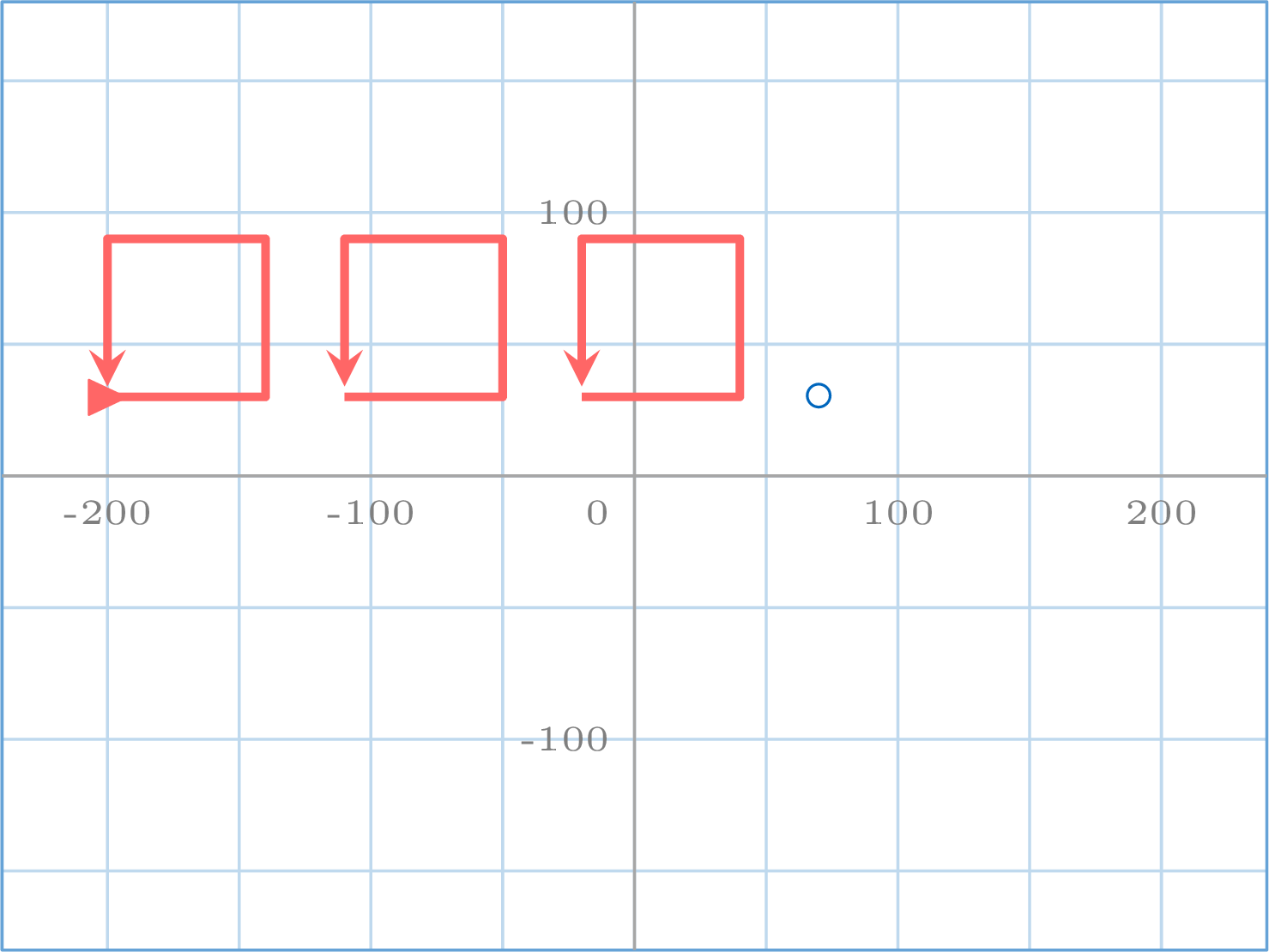
Example
This script draws a rectangle. How must it be modified to draw a square of side \(120\), still starting from \((-80, -30)\)? 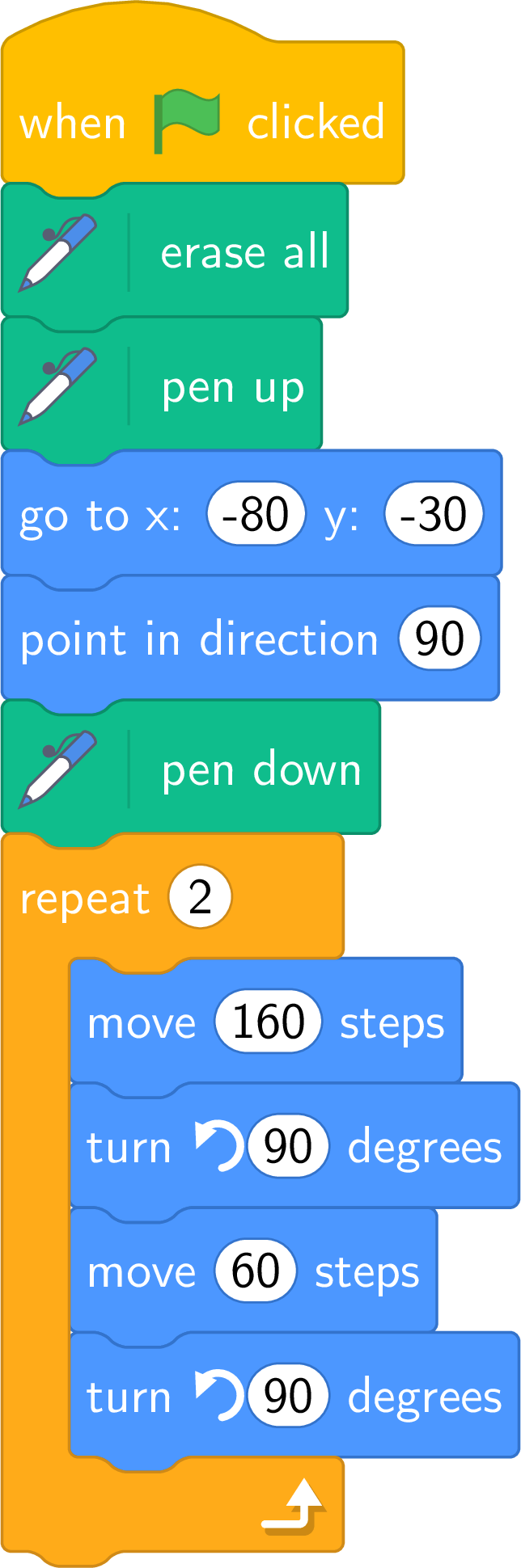
The rectangle is “long side, turn, short side, turn” twice: \(160\) by \(60\). A square has four equal sides: replace both “move” by “move \(120\) steps” — or, simpler, keep one “move \(120\)” and one turn, and repeat \(4\) times. Two parameters changed, or one motif shortened: two correct scripts for the same drawing.
The Three-Sided Square
“repeat 3” with “move, turn \(\circlearrowright\) \(90\)” from direction \(90\) draws three sides and leaves the sprite looking up, not in its starting direction: the square is open. “repeat 5” draws the first side twice. And “turn \(90\)” draws no equilateral triangle at all: its exterior angle is \(120\). The number of turns and the angle are read together — \(n\) turns of \(360 / n\).
Skills to practice
- Finding the Figure a Script Draws
- Writing with a Repeat
II.5
Conditions and Decision Boxes
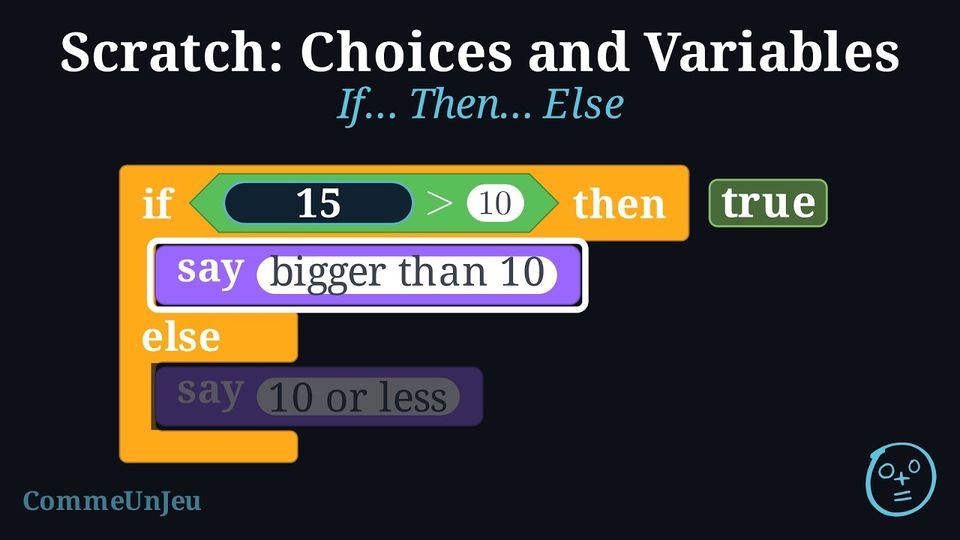
This script must say “bigger than 10” when the number typed is bigger than \(10\), and “10 or less” otherwise. As written, it says “bigger than 10” whatever the user types. 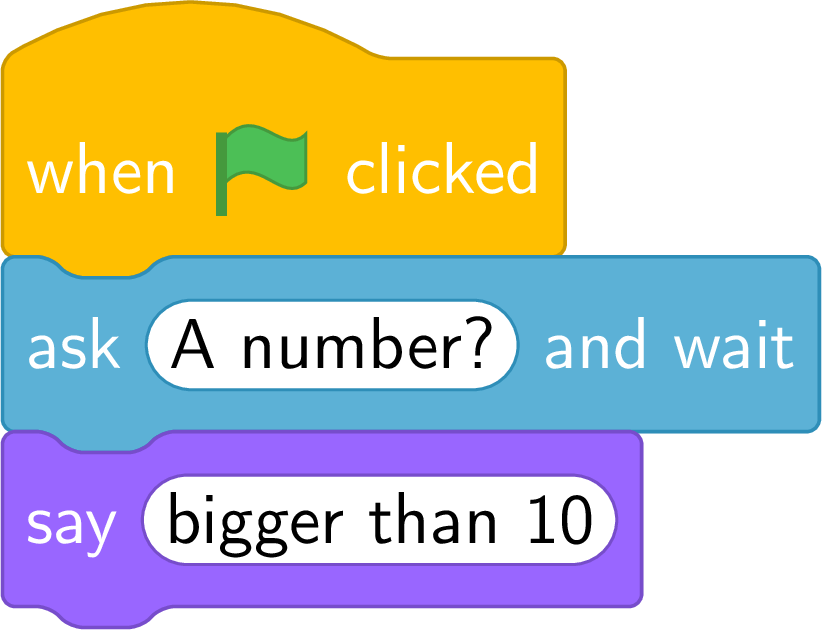
With the blocks seen so far, can the sprite say two different things depending on the number? What is missing?
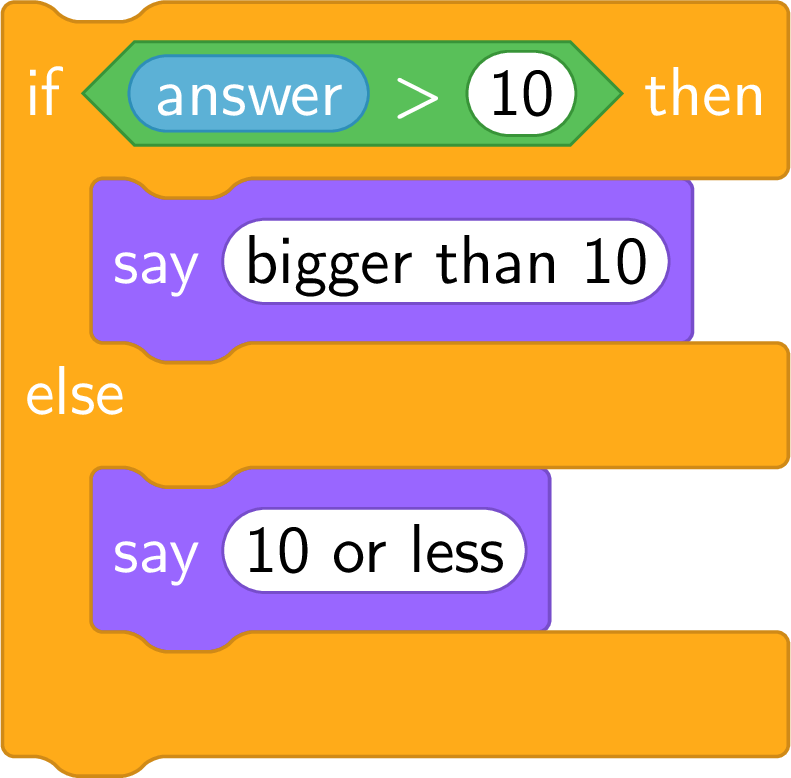
No: the blocks seen so far are all executed, always, from top to bottom. What is missing is a block that chooses: the orange “if … then … else”, with a green hexagonal block inside it — “answer \(>\) 10” — that is true or false. 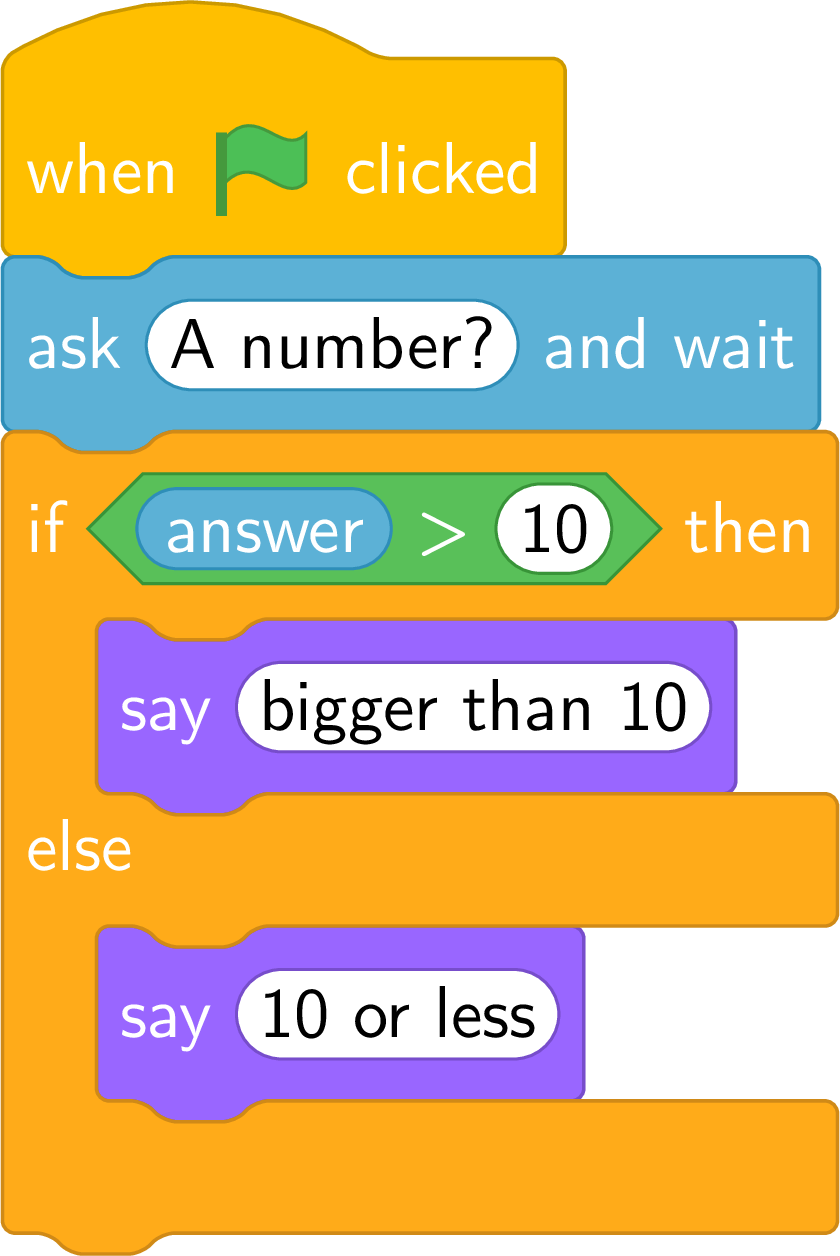
For \(7\), “\(7 > 10\)” is false: the sprite says “10 or less”. For \(15\), it is true: “bigger than 10”. For \(10\) exactly, “\(10 > 10\)” is false: “10 or less” — the boundary belongs to the “else” branch.
Definition — A Condition
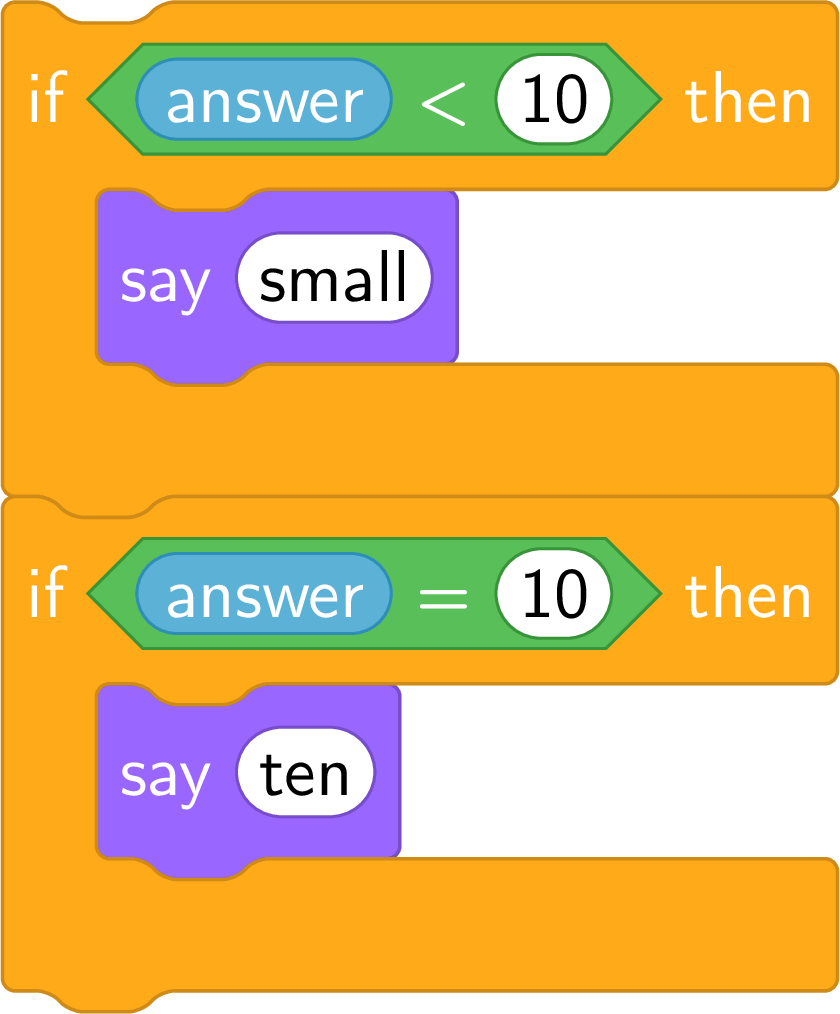
A condition is a green hexagonal block that is either true or false: “( ) \(<\) ( )”, “( ) \(>\) ( )”, “( ) \(=\) ( )”. Its value is computed at the moment it is tested, with what the holes contain then — for “answer \(>\) 10”, with the last input. A hexagonal block only fits a hexagonal hole, such as that of an “if”.There is no “\(\leqslant\)” block: “10 or less” is the “else” of “\(>\) 10”.
Definition — If… Then, If… Then… Else
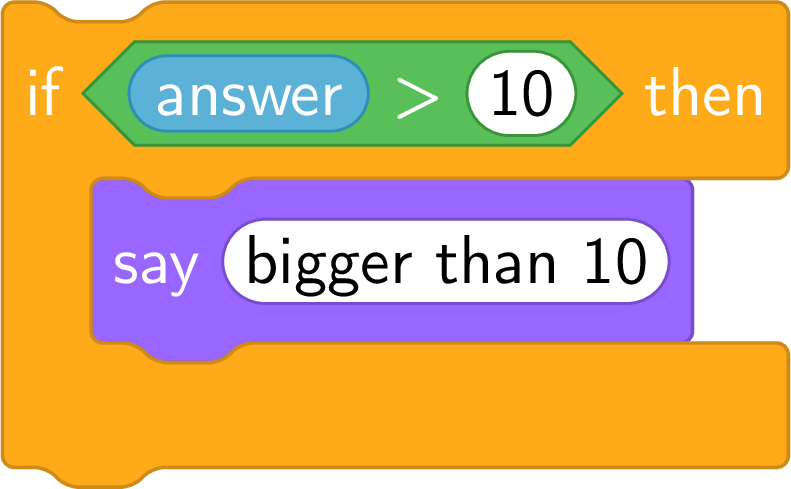
- “if … then” has one branch: when the condition is true, the blocks inside the C are executed; when it is false, nothing happens, and the script goes on below the C.
- “if … then … else” has two branches: the blocks of the first when the condition is true, the blocks after “else” when it is false. Exactly one of the two branches is executed, never both, never none.
Method — The Guard
To write or to read an “if”, the condition is treated as a guard at a door: - Write the condition as a hexagonal block, with what is compared on each side: “answer \(>\) 10”.
- Say what happens when it is true, and when it is false — the second case included: with a single branch, “false” means “nothing”.
- Test with three values: one from each branch and the boundary value. For “\(>\) 10”: \(7\), \(15\) and \(10\) — the boundary shows on which side the equal case falls.
Definition — Modulo
The green block “( ) mod ( )” gives the remainder of the division of a whole number by a whole number other than \(0\): “17 mod 5” is \(2\), since \(17 = 3 \times 5 + 2\). A whole number is even when its remainder by \(2\) is \(0\), odd when it is \(1\): the condition “( answer mod 2 ) \(=\) 0” is true exactly for the even numbers — provided the input is a whole number. 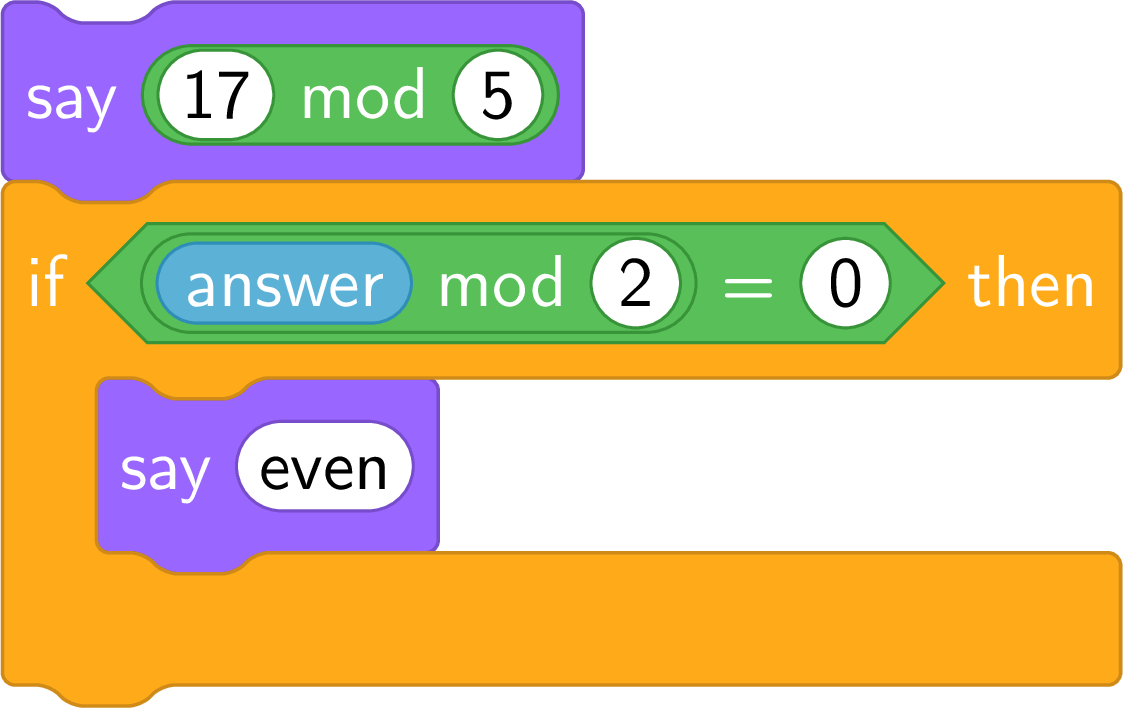
Definition — Decision Box
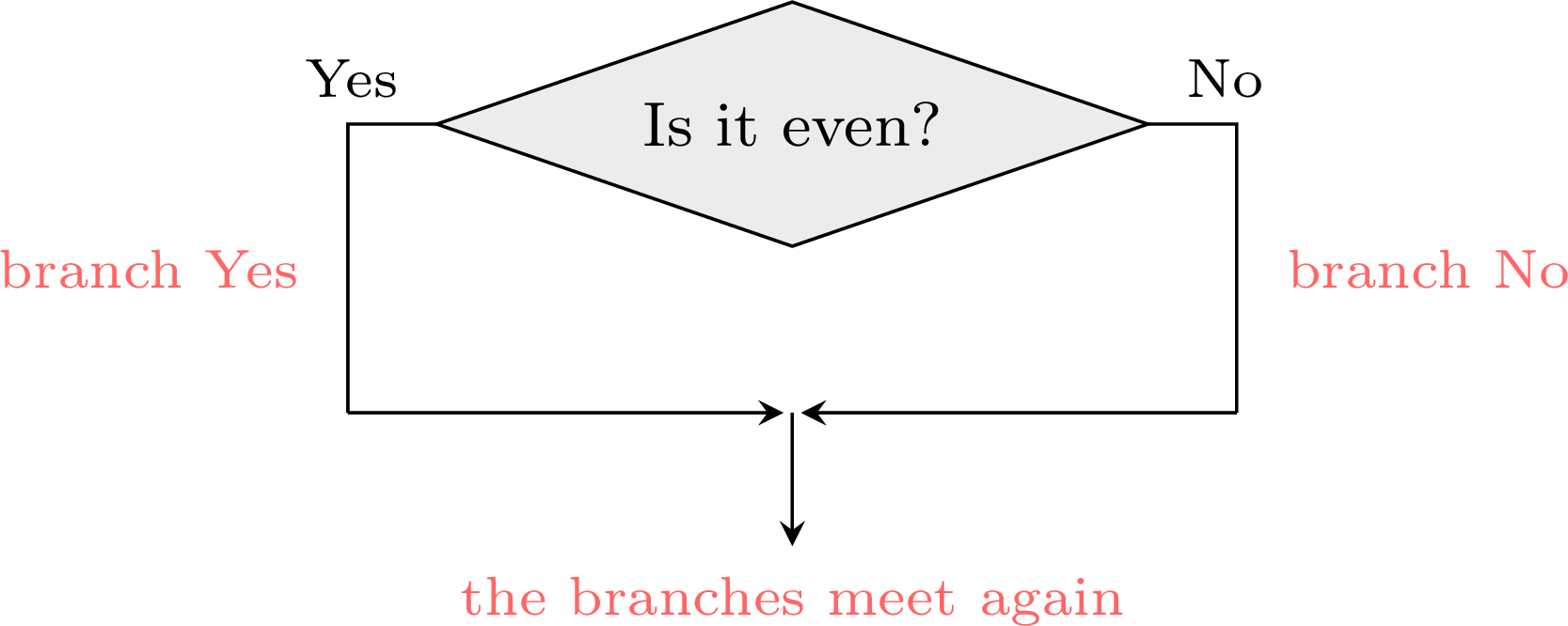
A flowchart, the drawing of a program in boxes joined by arrows, can also show a choice. A decision box is a diamond holding a question answered by yes or no — a condition. Two arrows leave it, one labelled Yes and one labelled No; each leads to a branch, and the two branches meet again below. For a given input, exactly one branch is followed.The decision box is the plan of an “if …\ then …\ else”: its question is the condition, its branch Yes the part after “then”, its branch No the part after “else”.
Method — From a Flowchart to an If… Then… Else
- The input box becomes “ask …\ and wait”: the number typed is in “answer”.
- The question of the diamond becomes the hexagonal condition of the “if”: “Is it even?” becomes “( answer mod \(2\) ) \(=\) \(0\)”.
- The branch Yes goes after “then”, the branch No after “else”.
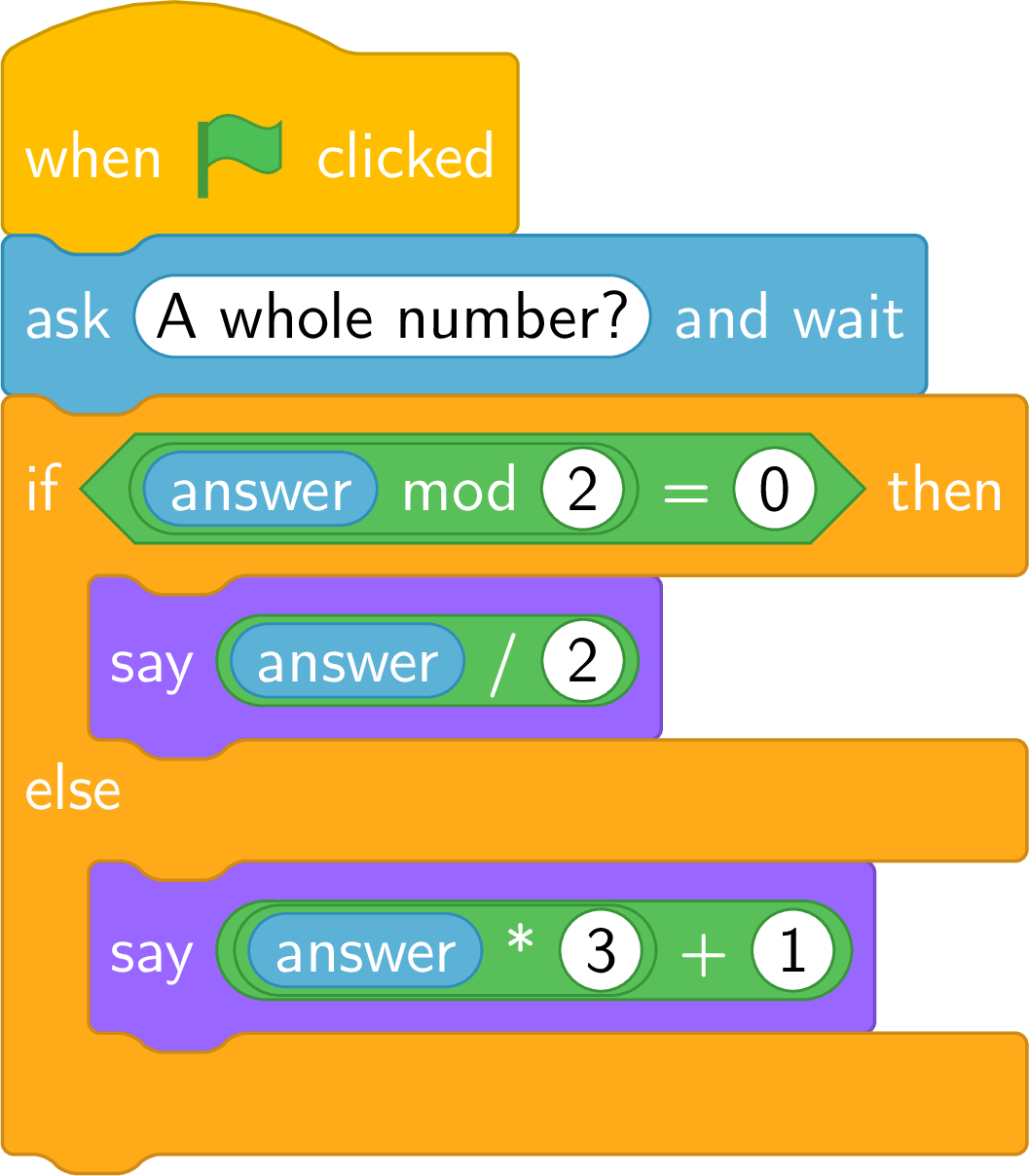
- The output box becomes a “say” block. As “answer” cannot be changed, the single output box placed after the meeting point becomes one “say” in each branch, which says the whole computation made on its path: after “divide by \(2\)”, “say ( answer \(/\) \(2\) )”.
- Test the script as for the guard: one value for each branch, and the boundary value when the condition compares with a number.
Example
Here is the flowchart of a calculation program with a choice. 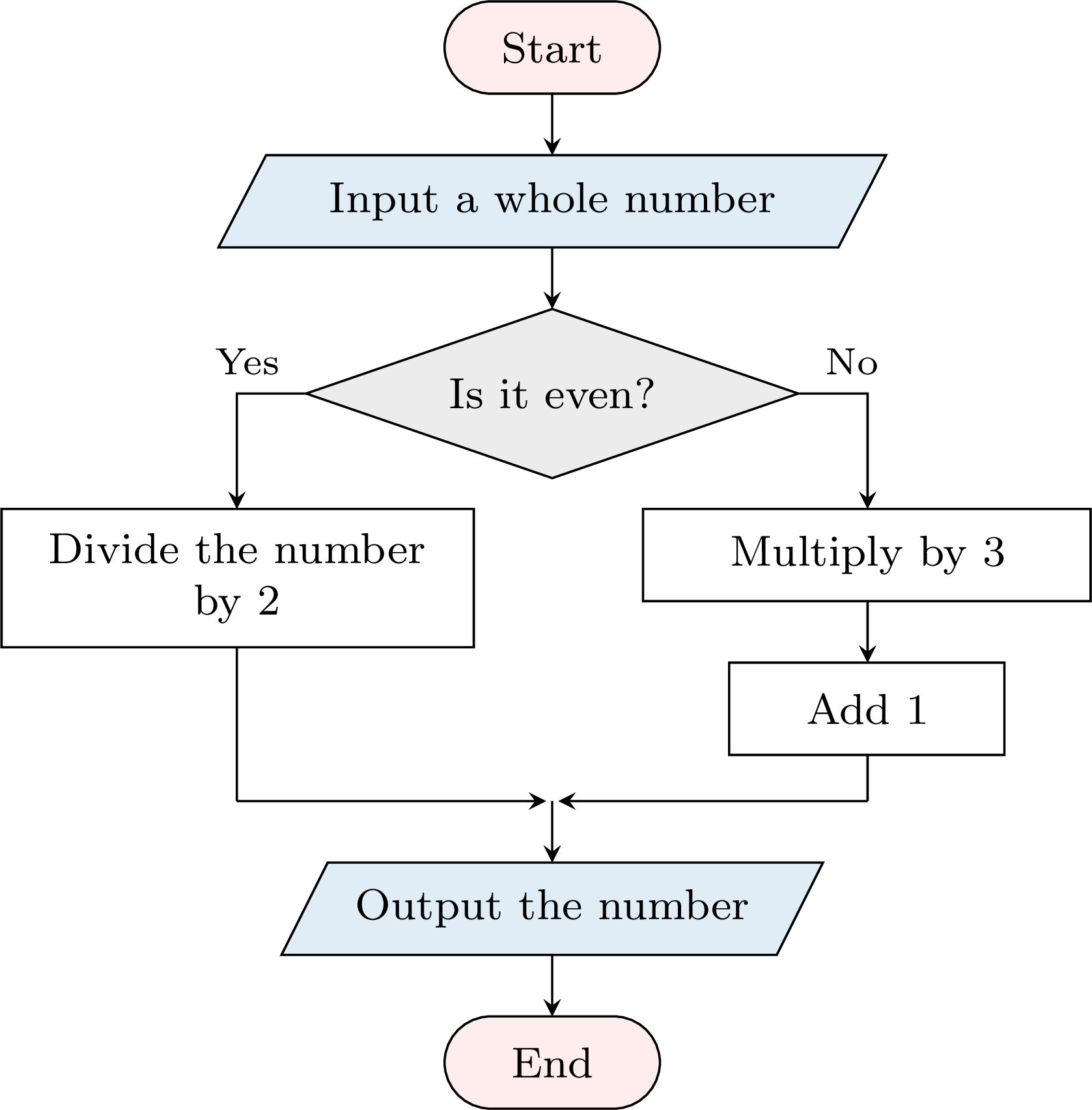
- Trace it for the input \(6\), then for the input \(7\).
- Write the script that does the same, and test it.
- Input \(6\): is it even? Yes: \(6 \div 2 = 3\), the output is \(3\). Input \(7\): is it even? No: \(7 \times 3 = 21\), then \(21 + 1 = 22\), the output is \(22\).
- “Is it even?” becomes “( answer mod \(2\) ) \(=\) \(0\)”; each branch says the computation of its path.
Example
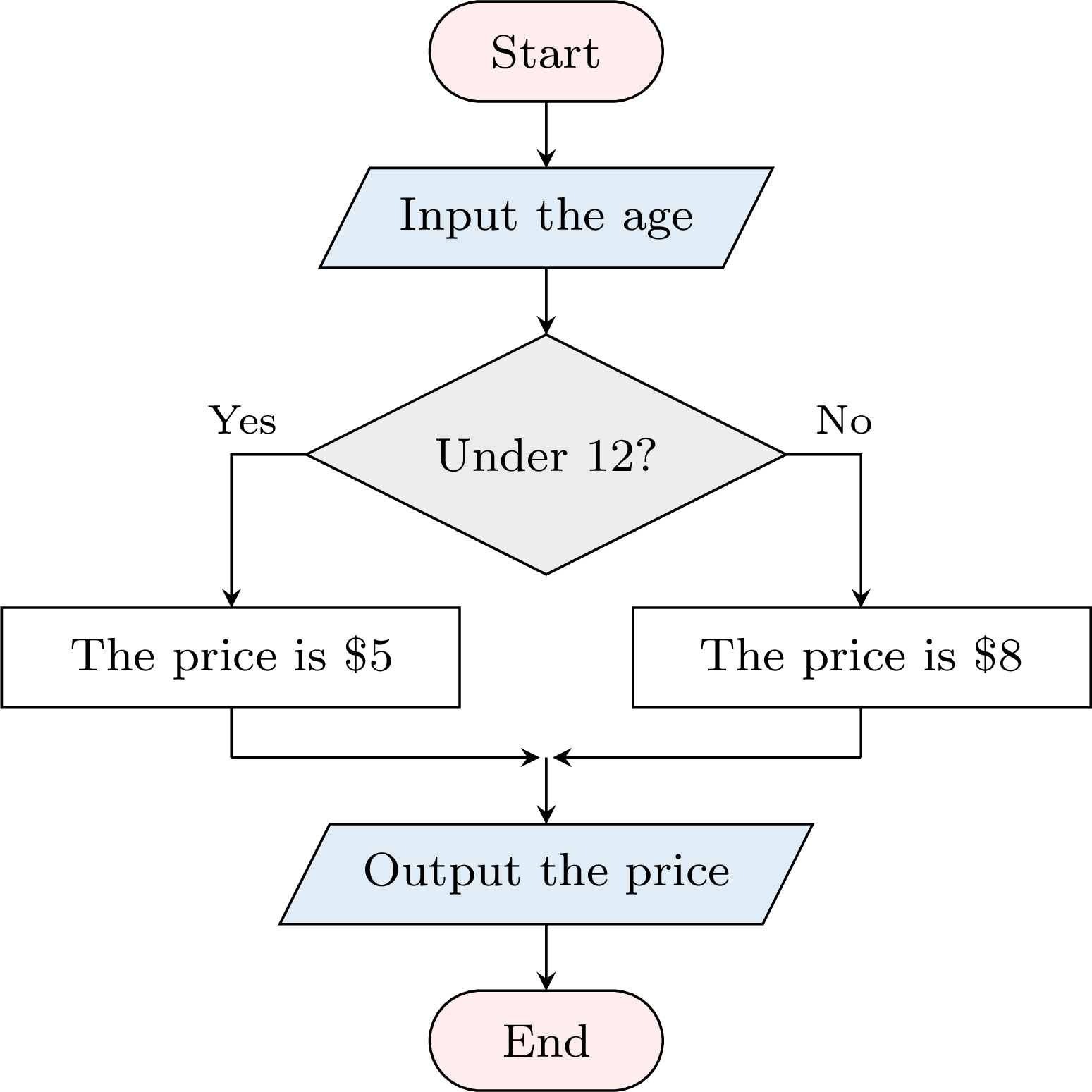
A museum charges \(\dollar 5\) for a visitor under \(12\) years old and \(\dollar 8\) for everyone else. - Draw a flowchart that reads the age of a visitor and outputs the price of the ticket.
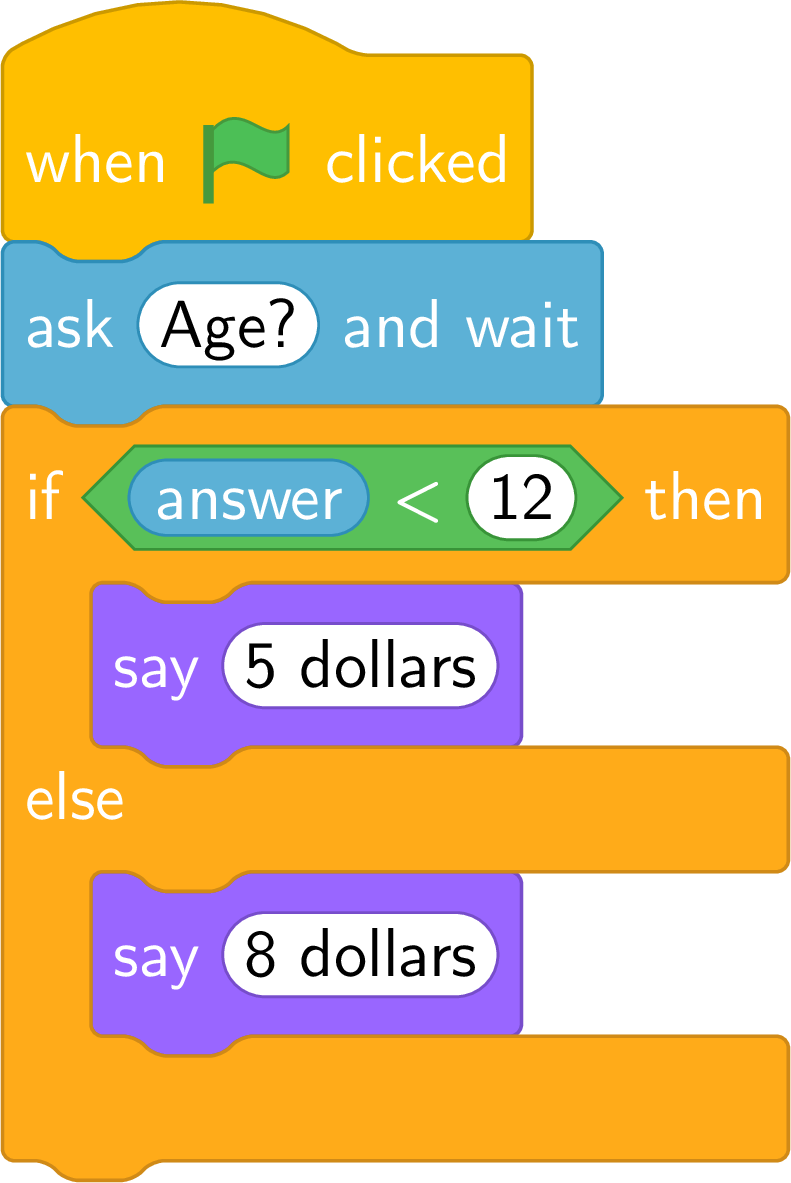
- Write the script, and test it with the ages \(9\), \(12\) and \(14\).
- One question, so one diamond; the two branches meet again before the output. In the boxes “the price is \(\dollar 5\)” and “the price is \(\dollar 8\)”, the number in hand changes from the age to the price.
- The question “Under \(12\)?” becomes “answer \(<\) \(12\)”.
Skills to practice
- Reading a Decision Box
- Tracing a Flowchart with a Decision
- Drawing the Flowchart of a Choice
III
Going further
Skills to practice
- Solving Problems
- Investigating Patterns with Flowcharts
- Quiz
Jump to section