International Baccalaureate · PYP 4
Position, Grids and Scale
I
Coding a Route in a Neighbourhood
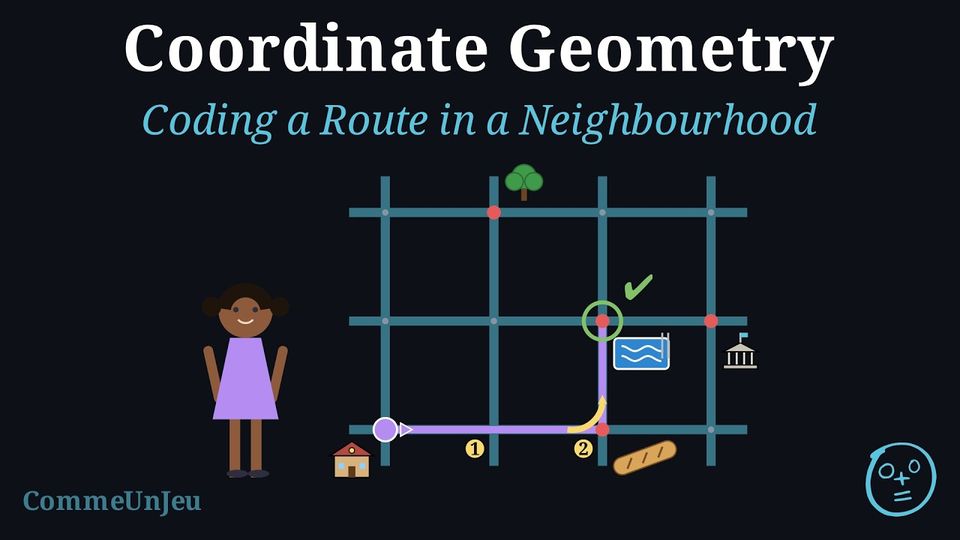
Definition — Route Instructions
On a grid, a path is coded with arrows, one for each step. In a neighbourhood, we no longer move square by square: we follow the streets and we only ever choose something at a crossing. So a route is coded with instructions, in order: - go straight on to the 1st, 2nd, 3rd… crossing;
- turn left or turn right at that crossing;
- turn around to go back the way you came.
Method — Writing a Route
- Say where you start and which way you face. Without that, no instruction means anything.
- Follow the route with your finger, and write one instruction each time you arrive at a crossing where you change direction: count the crossings from where you last turned — the crossing you are leaving does not count, the next one you reach is the 1st, and you count up to the crossing where you turn — then say which way you turn.
- End with the last straight run, the one that brings you to your destination, and name the place you arrive at. Without it, the reader stays at the last crossing and never reaches the destination.
- Read your route again from the start, finger on the plan, without looking at the path you had in mind. If you land somewhere else, the route is wrong, not the reader.
Example
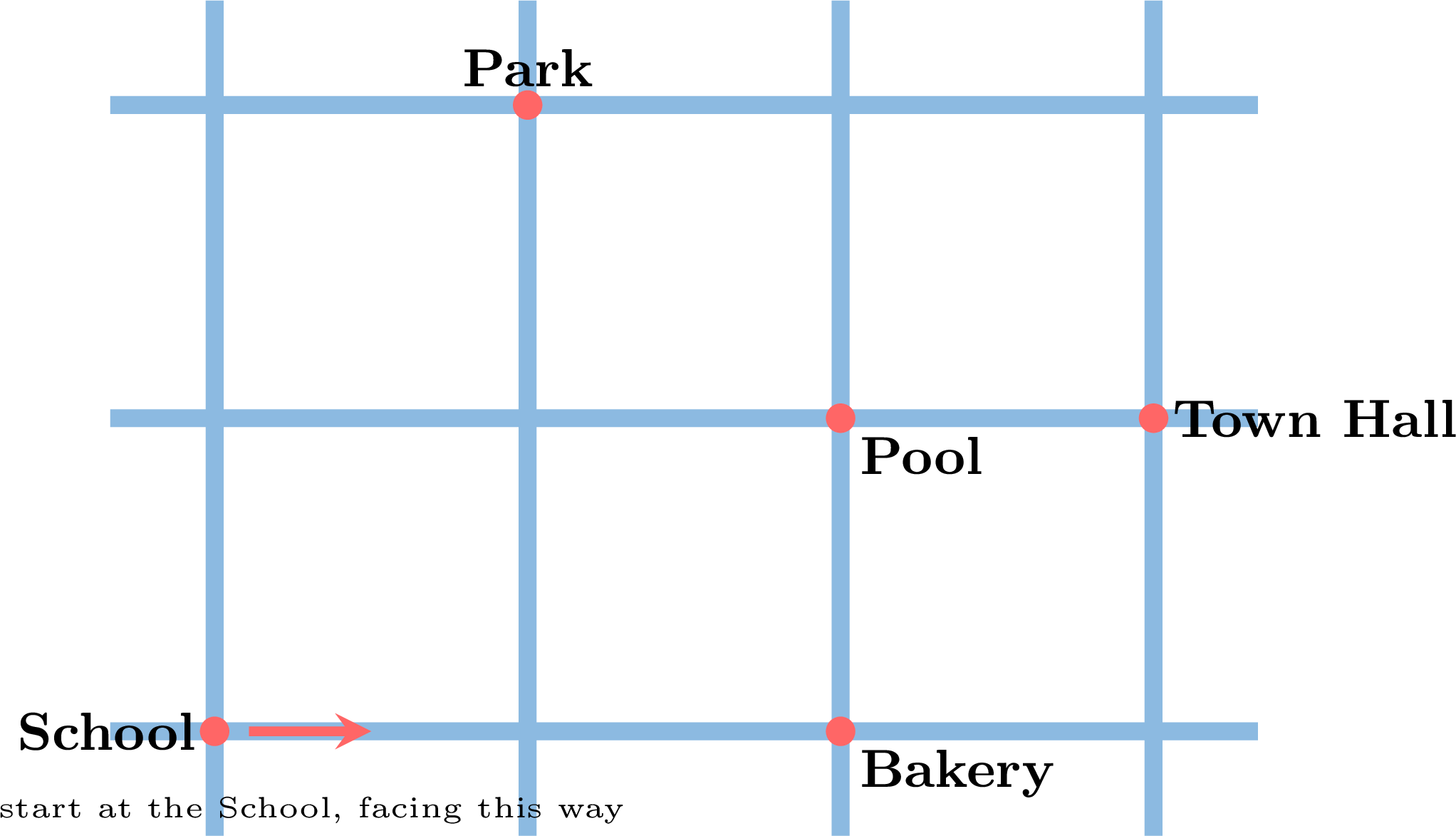
Aya starts at the School, facing the way the arrow shows, and follows this route: go straight on to the 2nd crossing, turn left, go straight on to the 1st crossing. Where does she arrive? 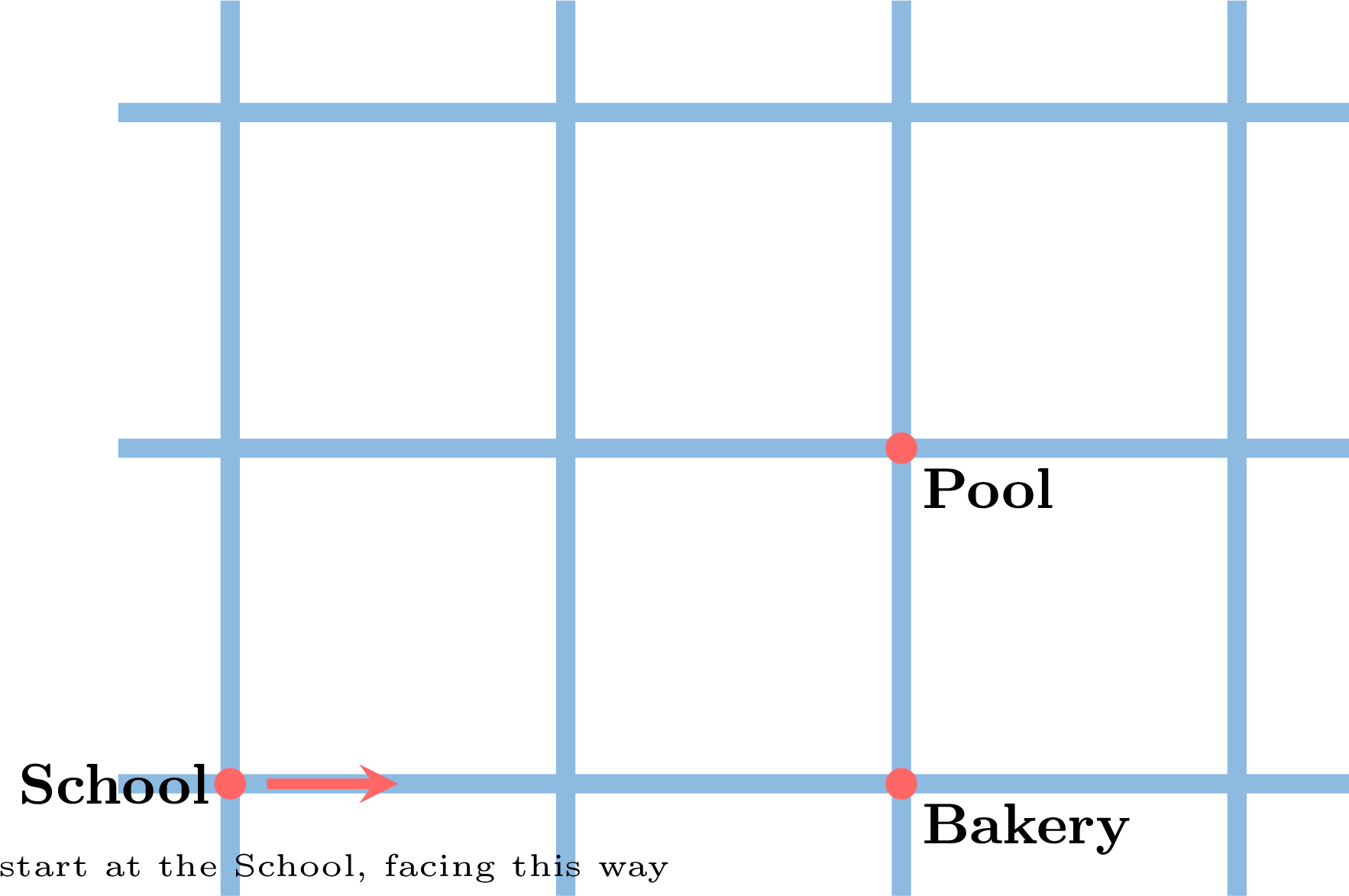
At the Pool. Facing that way, the 2nd crossing is the one at the Bakery: she goes straight past the first one. There she turns left — she is now facing the top of the plan — and the next crossing is the Pool. Notice that the Bakery is not written in the route: it is the place at the 2nd crossing, and a route only counts the crossings, it does not name the places you pass. 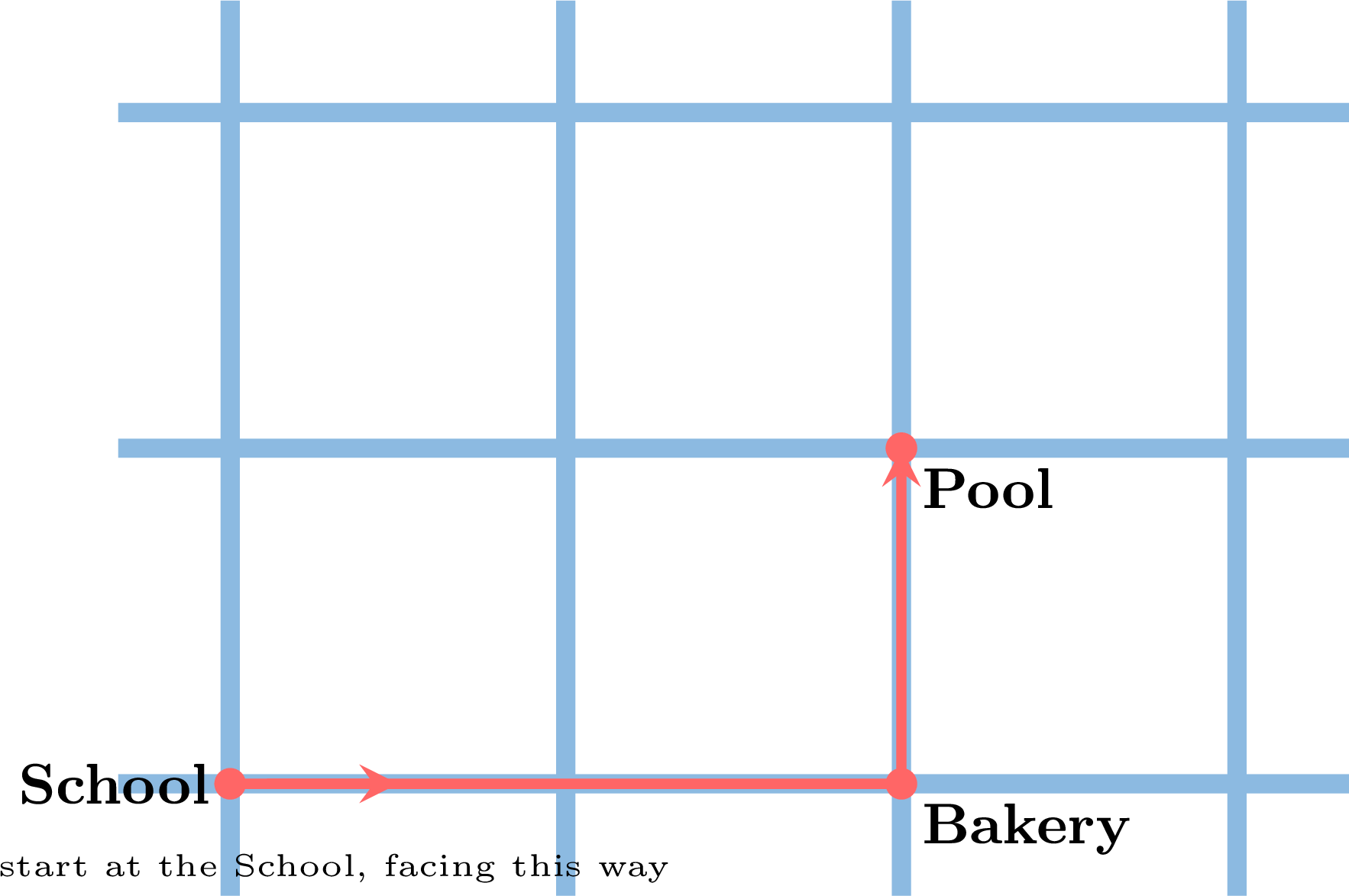
Example
Now write the route from the School to the Park. You start at the School, facing the way the arrow shows. 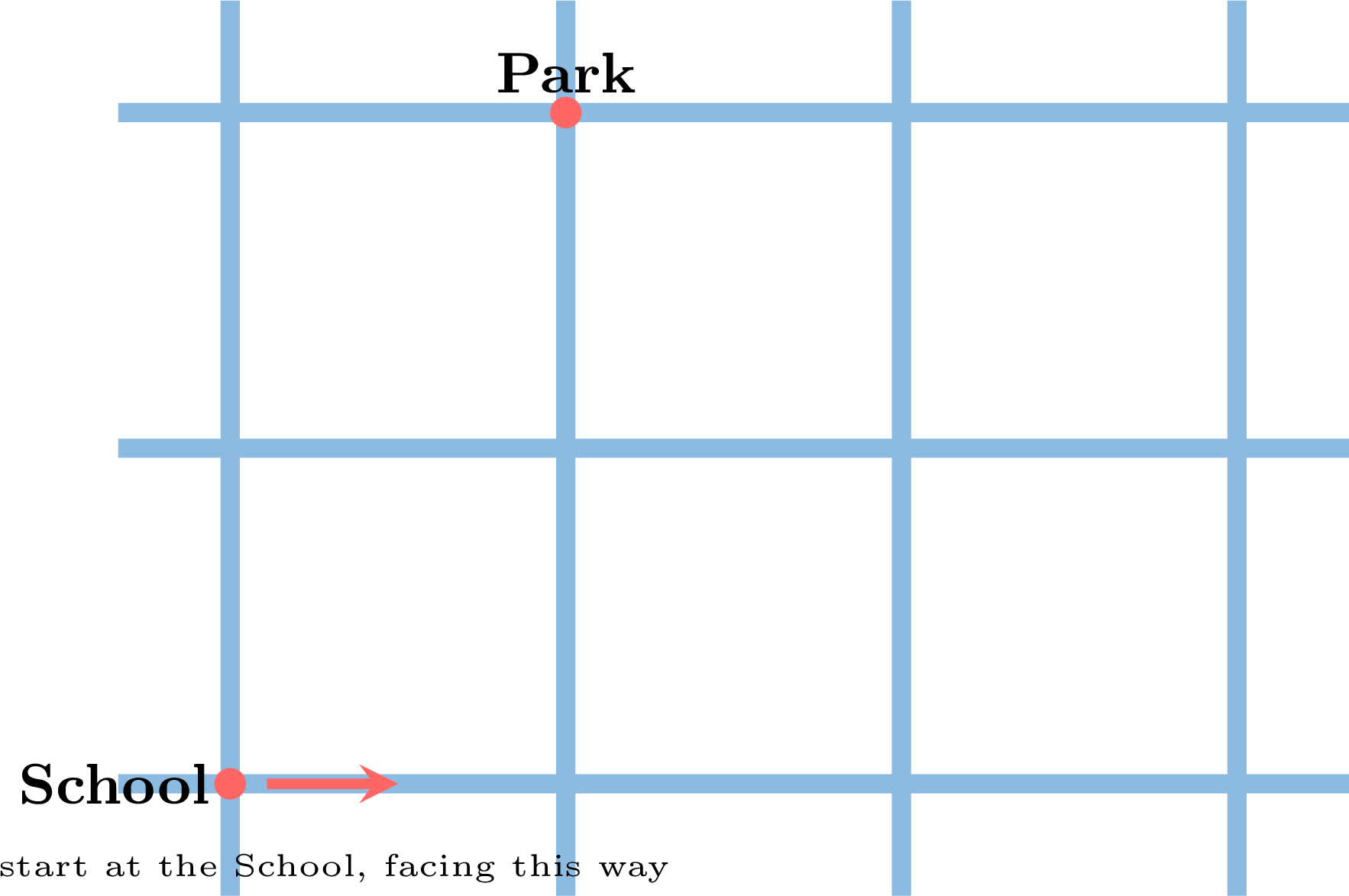
Go straight on to the 1st crossing, turn left, go straight on to the 2nd crossing — and you arrive at the Park. And now the check: finger on the School, facing the arrow. First crossing — turn left, facing the top of the plan. One crossing straight past, a second one: the Park. It works. Had we written “1st crossing” at the end, the finger would have stopped one street short, and the route would have been wrong even though the path we had in mind was correct. Other routes reach the Park too; this one is one of the shortest, and any route that really arrives at the Park when read back with the finger is correct. 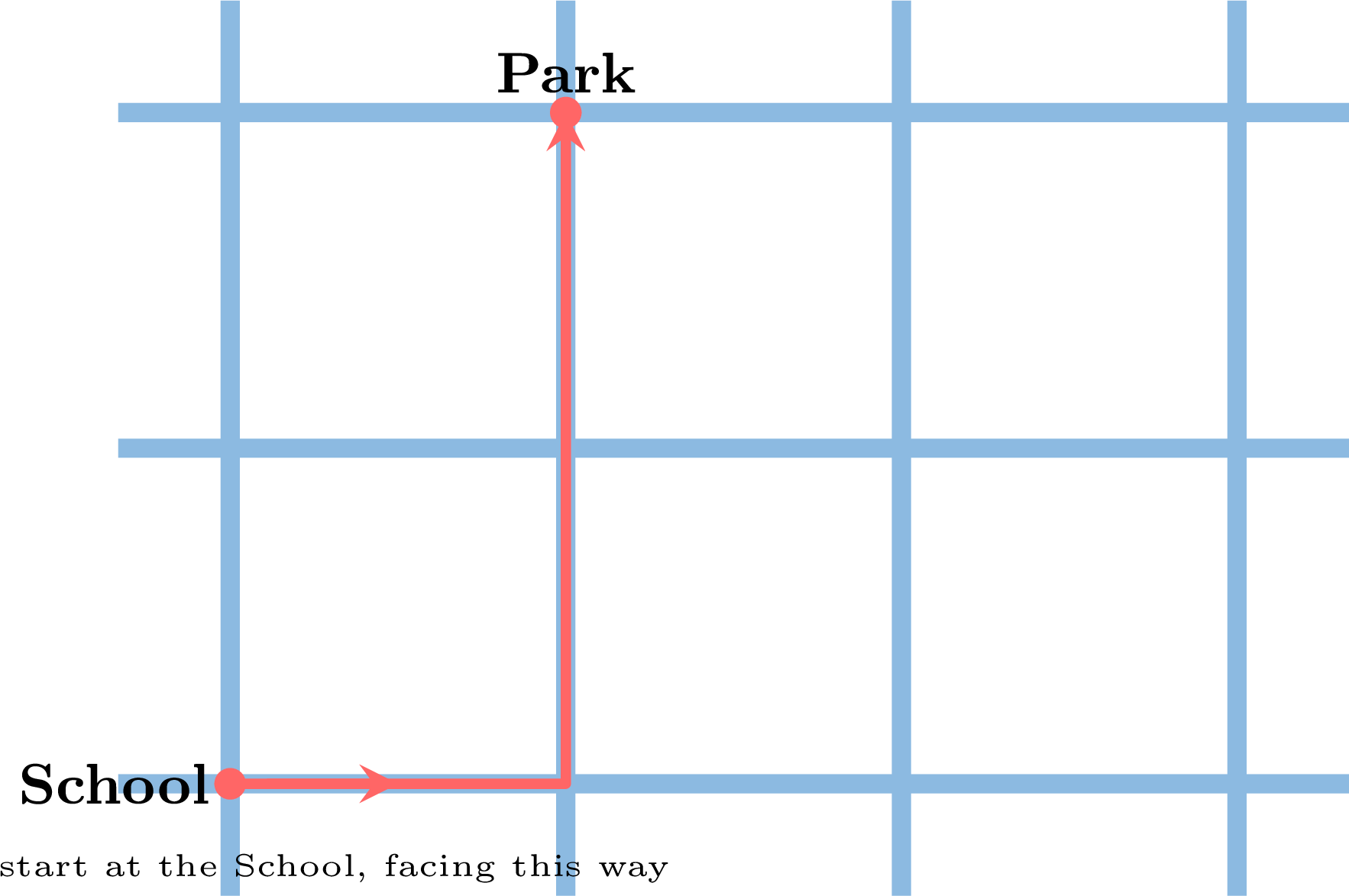
Skills to practice
- Writing and Checking a Route
II
Long Programs with Quarter Turns
Definition — The Robot Code
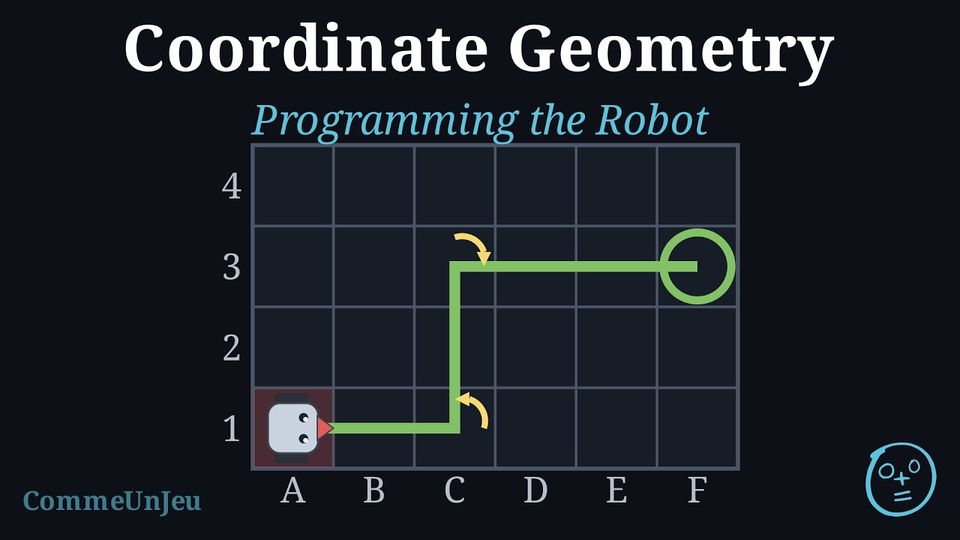
On squared paper, a path can be coded with the four arrows \(\uparrow\ \rightarrow\ \downarrow\ \leftarrow\), one per step, each one pointing the way to go on the sheet. A robot does not know the sheet: it only knows where it is looking. Its program uses three instructions: | \(\rightarrow\) | move forward one square |
| \(\curvearrowright\) | quarter turn to the right (the robot stays on its square) |
| \(\curvearrowleft\) | quarter turn to the left (the robot stays on its square) |
Method — Executing a long program
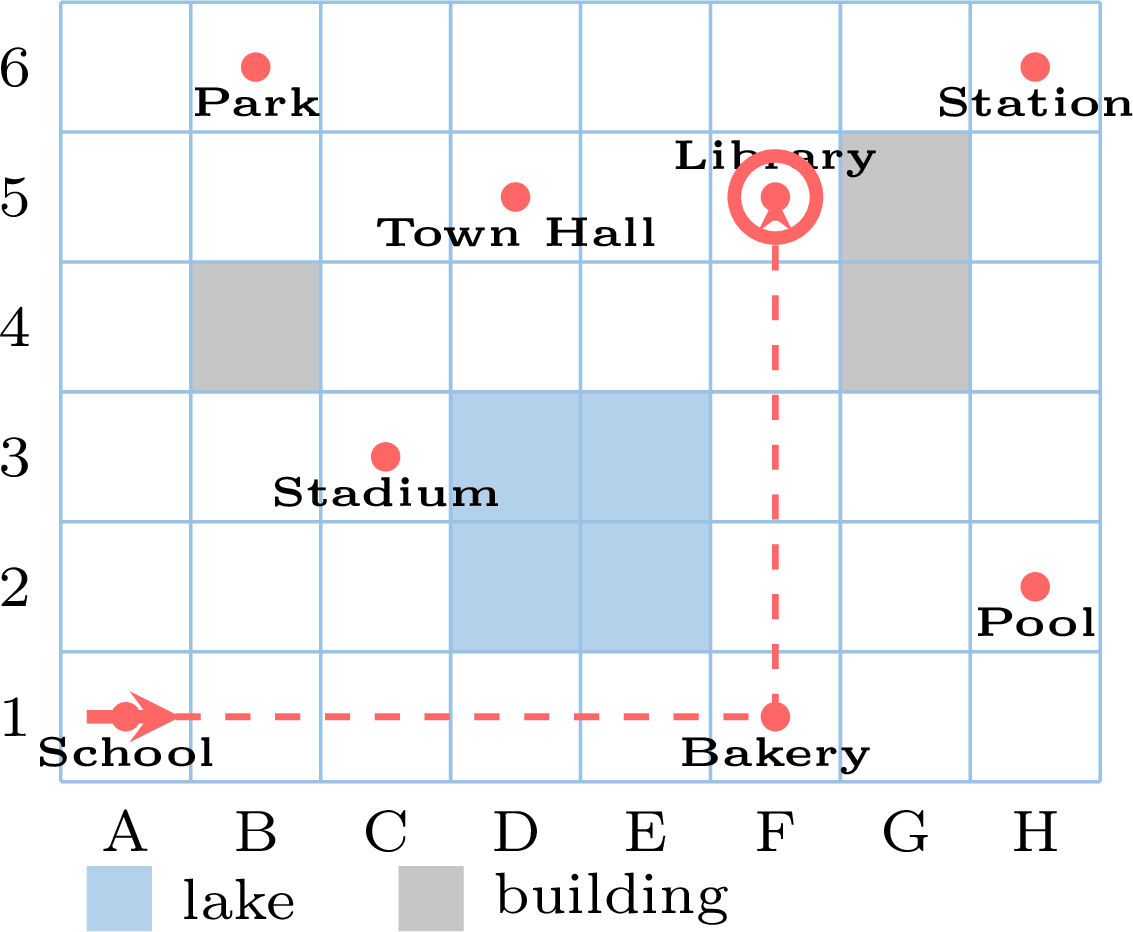
The robot starts at the School, square A1, looking to the right, and receives this program of 10 instructions: 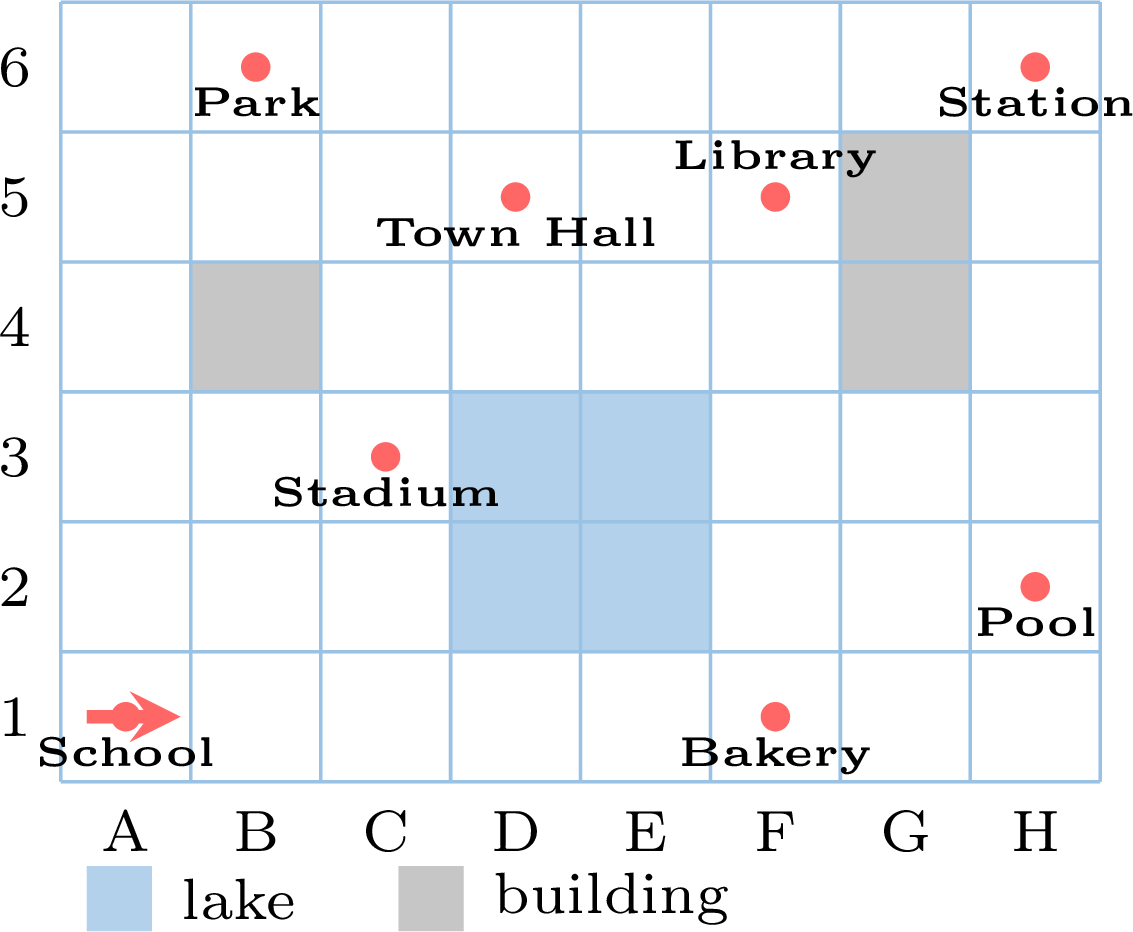
- Note the start. Write the starting square and draw a small arrow showing where the robot looks.
- Read by groups. Several \(\rightarrow\) in a row are one straight run: count them. A \(\curvearrowright\) or \(\curvearrowleft\) changes only the direction: after it, redraw the arrow before going on.
- Keep a table with, for each group, the new direction and the square reached. With a long program, the table is what saves you from getting lost.
- Check at the end that you have used every instruction: count them.
| instructions | what the robot does | now looking | square |
| \(\rightarrow\ \rightarrow\ \rightarrow\ \rightarrow\ \rightarrow\) | 5 forward | to the right | F1 |
| \(\curvearrowleft\) | quarter turn | upwards | F1 |
| \(\rightarrow\ \rightarrow\ \rightarrow\ \rightarrow\) | 4 forward | upwards | F5 |
Method — Writing a long program
Write the program that takes the robot from the Town Hall (square D5, looking upwards) to the Station. 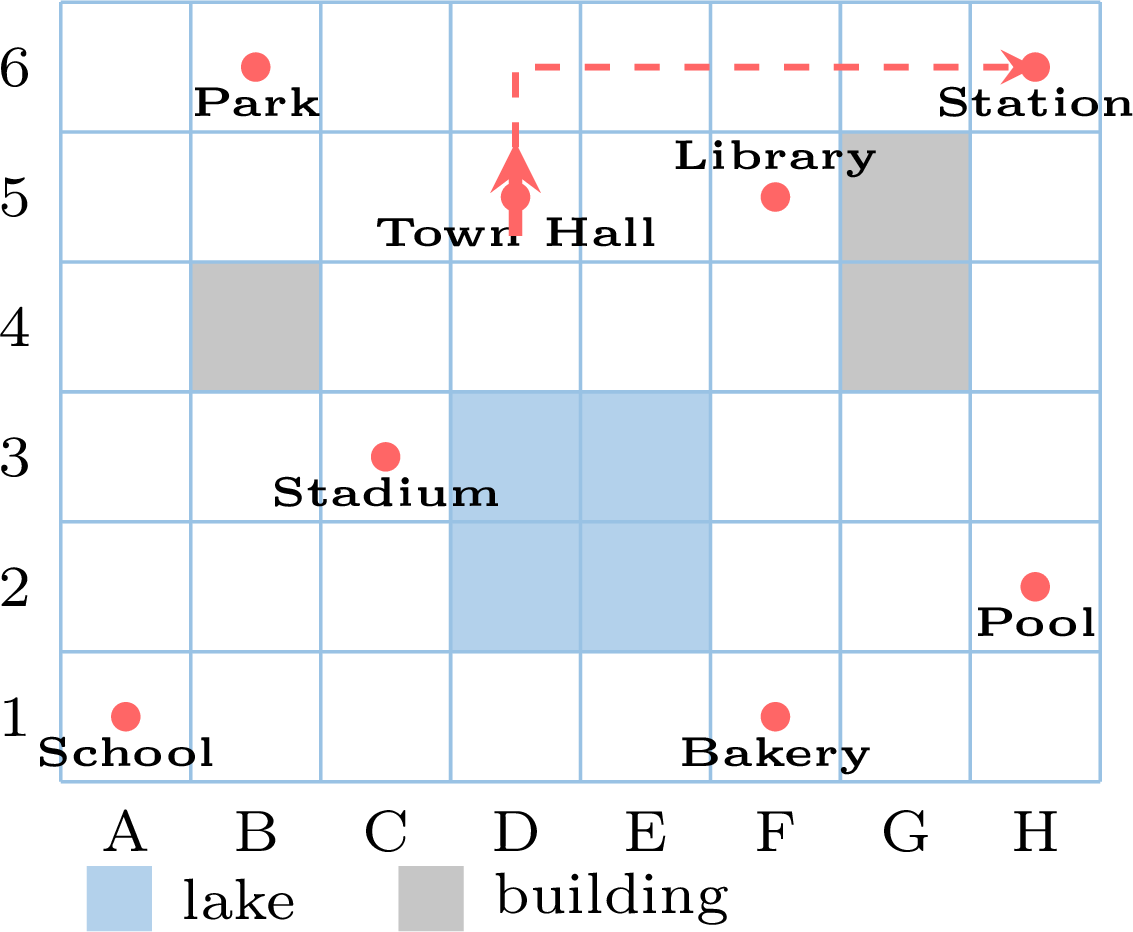
- Draw the path on the map, square by square, avoiding the lake and the buildings.
- Follow it with your finger from the start, looking where the robot looks. First turn the robot if it is not looking along the first straight line; write as many \(\rightarrow\) as squares; then, at each change of direction, write \(\curvearrowright\) or \(\curvearrowleft\) — right or left for the robot, not for the sheet. Then count the squares of the straight run and write as many \(\rightarrow\).
- Execute your program again from the start, with the table of the previous method. If the robot does not arrive where you wanted, the program is wrong, not the robot.
Repeating. Long programs often repeat the same little group. Instead of writing \(\rightarrow\ \rightarrow\ \rightarrow\), we can write \(3 \times \rightarrow\); instead of writing the group \(\rightarrow\ \rightarrow\ \curvearrowright\) four times, we write \(4 \times (\rightarrow\ \rightarrow\ \curvearrowright)\): the robot goes forward two squares and turns right, four times, and comes back to its starting square after drawing a square. This is how programs on a screen are written, with a “repeat” block. 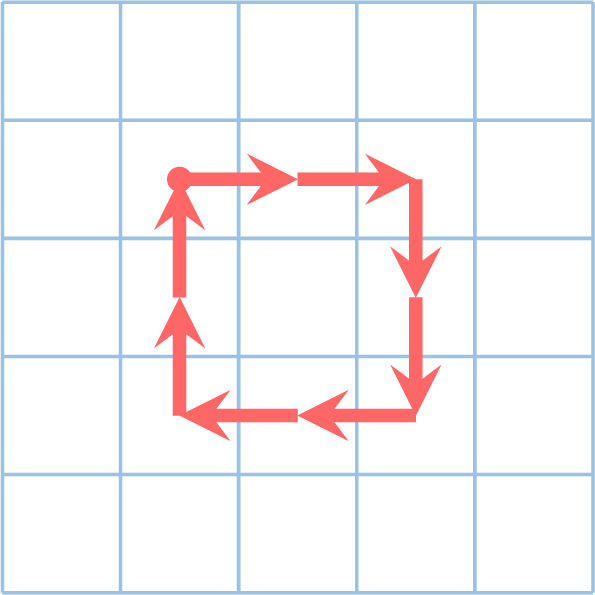
Example
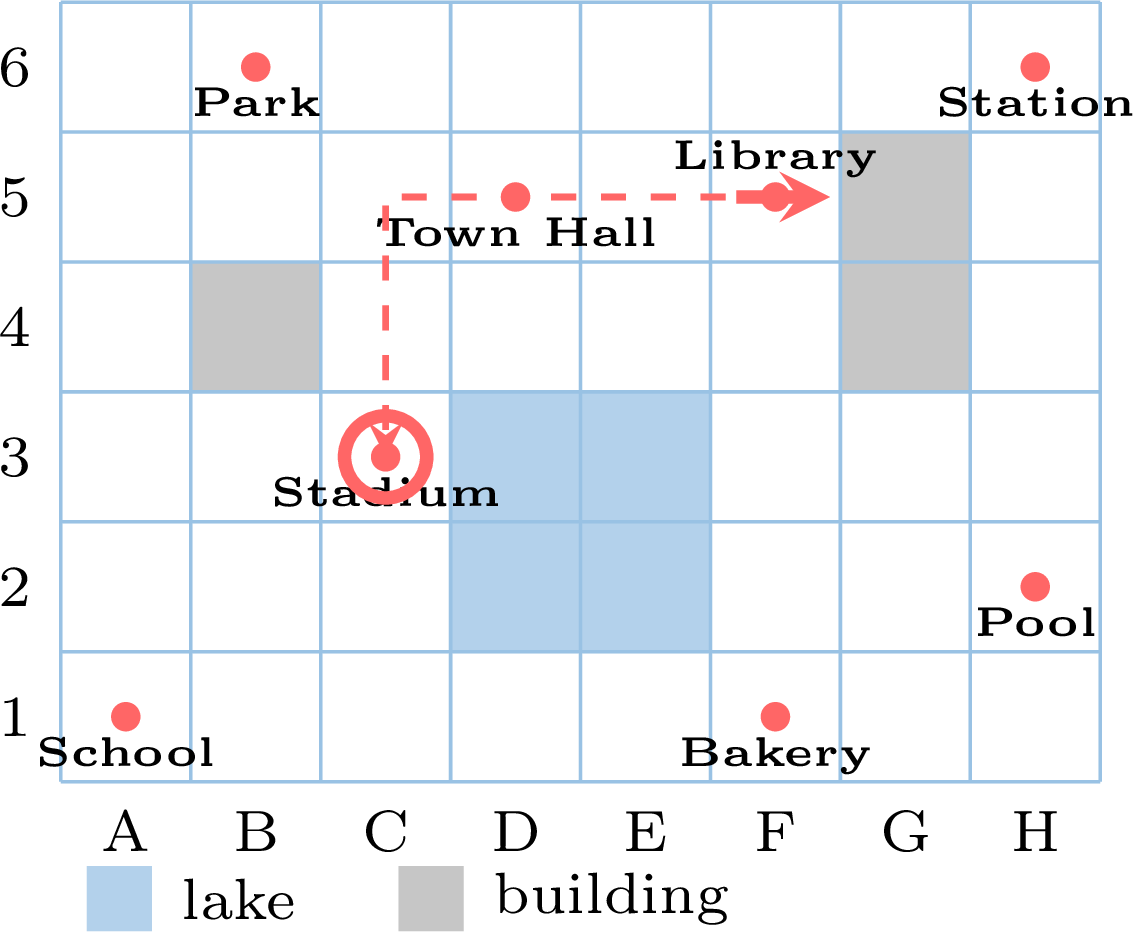
Léo's robot starts at the Library, looking to the right, and receives this program: 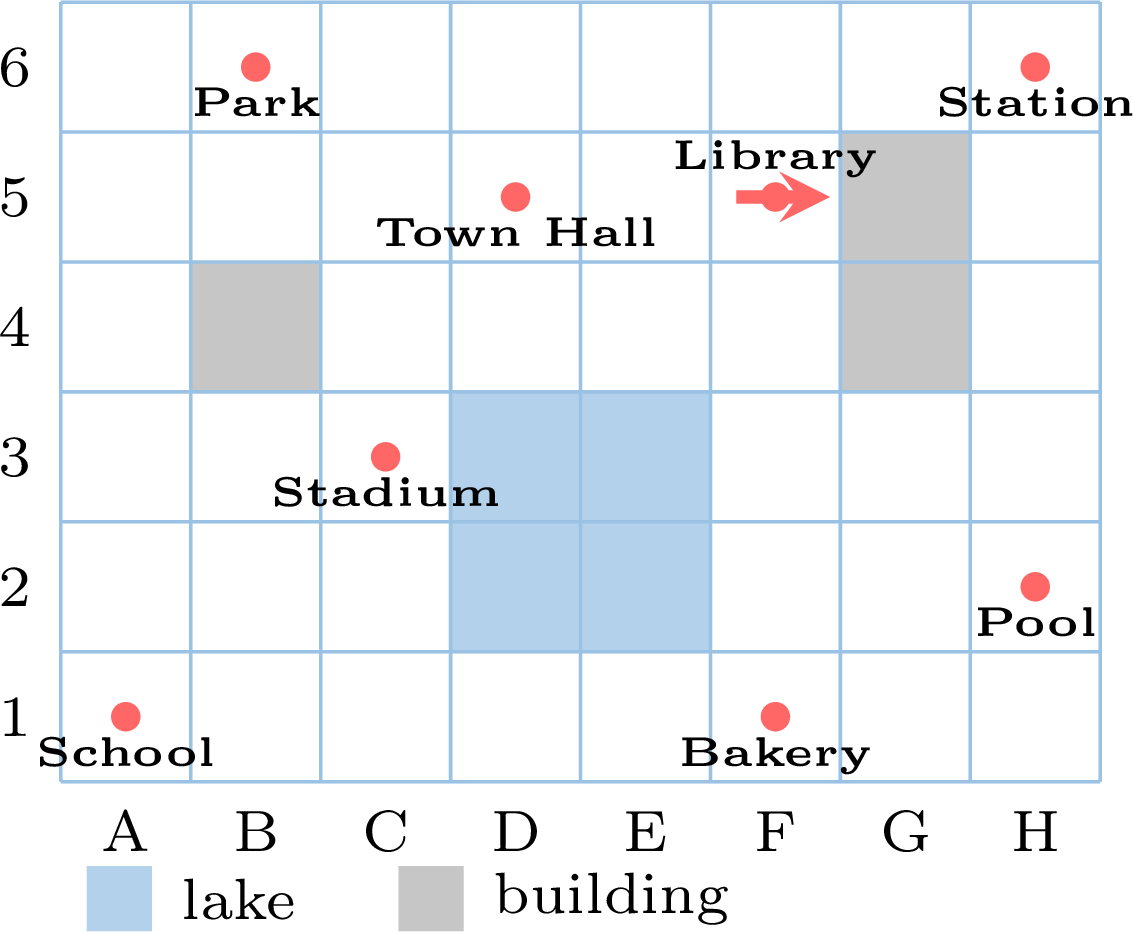
| instructions | what the robot does | now looking | square |
| \(\curvearrowright\) | quarter turn | downwards | F5 |
| \(\curvearrowright\) | quarter turn | to the left | F5 |
| \(\rightarrow\ \rightarrow\ \rightarrow\) | 3 forward | to the left | C5 |
| \(\curvearrowleft\) | quarter turn | downwards | C5 |
| \(\rightarrow\ \rightarrow\) | 2 forward | downwards | C3 |
Example
Same program, but this time the robot starts at the Library looking upwards. Where does it arrive? 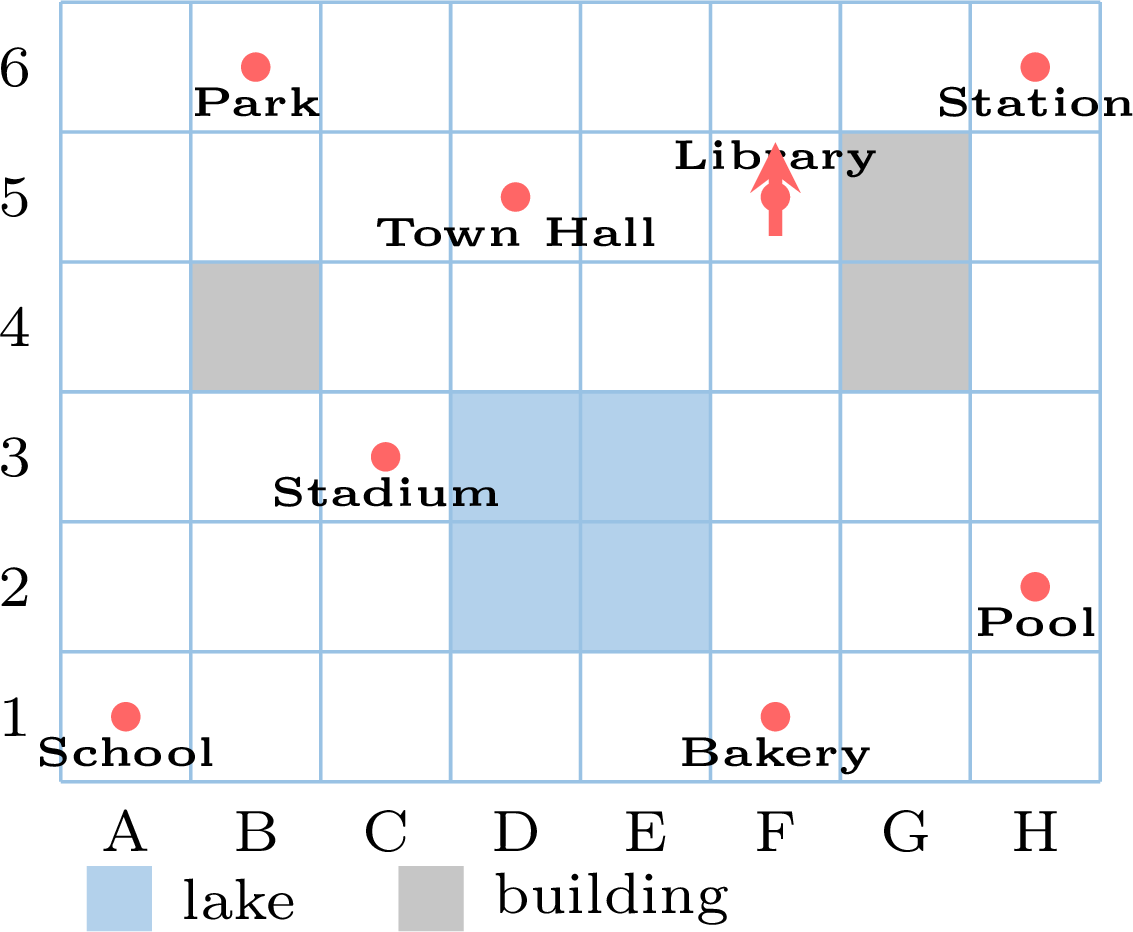
Not at the Stadium at all: the same instructions, followed from a different direction, draw the same path turned a quarter turn. The robot arrives at the Pool, square H2, looking to the right. A program means nothing without the starting square and the starting direction. 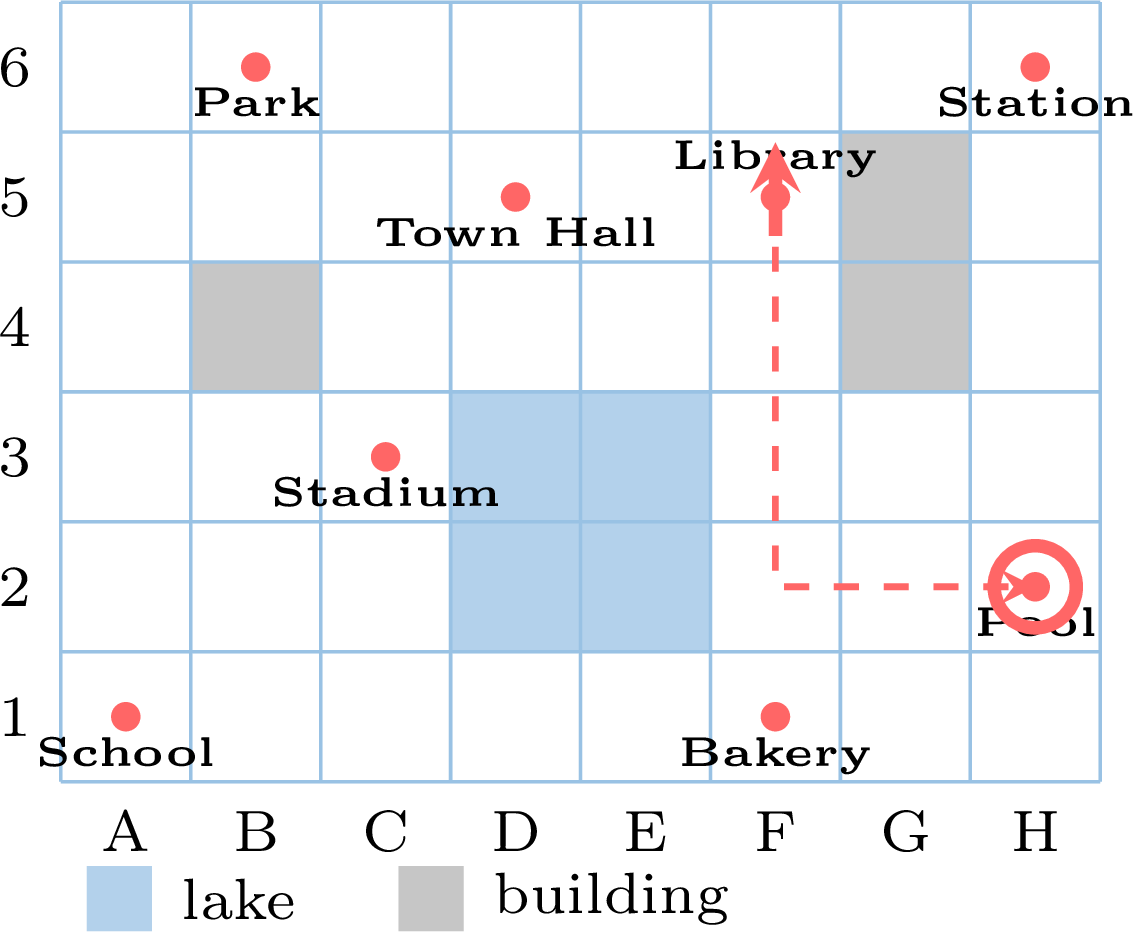
Skills to practice
- Executing a Program
- Finding the Arrival Square and Direction
- Finding the Wrong Instruction
- Writing a Program
III
Coordinate Plane
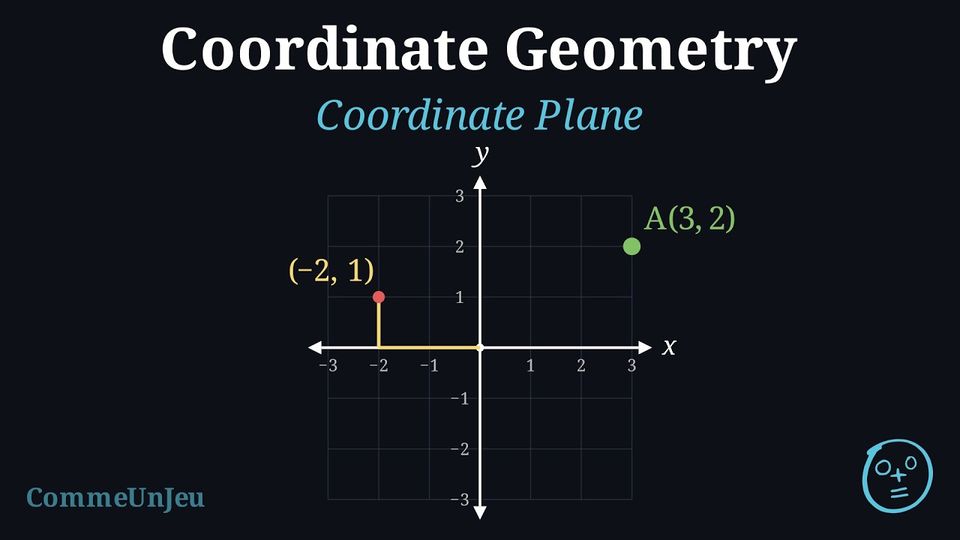
The nodes of a grid, named by two numbers, become the points of a coordinate plane: the two lines numbered \(0\) become the axes, and the node \((0,0)\) is the origin.
Definition — Coordinate Plane
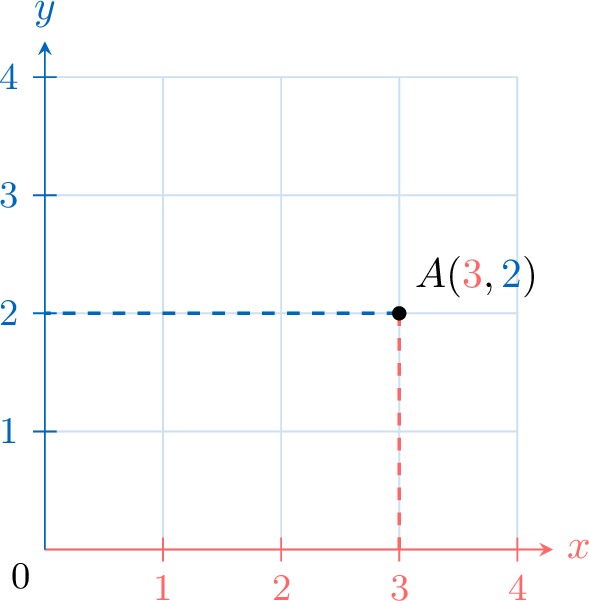
A coordinate plane is a grid formed by two number lines that cross at zero. One number line goes left and right (called the x-axis), and the other goes up and down (called the y-axis). The point where they cross is called the origin and has coordinates \((0,0)\).The coordinates of a point are a pair of numbers, like \(A(3,2)\). The first number is the \(x\)-coordinate and tells you how far to move along the \(x\)-axis. The second number is the \(y\)-coordinate and tells you how far to move along the \(y\)-axis.
Example
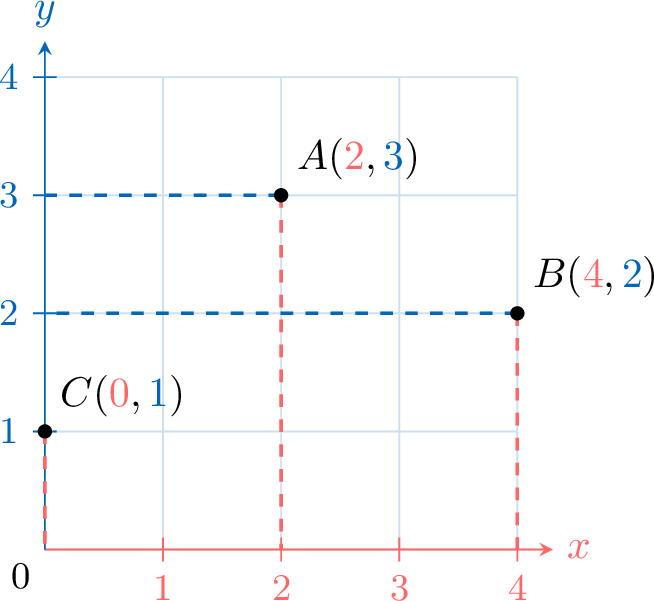
Plot these points on a coordinate plane: \(A(2,3)\), \(B(4,2)\), and \(C(0,1)\). - For \(A(2,3)\): Start at the origin \((0,0)\), move 2 units along the \(x\)-axis, then 3 units up.
- For \(B(4,2)\): Start at \((0,0)\), move 4 units along the \(x\)-axis, then 2 units up.
- For \(C(0,1)\): Stay at \(0\) on the \(x\)-axis, then move 1 unit up along the \(y\)-axis.
Skills to practice
- Finding the Coordinates of a Point
- Plotting Points
- Targeting Ships with Coordinates
IV
Reading a Plan
Here is the plan of a park, drawn on a grid of \(1\) cm squares. 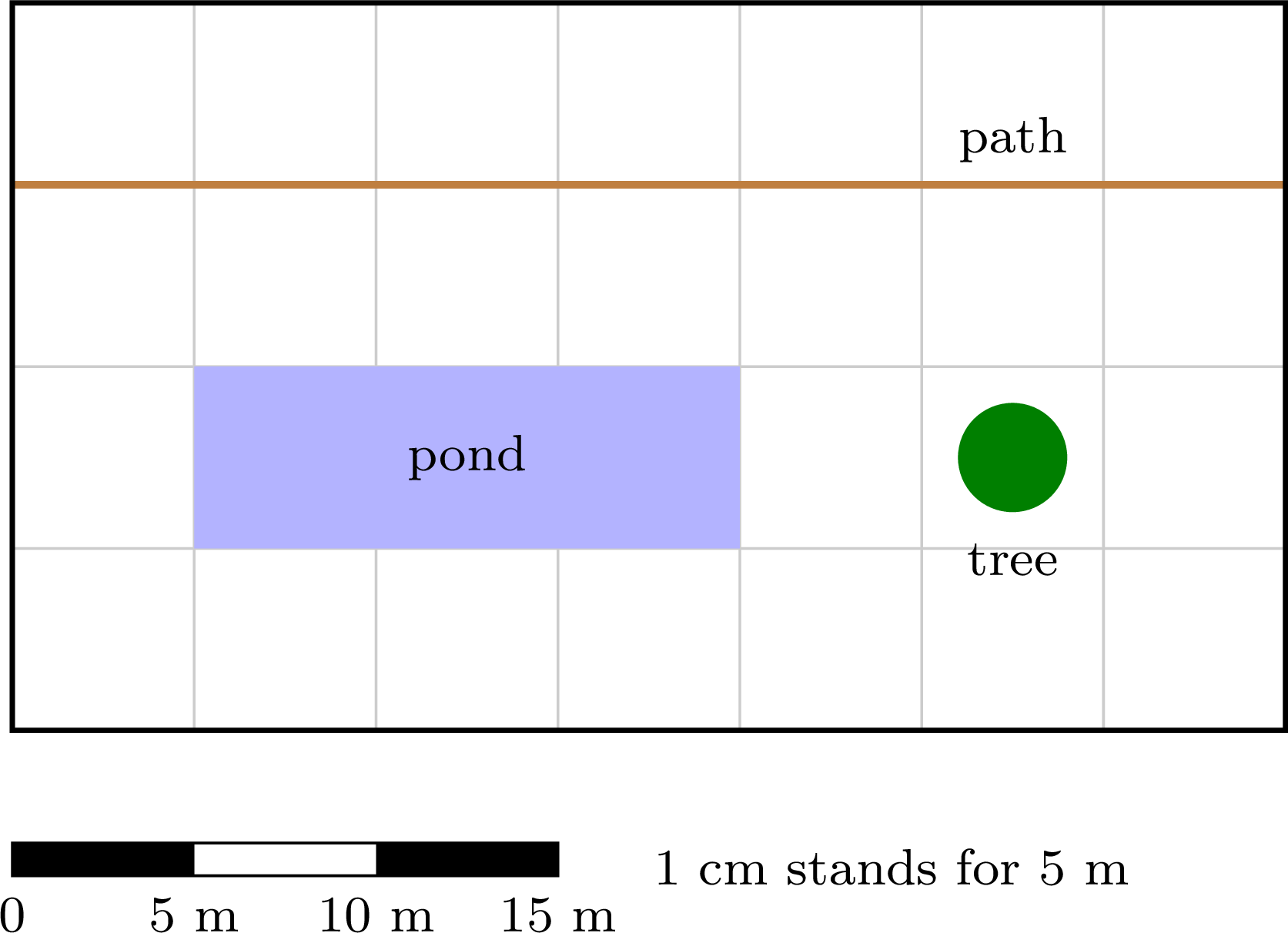
Tom measures the pond on the plan: \(3\) cm. He says: "The real pond is \(3\) cm long."
Say why Tom is wrong, then find the real length of the pond.
Say why Tom is wrong, then find the real length of the pond.
A real pond of \(3\) cm would be smaller than a hand. The plan is a small drawing of the park: every length has been made much smaller.
The sentence under the plan says how much smaller: \(1\) cm on the plan stands for \(5\) m in the park. The pond is \(3\) cm long on the plan, that is \(3\) times \(1\) cm, so it stands for \(3\) times \(5\) m: $$\begin{aligned} \text{real length} &= 3 \times 5~\mathrm{m} &&\text{(}1~\mathrm{cm} \text{ stands for } 5~\mathrm{m}\text{)}\\ &= \textcolor{colorprop}{15~\mathrm{m}} \end{aligned}$$ The real pond is \(15\) m long.
The sentence under the plan says how much smaller: \(1\) cm on the plan stands for \(5\) m in the park. The pond is \(3\) cm long on the plan, that is \(3\) times \(1\) cm, so it stands for \(3\) times \(5\) m: $$\begin{aligned} \text{real length} &= 3 \times 5~\mathrm{m} &&\text{(}1~\mathrm{cm} \text{ stands for } 5~\mathrm{m}\text{)}\\ &= \textcolor{colorprop}{15~\mathrm{m}} \end{aligned}$$ The real pond is \(15\) m long.
Definition — Plan and Scale
A plan (or a map) is a drawing of a real place, made much smaller. Every length is made smaller in the same way, so the shapes stay the same.The scale of the plan says what \(1\) cm on the plan stands for in real life, for example "\(1\) cm stands for \(5\) m". It is often drawn as a scale bar: every piece of \(1\) cm stands for the same real length, and the numbers under the bar count the metres from \(0\). Here each piece stands for \(5\) m:

Method — From the Plan to Real Life
To find a real length from a plan: - Measure the length on the plan in centimetres, with a ruler or by counting the squares of a \(1\) cm grid.
- Multiply this number by what \(1\) cm stands for. With "\(1\) cm stands for \(5\) m", \(4\) cm stand for \(4 \times 5 = 20\) m.
- Write the unit of real life (m or km), not the centimetre of the plan.
Example
Here is the plan of a school playground, drawn on a grid of \(1\) cm squares. 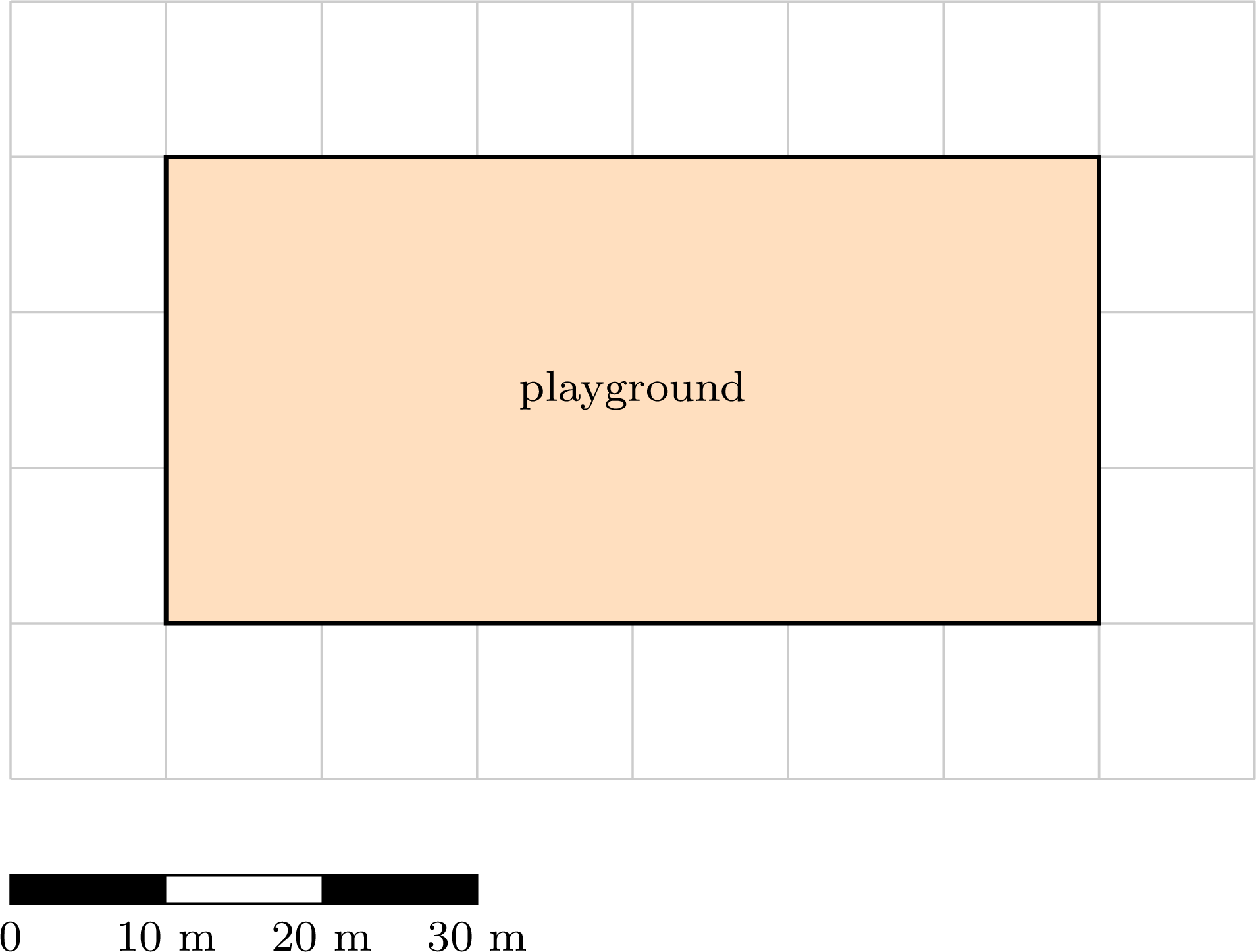
On the plan, the playground is \(6\) squares long and \(3\) squares wide: \(6\) cm and \(3\) cm. The scale bar shows that \(1\) cm stands for \(10\) m. $$\begin{aligned} \text{real length} &= 6 \times 10~\mathrm{m} &&\text{(}1~\mathrm{cm} \text{ stands for } 10~\mathrm{m}\text{)}\\
&= \textcolor{colorprop}{60~\mathrm{m}}\\
\text{real width} &= 3 \times 10~\mathrm{m}\\
&= \textcolor{colorprop}{30~\mathrm{m}} \end{aligned}$$ The playground is \(60\) m long and \(30\) m wide.
Example
On this map, a straight road goes from Léa's home to the school. A ruler is placed along the road. 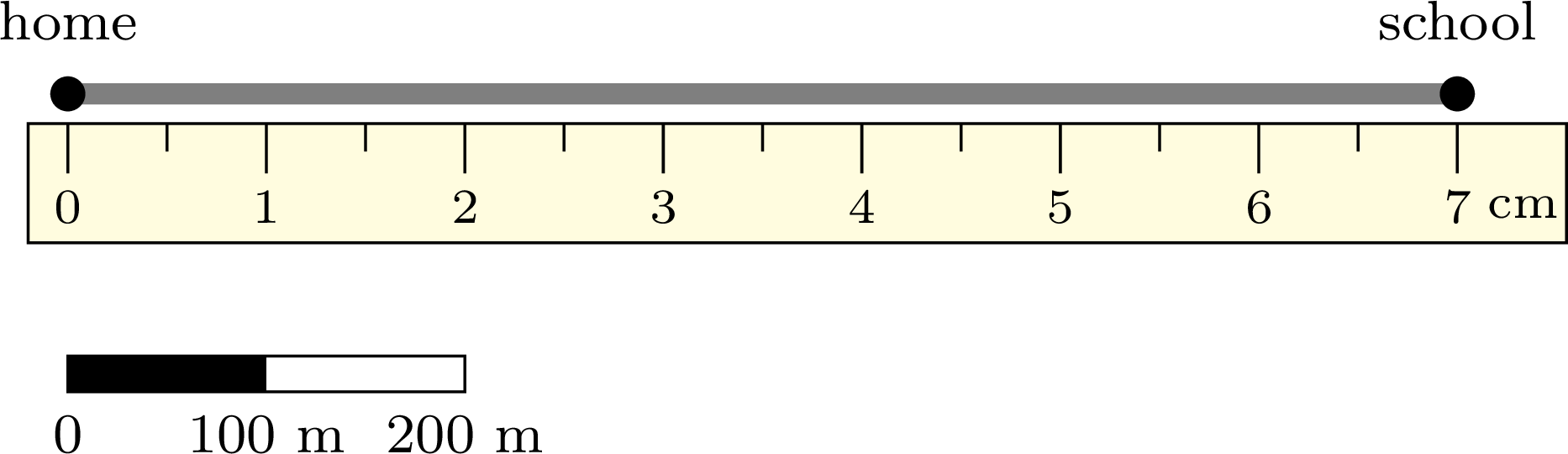
The ruler shows that the road measures \(7\) cm on the map. The scale bar shows that \(1\) cm stands for \(100\) m. $$\begin{aligned} \text{real length} &= 7 \times 100~\mathrm{m} &&\text{(}1~\mathrm{cm} \text{ stands for } 100~\mathrm{m}\text{)}\\
&= \textcolor{colorprop}{700~\mathrm{m}} \end{aligned}$$ Léa walks \(700\) m from her home to the school.
Skills to practice
- Reading a Scale
- Finding a Real Length
V
Drawing a Plan
Method — From Real Life to the Plan
To draw a real length on a plan: - Find how many times the real length contains what \(1\) cm stands for. With "\(1\) cm stands for \(5\) m", \(30\) m is \(6\) times \(5\) m, because \(6 \times 5 = 30\): this is the division \(30 \div 5 = 6\).
- Draw that many centimetres on the plan: \(6\) cm.
- Check by going back to real life: \(6 \times 5\) m \(= 30\) m.
Example
A vegetable garden is a rectangle \(20\) m long and \(15\) m wide. Tom wants to draw its plan on squared paper with \(1\) cm squares, with the scale "\(1\) cm stands for \(5\) m". Find the length and the width of the garden on the plan, then draw the plan.
Each real length is divided by \(5\), the number of metres that \(1\) cm stands for: $$\begin{aligned} 20 \div 5 &= 4 &&\text{(}4 \times 5 = 20\text{)}\\
15 \div 5 &= 3 &&\text{(}3 \times 5 = 15\text{)} \end{aligned}$$ So the garden is \(4\) cm long and \(3\) cm wide on the plan. Check: \(4 \times 5\) m \(= 20\) m and \(3 \times 5\) m \(= 15\) m. The plan is a rectangle of \(4\) cm by \(3\) cm: 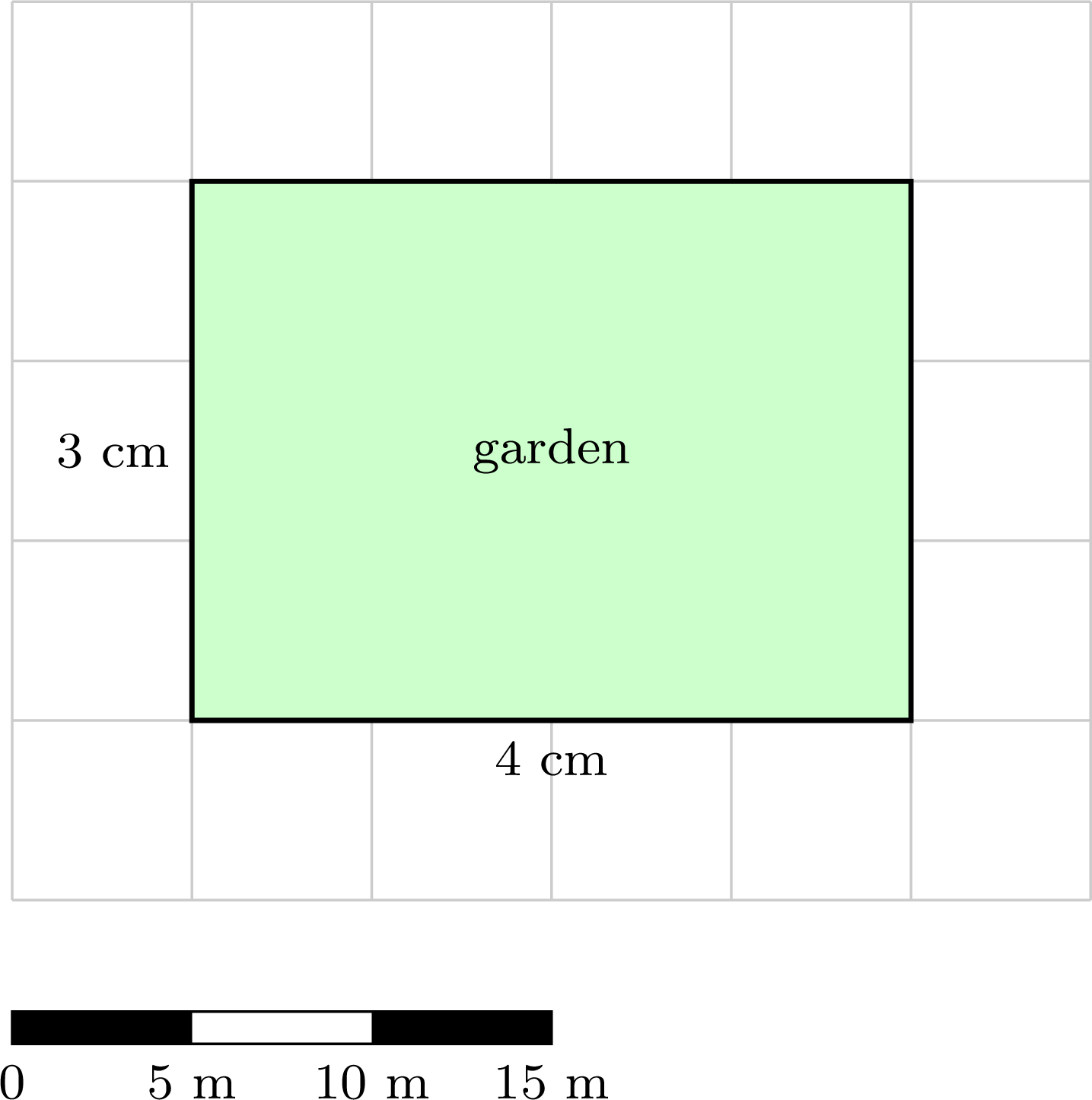
Skills to practice
- Finding a Length on the Plan
- Drawing a Plan to Scale
VI
Going further
Skills to practice
- Solving Route and Program Problems
- Reasoning with Coordinates
- Quiz
Jump to section